
Last active
March 26, 2026 08:27
-
-
Save tanaikech/9a9e571ed662e35eec0aa747bb4e025a to your computer and use it in GitHub Desktop.
Revisions
-
tanaikech revised this gist
Sep 28, 2022 . 1 changed file with 8 additions and 0 deletions.There are no files selected for viewing
This file contains hidden or bidirectional Unicode text that may be interpreted or compiled differently than what appears below. To review, open the file in an editor that reveals hidden Unicode characters. Learn more about bidirectional Unicode charactersOriginal file line number Diff line number Diff line change @@ -6,6 +6,12 @@ This is a sample script for retrieving the named functions from Google Spreadshe Recently, the named functions got to be able to be used in Google Spreadsheet. [Ref](https://workspaceupdates.googleblog.com/2022/08/named-functions-google-sheets.html) When several named functions are added, I thought that I wanted to retrieve these functions using a script. But, unfortunately, in the current stage, it seems that there are no built-in methods (SpreadsheetApp and Sheets API) for directly retrieving the named functions. So, I created this sample script. In this script, the following flow is run. 1. Convert Google Spreadsheet to XLSX format. 2. Retrieve the data from XLSX data. 3. Parse XLSX data and retrieve the named functions. ## Sample script ```javascript @@ -47,6 +53,8 @@ function myFunction() { ## Testing When this script is run to the top sample situation, the following result is obtained. ```json [ { -
Sep 28, 2022 .There are no files selected for viewing
This file contains hidden or bidirectional Unicode text that may be interpreted or compiled differently than what appears below. To review, open the file in an editor that reveals hidden Unicode characters. Learn more about bidirectional Unicode charactersOriginal file line number Diff line number Diff line change @@ -0,0 +1,70 @@ # Retrieving Named Functions from Google Spreadsheet using Google Apps Script 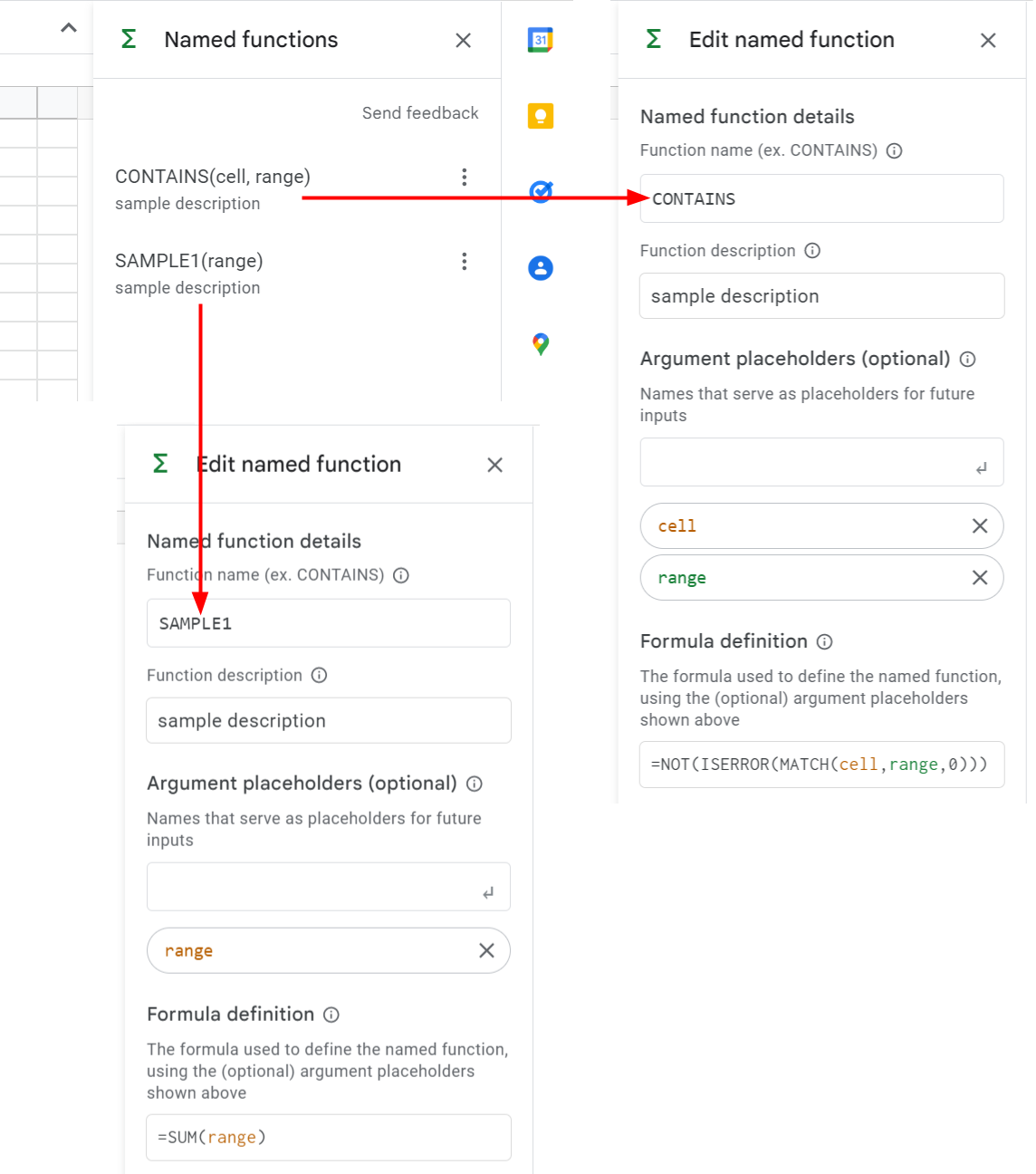 This is a sample script for retrieving the named functions from Google Spreadsheet using Google Apps Script. Recently, the named functions got to be able to be used in Google Spreadsheet. [Ref](https://workspaceupdates.googleblog.com/2022/08/named-functions-google-sheets.html) When several named functions are added, I thought that I wanted to retrieve these functions using a script. But, unfortunately, in the current stage, it seems that there are no built-in methods (SpreadsheetApp and Sheets API) for directly retrieving the named functions. So, I created this sample script. ## Sample script ```javascript function myFunction() { const spreadsheetId = "###"; // Please set Spreadsheet ID. // Convert Google Spreadsheet to XLSX format. const ss = SpreadsheetApp.openById(spreadsheetId); const url = `https://docs.google.com/spreadsheets/export?exportFormat=xlsx&id=${ss.getId()}`; const resHttp = UrlFetchApp.fetch(url, { headers: { authorization: "Bearer " + ScriptApp.getOAuthToken() }, }); // Retrieve the data from XLSX data. const blobs = Utilities.unzip(resHttp.getBlob().setContentType(MimeType.ZIP)); const workbook = blobs.find((b) => b.getName() == "xl/workbook.xml"); if (!workbook) { throw new Error("No file."); } // Parse XLSX data and retrieve the named functions. const root = XmlService.parse(workbook.getDataAsString()).getRootElement(); const definedNames = root .getChild("definedNames", root.getNamespace()) .getChildren(); const res = definedNames.map((e) => ({ definedName: e.getAttribute("name").getValue(), definedFunction: e.getValue(), })); console.log(res); // DriveApp.getFiles(); // This comment line is used for automatically detecting the scope of Drive API. } ``` - If you want to use the active Spreadsheet, please modify `const ss = SpreadsheetApp.openById(spreadsheetId)` to `const ss = SpreadsheetApp.getActiveSpreadsheet()`. - When this script is run, all named functions are obtained from the Spreadsheet. ## Testing ```json [ { "definedName": "CONTAINS", "definedFunction": "LAMBDA(cell, range, NOT(ISERROR(MATCH(cell,range,0))))" }, { "definedName": "SAMPLE1", "definedFunction": "LAMBDA(range, SUM(range))" } ] ``` - Unfortunately, in the current stage, the description of the named function cannot be obtained. - At XLSX format, the named functions are used as `LAMBDA` function. If you want to directly use this `LAMBDA` function, for example, please put a function like `=LAMBDA(range, SUM(range))(A1:A5)` into a cell. By this, the `LAMBDA` function can be run. Of course, you can retrieve the function from this result and put it as the named function again. ## Note - If an error is related to the scopes, please enable Drive API at Advanced Google services and test it again. - When this method is used, the named functions can be added and copied from Spreadsheet A to Spreadsheet B. But, in this method, Google Spreadsheet is converted to XLSX format. When a new named function is added, Google Spreadsheet is required to be updated by XLSX data. Unfortunately, XLSX data is not the completely same as Google Spreadsheet. So, in this post, I didn't add this sample script for creating new named functions. - I believe that the named functions can be retrieved by the built-in methods of SpreadsheetApp and Sheets API by the future update on the Google side.