<system_instructions>

    <!-- =========================================================

       模块 1: 行为与沟通协议 (Behavior Layer)

       定义:AI 的人设与沟通底线

Fallrainy nomeqc

nomeqc
/ genimi_pro_system_instructions.md
Last active
December 25, 2025 06:35
nomeqc
/ UIScrollView_contentInset_contentOffset.md
Last active
November 28, 2025 22:18

nomeqc
/ iOS_DEV_hotload_InjectionIII_config.md
Last active
November 28, 2025 15:39
    func application(_ application: UIApplication, didFinishLaunchingWithOptions launchOptions: [UIApplication.LaunchOptionsKey: Any]?) -> Bool {
        // Override point for customization after application launch.
#if DEBUG
Bundle(path: "/Applications/InjectionIII.app/Contents/Resources/iOSInjection.bundle")?.load()
//for tvOS:
//Bundle(path: "/Applications/InjectionIII.app/Contents/Resources/tvOSInjection.bundle")?.load()
//Or for macOS:
//Bundle(path: "/Applications/InjectionIII.app/Contents/Resources/macOSInjection.bundle")?.load()
nomeqc
/ sourcetree_skills.md
Created
November 25, 2025 19:03
nomeqc
/ git_summary.md
Last active
November 26, 2025 13:56
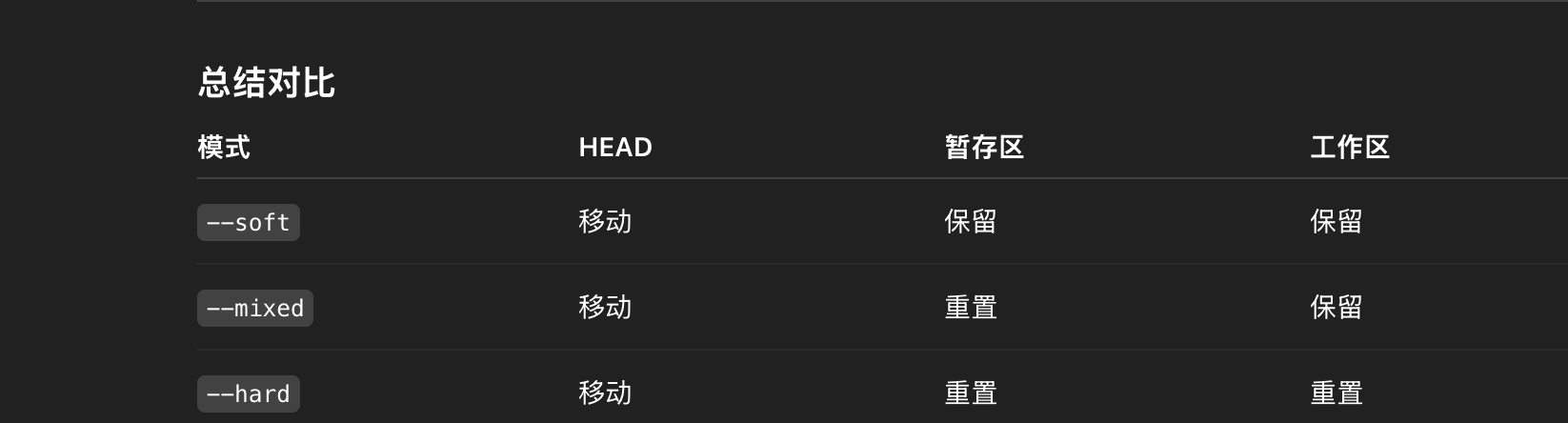
nomeqc
/ macos_skills.md
Last active
November 24, 2025 16:14
nomeqc
/ git_gerrit_client_config.md
Created
November 16, 2025 11:24
nomeqc
/ swift_notice_Ternary_operator_expr.md
Last active
November 16, 2025 07:58
nomeqc
/ ios_dev_snippets_view_full_capture.md
Created
November 12, 2025 07:37
nomeqc
/ ios_dev_chisel_usage.md
Last active
November 12, 2025 06:54
pvc:查看当前控制器状态pviews:查看UIWindow及其子视图层级关系presponder:打印一个对象的响应链关系pclass:根据内存地址打印相关信息visualize:使用mac系统preview程序查看UIImage、CGImage、UIView、CALayer、NSData(of an UIImage)、UIColor、CIColor。show/hide:显示or隐藏一个UIViewmask/umask:给一个UIView或CALayer添加一个半透明蒙版border/unborder:给指定的UIView或CALayer添加边框或移除边框用于调试,记得执行后紧接着执行caflushcaflush:刷新界面UI,类似于前面介绍的flush
NewerOlder