
Last active
January 31, 2023 12:21
-
-
Save negativems/c403fb25df9d0d58456f233589dca375 to your computer and use it in GitHub Desktop.
Revisions
-
negativems revised this gist
Jan 31, 2023 . 1 changed file with 31 additions and 6 deletions.There are no files selected for viewing
This file contains hidden or bidirectional Unicode text that may be interpreted or compiled differently than what appears below. To review, open the file in an editor that reveals hidden Unicode characters. Learn more about bidirectional Unicode charactersOriginal file line number Diff line number Diff line change @@ -1,9 +1,10 @@  --- ### Usage - ```php-versions # Find all installed php versions in laragon folder (configurate)``` - ```php-use <version/lastest> # Switch to a php version changing env variables ($PATH)``` - ```(**NEW**) php-switch # Interactive beautiful menu using fzf``` ### Script Put this on your `.bashrc` (NOTE: This script is made to use in Windows with Git Bash) @@ -13,9 +14,6 @@ Put this on your `.bashrc` (NOTE: This script is made to use in Windows with Git PHP_FOLDER="/c/laragon/bin/php" # List all PHP versions php-versions() { versions=$(ls -1 $PHP_FOLDER | cut -d'-' -f2 | sort -u) lastest=$(ls -1 $PHP_FOLDER | cut -d'-' -f2 | sort -u | tail -n 1) @@ -30,7 +28,7 @@ php-versions() { } # Switch between PHP versions php-use() { if [ -z "$1" ]; then echo "Usage: php-switch <version>" @@ -73,5 +71,32 @@ php-use() { echo "Using php $version" } # Create command php-switch that combines the two commands using fzf to select the version php-switch() { # Check if fzf is installed, if not tells where and how can install on Windows with Choco, Scoop or curl if ! command -v fzf &> /dev/null; then echo "fzf is not installed. You can install it with:" echo " - Manually: download fzf.exe from the official repo (https://github.com/junegunn/fzf-bin/releases/tag/0.23.1) and put it on your git-bash-path/usr/bin/" echo " - Using scoop: scoop install fzf" echo " - Using choco: choco install fzf" echo -e " - Using curl: curl -fsSL https://raw.githubusercontent.com/junegunn/fzf/master/install | bash \e[32m(recommended) \e[0m" return fi # Current PHP version if command php not exists then "none" if ! command -v php &> /dev/null; then current="You are not using php." else current=$(php -v) fi version=$(php-versions | fzf --height 40% --reverse --border --prompt="Select the PHP version: ") if [ -z "$version" ]; then return fi php-use $(echo $version | cut -d' ' -f1) } php-use lastest ``` -
Jan 31, 2023 . 1 changed file with 36 additions and 8 deletions.There are no files selected for viewing
This file contains hidden or bidirectional Unicode text that may be interpreted or compiled differently than what appears below. To review, open the file in an editor that reveals hidden Unicode characters. Learn more about bidirectional Unicode charactersOriginal file line number Diff line number Diff line change @@ -1,9 +1,9 @@ 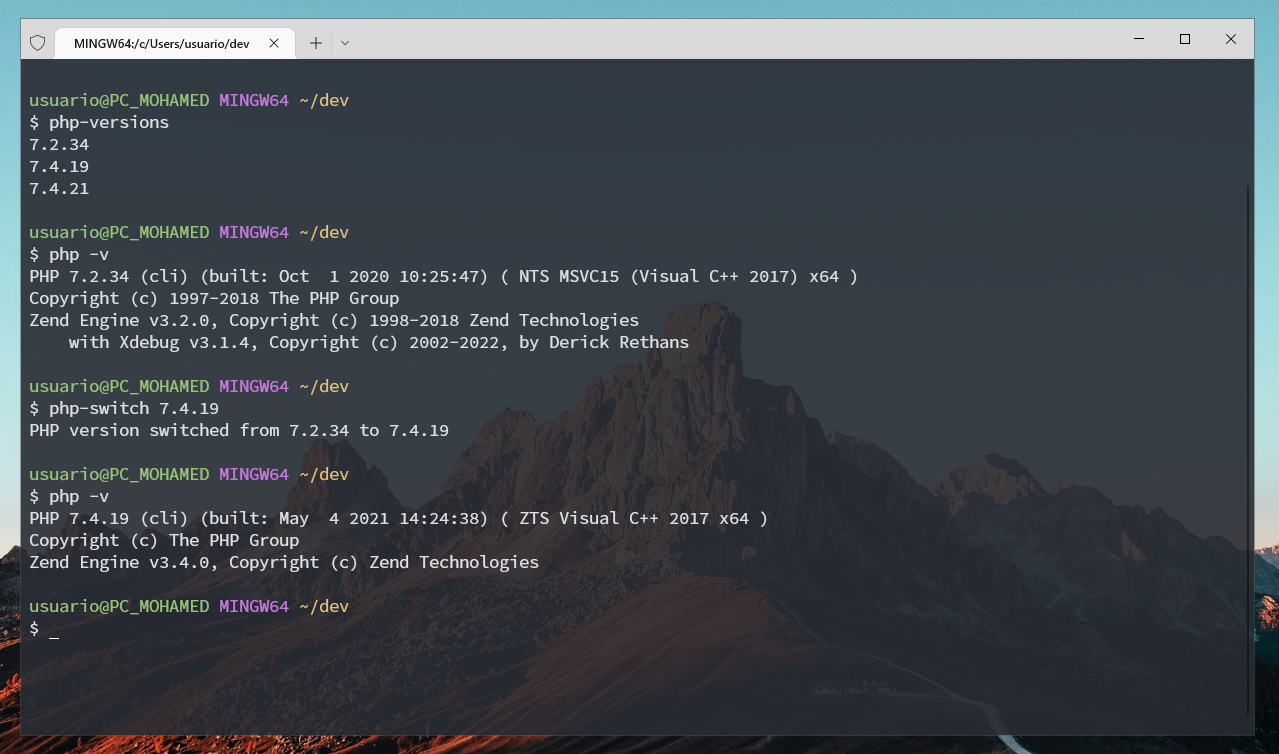 --- ### Usage - ```php-versions # Find all installed php versions in laragon folder (configurate)``` - ```php-switch <version/lastest> # Switch to a php version changing env variables ($PATH)``` ### Script Put this on your `.bashrc` (NOTE: This script is made to use in Windows with Git Bash) @@ -13,18 +13,44 @@ Put this on your `.bashrc` (NOTE: This script is made to use in Windows with Git PHP_FOLDER="/c/laragon/bin/php" # List all PHP versions # alias php-versions="ls -1 $PHP_FOLDER | cut -d'-' -f2 | sort -u" # Create alias like php-versions but in the last version put "lastest" in parenthesis (7.4.1 => 7.4.1 (lastest)) php-versions() { versions=$(ls -1 $PHP_FOLDER | cut -d'-' -f2 | sort -u) lastest=$(ls -1 $PHP_FOLDER | cut -d'-' -f2 | sort -u | tail -n 1) for version in $versions; do if [ "$version" = "$lastest" ]; then echo "$version (lastest)" else echo "$version" fi done } # Switch PHP version php-use() { if [ -z "$1" ]; then echo "Usage: php-switch <version>" return fi # Check if PHP command exists if ! command -v php &> /dev/null; then previous="none" else previous=$(php -v | head -n 1 | cut -d' ' -f2) fi version=$1 # Check if version is "lastest" if [ "$version" = "lastest" ]; then version=$(php-versions | tail -n 1 | cut -d' ' -f1) fi # Check if PHP version is already that version if [ "$version" = "$previous" ]; then echo "PHP version $version is already active" @@ -44,6 +70,8 @@ php-switch() { # Change PHP version in env path export PATH="/c/laragon/bin/php/$PHP_FILE:$PATH" echo "Using php $version" } php-use lastest ``` -
Jan 24, 2023 . 1 changed file with 0 additions and 0 deletions.There are no files selected for viewing
File renamed without changes. -
Jan 24, 2023 .There are no files selected for viewing
This file contains hidden or bidirectional Unicode text that may be interpreted or compiled differently than what appears below. To review, open the file in an editor that reveals hidden Unicode characters. Learn more about bidirectional Unicode charactersOriginal file line number Diff line number Diff line change @@ -0,0 +1,49 @@  --- ### Commands - ```php-versions # Find all installed php versions in laragon folder (configurable)``` - ```php-switch <version> # Switch to a php version changing env variables ($PATH)``` ### Script Put this on your `.bashrc` (NOTE: This script is made to use in Windows with Git Bash) ```bash # The folder where you have all the PHP versions PHP_FOLDER="/c/laragon/bin/php" # List all PHP versions alias php-versions="ls -1 $PHP_FOLDER | cut -d'-' -f2 | sort -u" # Switch PHP version php-switch() { if [ -z "$1" ]; then echo "Usage: php-switch <version>" return fi previous=$(php -v | head -n 1 | cut -d' ' -f2) version=$1 # Check if PHP version is already that version if [ "$version" = "$previous" ]; then echo "PHP version $version is already active" return fi # Check if the new version exists PHP_FILE=$(ls -1 /c/laragon/bin/php | grep $version | head -n 1) if [ -z "$PHP_FILE" ]; then echo "PHP version $version not found" return fi # Get previous PHP path PHP_PREV_FILE=$(ls -1 /c/laragon/bin/php | grep $previous | head -n 1) # Change PHP version in env path export PATH="/c/laragon/bin/php/$PHP_FILE:$PATH" echo "PHP version switched from $previous to $version" } ```