Interpolating between things using lerp.
function lerp (start, end, t) {
  return start * (1 - t) + end * t;
}

| using System; | |
| using UnityEditor; | |
| using UnityEditor.XR.Management; | |
| using UnityEditor.XR.Management.Metadata; | |
| using UnityEngine; | |
| namespace FrameSynthesis.XR | |
| { | |
| // ref. https://docs.unity3d.com/Packages/com.unity.xr.management@4.1/manual/EndUser.html | |
| public static class XRPluginManagementSettings |
| ## Photon Methods | |
| **public class Blank : Photon.PunBehaviour** | |
| instead of mono behavior, use this to receive photon callbacks in your script. | |
| **public override void OnLeftRoom()** | |
| An example of overriding a punbehavior callback |
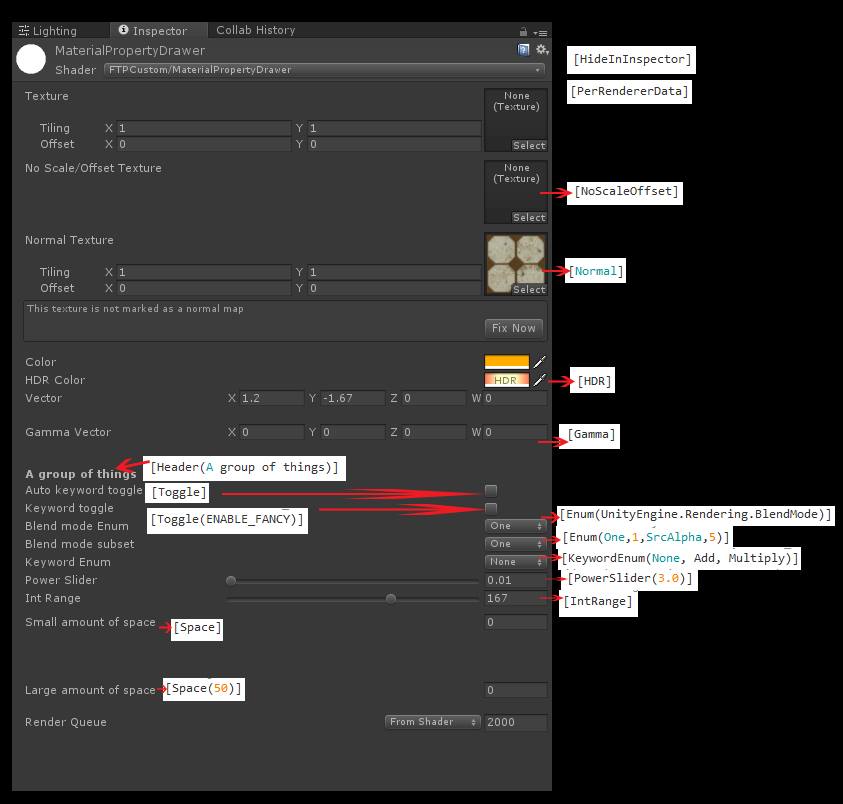
Shader "MaterialPropertyDrawer"
{
Properties
{
_MainTex("Texture", 2D) = "white" {}

[HideInInspector] _MainTex2("Hide Texture", 2D) = "white" {}
| Shader "Flipping Normals" { | |
| Properties { | |
| _MainTex ("Base (RGB)", 2D) = "white" {} | |
| } | |
| SubShader { | |
| Tags { "RenderType" = "Opaque" } | |
| Cull Off |
Brought to you by Headjack
FFmpeg is one of the most powerful tools for video transcoding and manipulation, but it's fairly complex and confusing to use. That's why I decided to create this cheat sheet which shows some of the most often used commands.
Let's start with some basics:
ffmpeg calls the FFmpeg application in the command line window, could also be the full path to the FFmpeg binary or .exe file
| #include "ProcedualSpline.h" | |
| #include "AwesomeStruct.h" | |
| FAwesomeStruct FAwesomeStruct::BuildAwesomeStruct( | |
| FVector AwesomeVector, | |
| bool AwesomeBoolean, | |
| float AwesomeFloat, | |
| int32 AwesomeInteger, | |
| FRotator AwesomeRotator | |
| ) |
| Shader "ToggleTest" | |
| { | |
| Properties | |
| { | |
| [Toggle(FILL_WITH_RED)] | |
| _FillWithRed ("Fill With Red", Float) = 0 | |
| } | |
| SubShader | |
| { | |
| Pass |
(by @andrestaltz)
If you prefer to watch video tutorials with live-coding, then check out this series I recorded with the same contents as in this article: Egghead.io - Introduction to Reactive Programming.
| urlencode() { | |
| # urlencode <string> | |
| old_lc_collate=$LC_COLLATE | |
| LC_COLLATE=C | |
| local length="${#1}" | |
| for (( i = 0; i < length; i++ )); do | |
| local c="${1:$i:1}" | |
| case $c in |