
Last active
August 30, 2024 12:30
-
-
Save soomtong/d443e7307ff7fd8a61696ba439883402 to your computer and use it in GitHub Desktop.
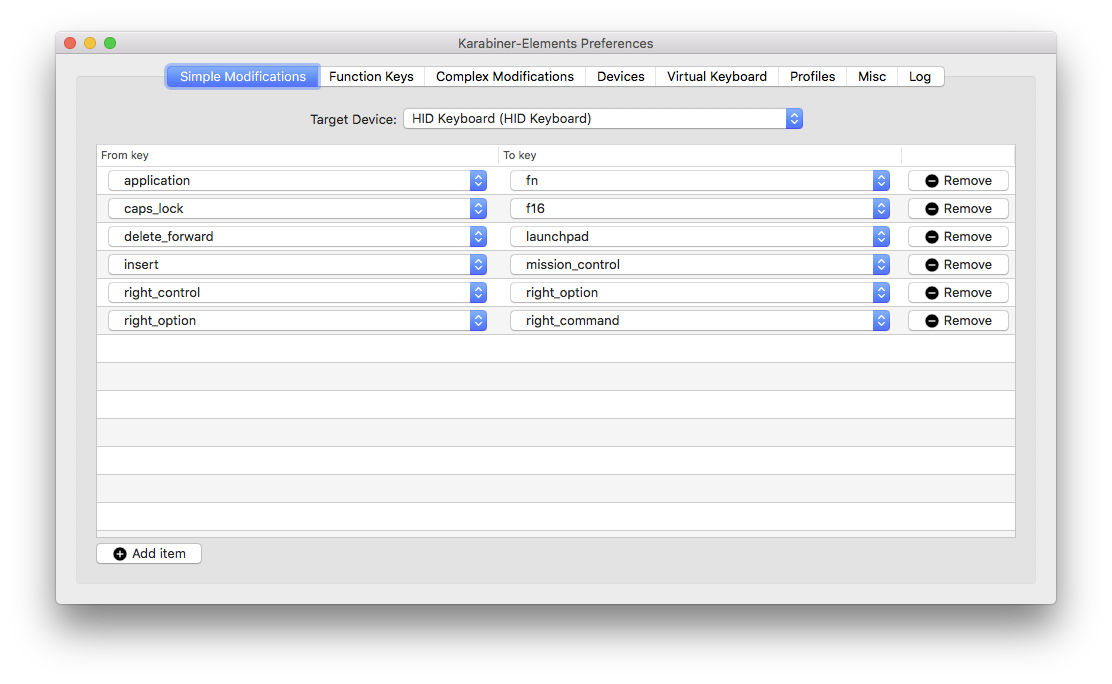
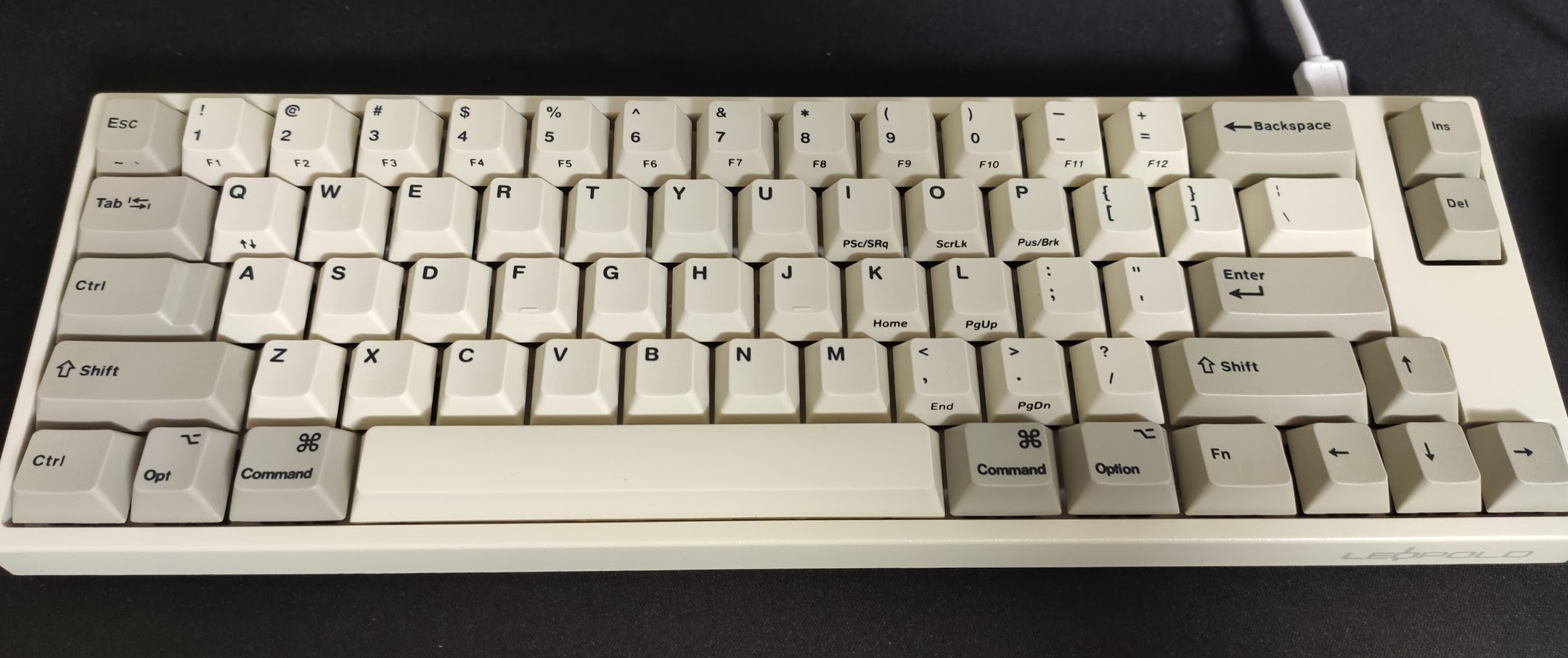
Leopold FC 660 default (switch 2 on) macOS setup for macbook (touchbar)
This file contains hidden or bidirectional Unicode text that may be interpreted or compiled differently than what appears below. To review, open the file in an editor that reveals hidden Unicode characters.
Learn more about bidirectional Unicode characters
| { | |
| "title": "FC660 like MacBook Pro", | |
| "rules": [ | |
| { | |
| "description": "Esc Modifiers to Backtick", | |
| "manipulators": [ | |
| { | |
| "type": "basic", | |
| "from": { | |
| "key_code": "escape", | |
| "modifiers": { | |
| "mandatory": [ | |
| "left_command" | |
| ] | |
| } | |
| }, | |
| "to": [ | |
| { | |
| "key_code": "grave_accent_and_tilde", | |
| "modifiers": [ | |
| "left_command" | |
| ] | |
| } | |
| ] | |
| }, | |
| { | |
| "type": "basic", | |
| "from": { | |
| "key_code": "escape", | |
| "modifiers": { | |
| "mandatory": [ | |
| "left_option" | |
| ] | |
| } | |
| }, | |
| "to": [ | |
| { | |
| "key_code": "grave_accent_and_tilde", | |
| "modifiers": [ | |
| "left_option" | |
| ] | |
| } | |
| ] | |
| }, | |
| { | |
| "type": "basic", | |
| "from": { | |
| "key_code": "escape", | |
| "modifiers": { | |
| "mandatory": [ | |
| "left_control" | |
| ] | |
| } | |
| }, | |
| "to": [ | |
| { | |
| "key_code": "grave_accent_and_tilde", | |
| "modifiers": [ | |
| "left_control" | |
| ] | |
| } | |
| ] | |
| }, | |
| { | |
| "type": "basic", | |
| "from": { | |
| "key_code": "escape", | |
| "modifiers": { | |
| "mandatory": [ | |
| "fn" | |
| ] | |
| } | |
| }, | |
| "to": [ | |
| { | |
| "key_code": "grave_accent_and_tilde" | |
| } | |
| ] | |
| }, | |
| { | |
| "type": "basic", | |
| "from": { | |
| "key_code": "grave_accent_and_tilde", | |
| "modifiers": { | |
| "mandatory": [ | |
| "command", | |
| "shift" | |
| ] | |
| } | |
| }, | |
| "to": [ | |
| { | |
| "key_code": "grave_accent_and_tilde", | |
| "modifiers": [ | |
| "fn" | |
| ] | |
| } | |
| ] | |
| } | |
| ] | |
| }, | |
| { | |
| "description": "Fn + h/j/k/l to Arrows", | |
| "manipulators": [ | |
| { | |
| "type": "basic", | |
| "from": { | |
| "key_code": "h", | |
| "modifiers": { | |
| "mandatory": [ | |
| "fn" | |
| ], | |
| "optional": [ | |
| "caps_lock" | |
| ] | |
| }, | |
| "to": [ | |
| { | |
| "key_code": "left_arrow" | |
| } | |
| ] | |
| } | |
| }, | |
| { | |
| "type": "basic", | |
| "from": { | |
| "key_code": "j", | |
| "modifiers": { | |
| "mandatory": [ | |
| "fn" | |
| ], | |
| "optional": [ | |
| "caps_lock" | |
| ] | |
| } | |
| }, | |
| "to": [ | |
| { | |
| "key_code": "down_arrow" | |
| } | |
| ] | |
| }, | |
| { | |
| "type": "basic", | |
| "from": { | |
| "key_code": "k", | |
| "modifiers": { | |
| "mandatory": [ | |
| "fn" | |
| ], | |
| "optional": [ | |
| "caps_lock" | |
| ] | |
| } | |
| }, | |
| "to": [ | |
| { | |
| "key_code": "up_arrow" | |
| } | |
| ] | |
| }, | |
| { | |
| "type": "basic", | |
| "from": { | |
| "key_code": "l", | |
| "modifiers": { | |
| "mandatory": [ | |
| "fn" | |
| ], | |
| "optional": [ | |
| "caps_lock" | |
| ] | |
| } | |
| }, | |
| "to": [ | |
| { | |
| "key_code": "right_arrow" | |
| } | |
| ] | |
| } | |
| ] | |
| }, | |
| { | |
| "description": "Forward Delete with Command Backward-Delete", | |
| "manipulators": [ | |
| { | |
| "from": { | |
| "key_code": "delete_or_backspace", | |
| "modifiers": { | |
| "mandatory": [ | |
| "left_command", | |
| "left_control" | |
| ], | |
| "optional": [ | |
| "any" | |
| ] | |
| } | |
| }, | |
| "to": [ | |
| { | |
| "key_code": "delete_forward" | |
| } | |
| ], | |
| "type": "basic" | |
| } | |
| ] | |
| }, | |
| { | |
| "description": "Notification with Launchpad", | |
| "manipulators": [ | |
| { | |
| "type": "basic", | |
| "from": { | |
| "key_code": "launchpad", | |
| "modifiers": { | |
| "mandatory": [ | |
| "command" | |
| ] | |
| } | |
| }, | |
| "to": [ | |
| { | |
| "key_code": "f13" | |
| } | |
| ] | |
| } | |
| ] | |
| } | |
| ] | |
| } |

Author
Author
Author
Sign up for free
to join this conversation on GitHub.
Already have an account?
Sign in to comment
it is intended works like macbook pro (touchbar) keyboard