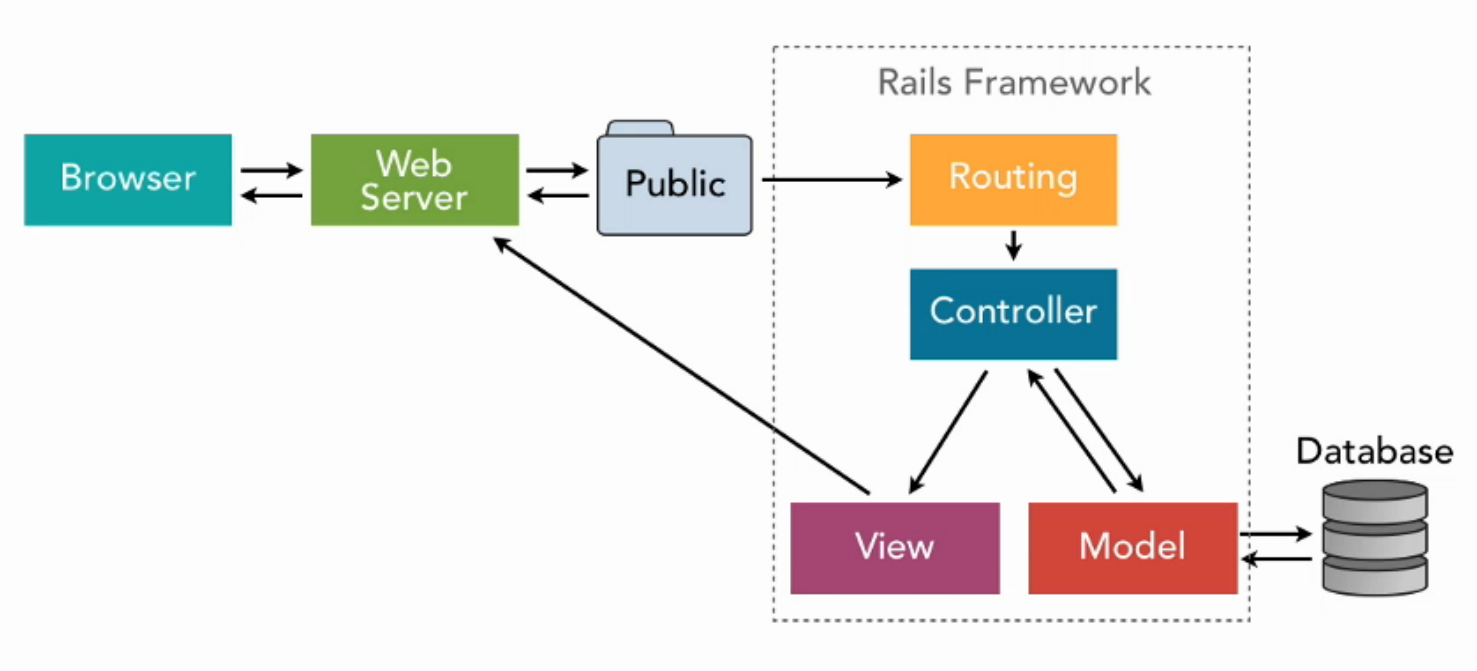
- Generate new rails app using
--webpackflag
rails new myApp --webpack=vueNote:
- You can use
--webpack=angularfor angular application and--webpack=reactfor react.


| /* eslint-disable */ | |
| // For more infos, see: https://github.com/jquense/yup/blob/master/src/locale.js | |
| import { setLocale } from 'yup' | |
| const translation = { | |
| mixed: { | |
| default: '${path} é inválido', | |
| required: '${path} é um campo obrigatório', | |
| oneOf: '${path} deve ser um dos seguintes valores: ${values}', | |
| notOneOf: '${path} não pode ser um dos seguintes valores: ${values}', |

| LocaleConfig.locales.fr = { | |
| monthNames: [ | |
| "Janeiro", | |
| "Fevereiro", | |
| "Março", | |
| "Abril", | |
| "Maio", | |
| "Junho", | |
| "Julho", | |
| "Agosto", |


Sometimes you may want to undo a whole commit with all changes. Instead of going through all the changes manually, you can simply tell git to revert a commit, which does not even have to be the last one. Reverting a commit means to create a new commit that undoes all changes that were made in the bad commit. Just like above, the bad commit remains there, but it no longer affects the the current master and any future commits on top of it.
git revert {commit_id}
Deleting the last commit is the easiest case. Let's say we have a remote origin with branch master that currently points to commit dd61ab32. We want to remove the top commit. Translated to git terminology, we want to force the master branch of the origin remote repository to the parent of dd61ab32:

The world, as we know it, has fallen into an apocalyptic scenario. The "Influenzer T-Virus" (a.k.a. Twiter Virus) is transforming human beings into stupid beasts (a.k.a. Zombies), hungry to cancel humans and eat their limbs.
You, the last survivor who knows how to code, will help the resistance by deploying a system to connect the remaining humans. This system will be essential to detect new infections and share resources between the members.




When working with Git, there are two prevailing workflows are Git workflow and feature branches. IMHO, being more of a subscriber to continuous integration, I feel that the feature branch workflow is better suited, and the focus of this article.
If you are new to Git and Git-workflows, I suggest reading the atlassian.com Git Workflow article in addition to this as there is more detail there than presented here.
I admit, using Bash in the command line with the standard configuration leaves a bit to be desired when it comes to awareness of state. A tool that I suggest using follows these instructions on setting up GIT Bash autocompletion. This tool will assist you to better visualize the state of a branc