
Last active
January 12, 2017 16:51
-
-
Save kip9000/5813379 to your computer and use it in GitHub Desktop.
Add IronPython scripting to your WPF app using VS2012/.Net4.5
This file contains hidden or bidirectional Unicode text that may be interpreted or compiled differently than what appears below. To review, open the file in an editor that reveals hidden Unicode characters.
Learn more about bidirectional Unicode characters
| Steps: | |
| 1. Create a new WPF App in VS2012 | |
| 2. Add NuGet packages IronPython, and IronPython Stdlib | |
| 3. Setup ScriptEngine (see code) | |
| 4. Create the Controller (MVC) for data binding. (see code) | |
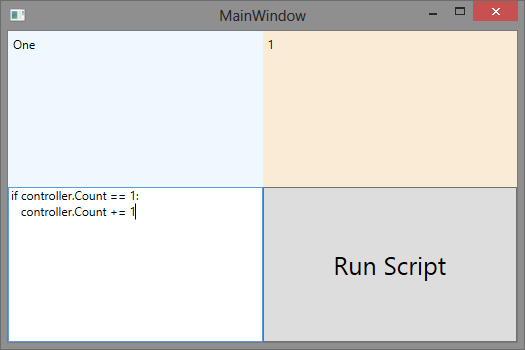
| 5. Run app, put some python code to TextBox hit Run Script | |
| XAML: | |
| ------ | |
| <Window x:Class="WpfApplication1.MainWindow" | |
| xmlns="http://schemas.microsoft.com/winfx/2006/xaml/presentation" | |
| xmlns:x="http://schemas.microsoft.com/winfx/2006/xaml" | |
| Title="MainWindow" Height="350" Width="525"> | |
| <Grid> | |
| <Grid.ColumnDefinitions> | |
| <ColumnDefinition/> | |
| <ColumnDefinition/> | |
| </Grid.ColumnDefinitions> | |
| <Grid.RowDefinitions> | |
| <RowDefinition/> | |
| <RowDefinition/> | |
| </Grid.RowDefinitions> | |
| <Label Grid.Row="0" Grid.Column="0" Content="{Binding Name}" Background="AliceBlue"/> | |
| <Label Grid.Row="0" Grid.Column="1" Content="{Binding Count}" Background="AntiqueWhite"/> | |
| <TextBox x:Name="tb" Grid.Row="1" Grid.Column="0" AcceptsReturn="True" /> | |
| <Button Grid.Row="1" Grid.Column="1" Click="Button_Click" Content="Run Script" FontSize="25"/> | |
| </Grid> | |
| </Window> | |
| Code Behind: | |
| ----------- | |
| using System; | |
| using System.Windows; | |
| using Microsoft.Scripting.Hosting; | |
| namespace WpfApplication1 | |
| { | |
| /// <summary> | |
| /// Interaction logic for MainWindow.xaml | |
| /// </summary> | |
| public partial class MainWindow : Window | |
| { | |
| ScriptEngine engine; | |
| ScriptScope scope; | |
| Controller ctrl = null; | |
| public MainWindow() | |
| { | |
| InitializeComponent(); | |
| ctrl = new Controller(); | |
| this.DataContext = ctrl; | |
| var setup = new ScriptRuntimeSetup(); | |
| setup.LanguageSetups.Add( | |
| new LanguageSetup( | |
| "IronPython.Runtime.PythonContext,IronPython", "IronPython", | |
| new[] { "IronPython", "Python", "py" }, | |
| new[] { ".py" })); | |
| var runtime = ScriptRuntime.CreateRemote(AppDomain.CurrentDomain, setup); | |
| engine = runtime.GetEngine("Python"); | |
| scope = engine.CreateScope(); | |
| scope.SetVariable("controller", ctrl); | |
| } | |
| private void Button_Click(object sender, RoutedEventArgs e) | |
| { | |
| try | |
| { | |
| var source = engine.CreateScriptSourceFromString(tb.Text.Trim()); | |
| source.Execute(scope); | |
| } | |
| catch (Exception eek) | |
| { | |
| MessageBox.Show(eek.Message, "Error executing script"); | |
| } | |
| } | |
| } | |
| } | |
| Controller.cs | |
| ------------- | |
| public class Controller : INotifyPropertyChanged | |
| { | |
| #region INotifyPropertyChanged Implementation | |
| public event PropertyChangedEventHandler PropertyChanged; | |
| protected void Notify(string propertyName) | |
| { | |
| if (PropertyChanged != null) | |
| PropertyChanged(this, new PropertyChangedEventArgs(propertyName)); | |
| } | |
| #endregion | |
| string _name = "One"; | |
| public string Name | |
| { | |
| get { return _name; } | |
| set { _name = value; Notify("Name"); } | |
| } | |
| int _count = 1; | |
| public int Count | |
| { | |
| get { return _count; } | |
| set { _count = value; Notify("Count"); } | |
| } | |
| } | |

Sign up for free
to join this conversation on GitHub.
Already have an account?
Sign in to comment