Some notes and techniques for reverse engineering Webpack (and a little bit about React/Vue/Angular) apps.

Hieu Nguyen kerituni12

0xdevalias
/ reverse-engineering-webpack-apps.md
Last active
March 7, 2026 02:53
Some notes and techniques for reverse engineering Webpack (and a little bit about React/Vue/Angular) apps

darwinsubramaniam
/ forRootAndForFeature.md
Last active
January 31, 2024 08:37
The Explaination of forRoot and ForFeature

slikts
/ react-memo-children.md
Last active
October 19, 2025 02:45
Why using the `children` prop makes `React.memo()` not work

I've recently ran into a pitfall of [React.memo()][memo] that seems generally overlooked; skimming over the top results in Google just finds it mentioned in passing in a [React issue][regit], but not in the [FAQ] or API [overview][react-api], and not in the articles that set out to explain React.memo() (at least the ones I looked at). The issue is specifically that nesting children defeats memoization, unless the children are just plain text. To give a simplified code example:
const Memoized = React.memo(({ children }) => (<div>{children}</div>));
// Won't ever re-render
<Memoized>bar</Memoized>
// Will re-render every time; the memoization does nothing
fworks
/ install-zsh-windows-git-bash.md
Last active
January 21, 2026 17:51
Zsh / Oh-my-zsh on Windows Git Bash
- Download the latest zsh package: https://packages.msys2.org/package/zsh?repo=msys&variant=x86_64
Example:
zsh-5.7.1-1-x86_64.pkg.tar.xz

AkatQuas
/ event-loop.md
Last active
June 28, 2022 13:32
Depth in Event Loop, both browser and Node.js.
For those JavaScript programmers, event loop is an important concept, inevitably.
Literally, event loop is what JavaScritp uses to implement non-blocking execution. Understanding how the event loops works internally would benefit you a lot when programming in JavaScript.
There are two major environments JavaScript runs in: browser and Node.js.

This file contains hidden or bidirectional Unicode text that may be interpreted or compiled differently than what appears below. To review, open the file in an editor that reveals hidden Unicode characters.
Learn more about bidirectional Unicode characters
| import * as Dockerode from "dockerode"; | |
| import * as stream from "stream"; | |
| import {ContainerCreateOptions, HostConfig} from "dockerode"; | |
| export async function dockerRunWithStdIn( | |
| docker: Dockerode, | |
| stdin: NodeJS.ReadableStream | Buffer, | |
| options: {name: string} & ContainerCreateOptions | |
| ): Promise<Buffer> { | |
| return await new Promise<Buffer>(async (resolve, reject) => { |

pavankjadda
/ How to fix gitignore not working issue.md
Last active
December 17, 2025 04:20
How to fix "gitignore not working" issue
FYI: Created blog post with more details
Sometimes git does not exclude files/folders added .gitignore especially if you had commited them before. Here is how to fix it. I am ignoring node_modules from Angular project as an example
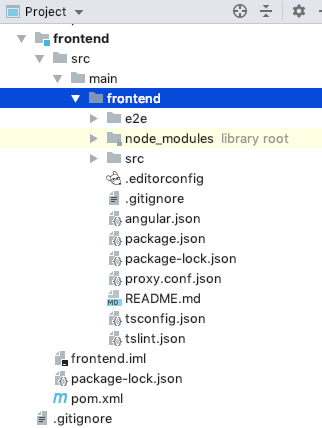
- Update
.gitignorewith the folder/file name you want to ignore. You can use anyone of the formats mentioned below (prefer format1)
### Format1  ###
node_modules/

First of all, please note that token expiration and revoking are two different things.
- Expiration only happens for web apps, not for native mobile apps, because native apps never expire.
- Revoking only happens when (1) uses click the logout button on the website or native Apps;(2) users reset their passwords; (3) users revoke their tokens explicitly in the administration panel.
A JWT token that never expires is dangerous if the token is stolen then someone can always access the user's data.
Quoted from JWT RFC:

This file contains hidden or bidirectional Unicode text that may be interpreted or compiled differently than what appears below. To review, open the file in an editor that reveals hidden Unicode characters.
Learn more about bidirectional Unicode characters
| public class Solution { | |
| public int[] quickSort(int[] array) { | |
| //corner cases | |
| if(array == null) return array; | |
| quickSort2(array, 0, array.length-1); | |
| return array; | |
| } | |
| //quicksort recursive method |

roommen
/ Hybrid (Windows+Linux) Docker Swarm
Last active
February 17, 2025 14:46
Hybrid (Windows+Linux) Docker Swarm
This file contains hidden or bidirectional Unicode text that may be interpreted or compiled differently than what appears below. To review, open the file in an editor that reveals hidden Unicode characters.
Learn more about bidirectional Unicode characters
| ********************** | |
| *** Pre-requisites *** | |
| ********************** | |
| 1. Set up Windows 2016 password: | |
| gcloud beta compute --project <project_id> reset-windows-password <instance_name> --zone <zone_name> | |
| ip_address: <ip_address> | |
| password: <defult_password_generated> | |
| username: <username> | |
| 3. Installing Docker: |
NewerOlder