
-
-
Save ghodsizadeh/c4433b379e60ad4303702a5a3f3dc9fc to your computer and use it in GitHub Desktop.
| import pandas as pd | |
| import requests | |
| def get_raw_data(stock_id): | |
| ''' | |
| get raw data of live price request | |
| ''' | |
| url = f'http://www.tsetmc.com/tsev2/data/instinfodata.aspx?i={stock_id}&c=70%20' | |
| r = requests.get(url) | |
| return r.text | |
| def text_to_list(raw_data): | |
| ''' | |
| convert response to a list | |
| ''' | |
| text = raw_data | |
| cleaned_text = text.split(';')[0] | |
| price_list = cleaned_text.split(',') | |
| return price_list | |
| def create_dataframe(price_list): | |
| ''' | |
| convert raw list to a dataframe with column names | |
| ''' | |
| columns = ['Time','Type','Price','Close','Open','Last','MaxPrice','MinPrice',"NumberOfTrades",'Volume','Value','1','Date','TimeInt'] | |
| df = pd.DataFrame([price_list], columns=columns) | |
| return df | |
| def get_price(stock_id): | |
| ''' | |
| Get live price as a dataframe | |
| ''' | |
| raw = get_raw_data(stock_id) | |
| price_list = text_to_list(raw) | |
| df = create_dataframe(price_list) | |
| return df | |


به نظر stock_id تعریف نشده است
کدتون رو برای گرفتن خروجی یه ورودی (آیدی سهم) براش تعریف کردم
همچنین برای نمایش خروجی یه دستور پرینت به آخرش اضافه کردم
نتیجهاش رو براتون میفرستم
چندتا از ستونها رو نشون نداد
بازم ممنون میشم بیشتر توضیح بدی
مرسی
import pandas as pd
import requests
the id of a share, herein: غشاذر
stock_id = 59921975187856916
def get_raw_data(stock_id):
'''
get raw data of live price request
'''
url = f'http://www.tsetmc.com/tsev2/data/instinfodata.aspx?i={stock_id}&c=70%20'
r = requests.get(url)
return r.text
def text_to_list(raw_data):
'''
convert response to a list
'''
text = raw_data
cleaned_text = text.split(';')[0]
price_list = cleaned_text.split(',')
return price_list
def create_dataframe(price_list):
'''
convert raw list to a dataframe with column names
'''
columns = ['Time','Type','Price','Close','Open','Last','MaxPrice','MinPrice',"NumberOfTrades",'Volume','Value','1','Date','TimeInt']
df = pd.DataFrame([price_list], columns=columns)
return df
def get_price(stock_id):
'''
Get live price as a dataframe
'''
raw = get_raw_data(stock_id)
price_list = text_to_list(raw)
df = create_dataframe(price_list)
return df
print(get_price(stock_id))
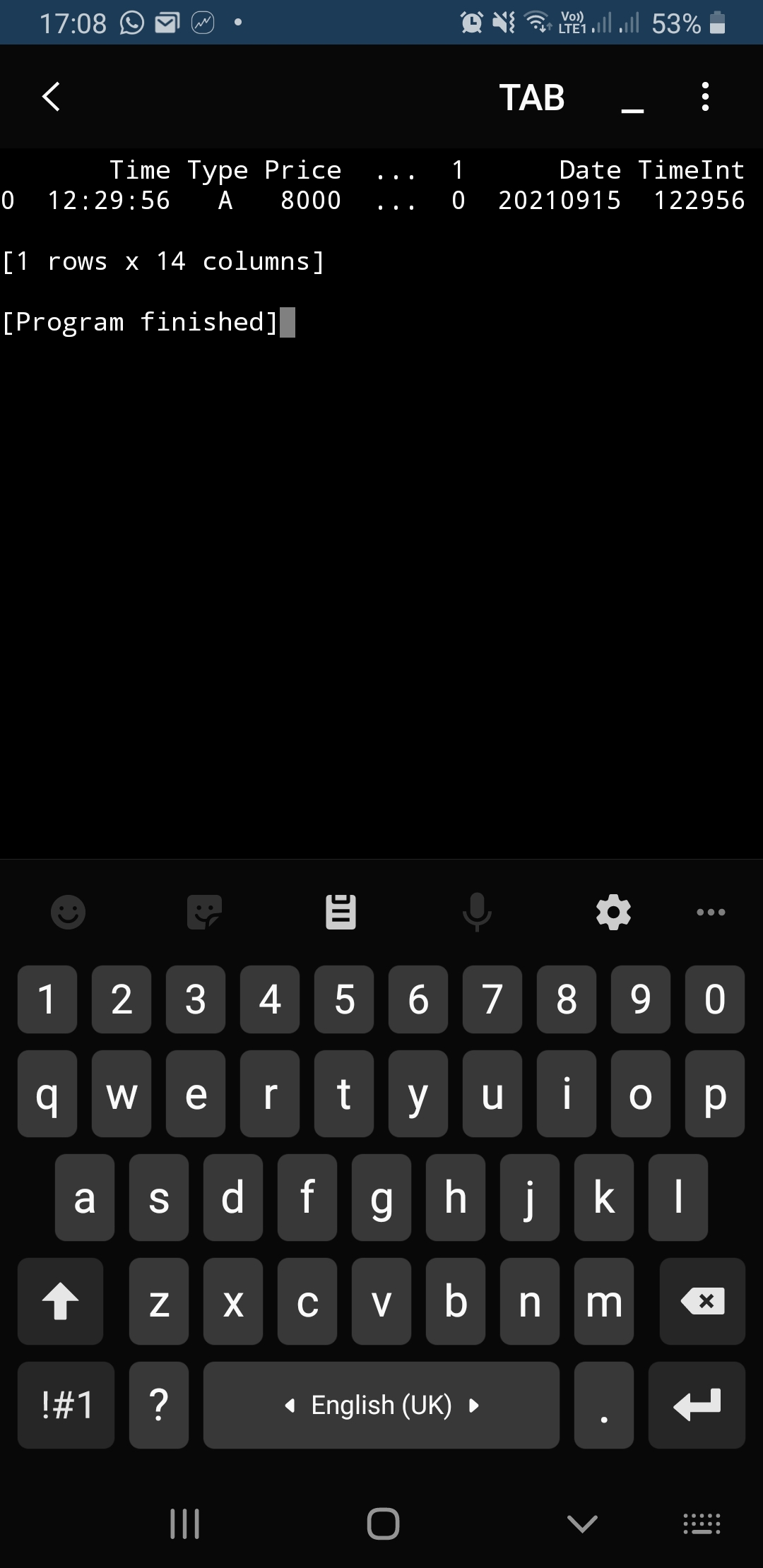
دیتاها رو به صورت سه نقطه نشون میده
import pandas as pd
import requests
'''the id of a share, herein: غشاذر '''
stock_id = 59921975187856916
def get_raw_data(stock_id):
'''
get raw data of live price request
'''
url = f'http://www.tsetmc.com/tsev2/data/instinfodata.aspx?i={stock_id}&c=70%20'
r = requests.get(url)
return r.text
def text_to_list(raw_data):
'''
convert response to a list
'''
text = raw_data
cleaned_text = text.split(';')[0]
price_list = cleaned_text.split(',')
return price_list
def create_dataframe(price_list):
'''
convert raw list to a dataframe with column names
'''
columns = ['Time','Type','Price','Close','Open','Last','MaxPrice','MinPrice',"NumberOfTrades",'Volume','Value','1','Date','TimeInt']
df = pd.DataFrame([price_list], columns=columns)
return df
def get_price(stock_id):
'''
Get live price as a dataframe
'''
raw = get_raw_data(stock_id)
price_list = text_to_list(raw)
df = create_dataframe(price_list)
return df
live_price = get_price(stock_id)
print(live_price)
آخرین تغییر این بود که خروجی
get_price(stock_id)
رو داخل یه متغیر ریختم و اینبار از متغیر پرینت گرفتم
نتبجه تغییری نکرد مهدی جان
لطفا با
IDE
خودت یه تست میکنی؟
برای درک بهتر مکانیزم کد میتونید این ویدیو رو مشاهده کنید:
https://www.youtube.com/watch?v=g6wRQ5_EE8w