Skip to content

Instantly share code, notes, and snippets.

@eritbh
Created January 19, 2022 02:32
Show Gist options
  • Select an option

  • Save eritbh/27b43dbfaa14ef7c7b2c1245e108dc6f to your computer and use it in GitHub Desktop.

Select an option

Save eritbh/27b43dbfaa14ef7c7b2c1245e108dc6f to your computer and use it in GitHub Desktop.
Run desktop applications under WSL and display them with VcXsrv

First setup:

  • Install VcXsrv (https://sourceforge.net/projects/vcxsrv/)

  • Launch it (shows up in windows search as "XLaunch"), it will prompt you for some configuration

    • "Select display settings" sets how you want your WSL applications to be presented on the desktop, set these options however you like
    • "Select how to start clients" can be left at "Start no client"
    • On the "Extra settings" screen, tick "Disable access control" (or, if you don't trust your local network, have fun figuring out X authorities I guess)
    • Save your configuration to a file - this will be handy later
  • Once you click "Finish", head to WSL and check /etc/resolv.conf. Copy down the IP in the nameserver line - that's the IP you can use in WSL to target normal Windows

  • In WSL bash, export DISPLAY="IP:0" where IP is the one you just found

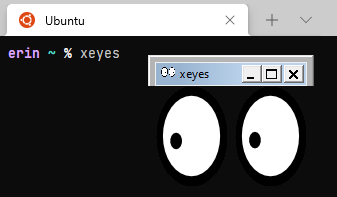
  • Try running a GUI application - for example, xeyes (sudo apt install xeyes if you don't have it)

xeyes working from wsl!

To speed things up in the future:

  • If you saved your XLaunch settings to a file, you can use them automatically by modifying the XLaunch application shortcut. Add the option -run "C:\Path\To\config.xlaunch" to the "Target" box in the shortcut's properties.

  • You can automatically set $DISPLAY from your shell profile. For example, I use the following for bash/zsh:

    # If on WSL, define DISPLAY with the local system address from /etc/resolv.conf to enable GUI stuff
    if [ -n "$WSL_DISTRO_NAME" ]; then
        export DISPLAY="$(cat /etc/resolv.conf | grep nameserver | awk '{print $2}'):0"
    fi
@AlwinEsch
Copy link
Copy Markdown

Hi, thanks for this gist!

There is one issue about your "head to WSL and check /etc/resolv.conf", on my computer (maybe on others different and OK) has this not worked.
As solution I found to use the IP given on Windows ipconfig.exe (where also listed on ifconfig by v1 only), there his output about

Ethernet-Adapter vEthernet (WSL (Hyper-V firewall)):

   Verbindungsspezifisches DNS-Suffix:
   Verbindungslokale IPv6-Adresse  . : fe80::40fb:183e:e346:188b%70
   IPv4-Adresse  . . . . . . . . . . : 172.27.16.1
   Subnetzmaske  . . . . . . . . . . : 255.255.240.0
   Standardgateway . . . . . . . . . :

Here what I found during fault search:

During test I seen following parts:

  1. With /etc/resolv.conf not match in my case:
    Here his output:
~$ cat /etc/resolv.conf
# This file was automatically generated by WSL. To stop automatic generation of this file, add the following entry to /etc/wsl.conf:
# [network]
# generateResolvConf = false
nameserver 192.168.178.1
nameserver fd00::62b5:8dff:fe07:e6ed
nameserver 2003:fd:7706:d900:62b5:8dff:fe07:e6ed
search fritz.box

With ifconfig I checked and brought:

eth1: flags=4163<UP,BROADCAST,RUNNING,MULTICAST>  mtu 1500
        inet 192.168.56.1  netmask 255.255.255.0  broadcast 192.168.56.255
        inet6 fe80::e103:ee06:d74e:b921  prefixlen 64  scopeid 0xfd<compat,link,site,host>
        ether 0a:00:27:00:00:14  (Ethernet)
        RX packets 0  bytes 0 (0.0 B)
        RX errors 0  dropped 0  overruns 0  frame 0
        TX packets 0  bytes 0 (0.0 B)
        TX errors 0  dropped 0 overruns 0  carrier 0  collisions 0

eth2: flags=4163<UP,BROADCAST,RUNNING,MULTICAST>  mtu 1500
        inet 172.27.16.1  netmask 255.255.240.0  broadcast 172.27.31.255
        inet6 fe80::40fb:183e:e346:188b  prefixlen 64  scopeid 0xfd<compat,link,site,host>
        ether 00:15:5d:38:df:77  (Ethernet)
        RX packets 0  bytes 0 (0.0 B)
        RX errors 0  dropped 0  overruns 0  frame 0
        TX packets 0  bytes 0 (0.0 B)
        TX errors 0  dropped 0 overruns 0  carrier 0  collisions 0

Has tried the second IP with export DISPLAY="172.27.16.1:0" and has worked with it.

  1. It seems to make with IP problems by version 2 (wsl.exe --set-version ubuntu 2)
    There brings resolv.conf this:
$ cat /etc/resolv.conf
# This file was automatically generated by WSL. To stop automatic generation of this file, add the following entry to /etc/wsl.conf:
# [network]
# generateResolvConf = false
nameserver 10.255.255.254
search fritz.box

The ifconfig brings there:

eth0: flags=4163<UP,BROADCAST,RUNNING,MULTICAST>  mtu 1492
        inet 172.27.27.235  netmask 255.255.240.0  broadcast 172.27.31.255
        inet6 fe80::215:5dff:fe3f:3c14  prefixlen 64  scopeid 0x20<link>
        ether 00:15:5d:3f:3c:14  txqueuelen 1000  (Ethernet)
        RX packets 1088  bytes 141015 (141.0 KB)
        RX errors 0  dropped 0  overruns 0  frame 0
        TX packets 1171  bytes 249798 (249.7 KB)
        TX errors 0  dropped 0 overruns 0  carrier 0  collisions 0

lo: flags=73<UP,LOOPBACK,RUNNING>  mtu 65536
        inet 127.0.0.1  netmask 255.0.0.0
        inet6 ::1  prefixlen 128  scopeid 0x10<host>
        loop  txqueuelen 1000  (Local Loopback)
        RX packets 15  bytes 1631 (1.6 KB)
        RX errors 0  dropped 0  overruns 0  frame 0
        TX packets 15  bytes 1631 (1.6 KB)
        TX errors 0  dropped 0 overruns 0  carrier 0  collisions 0

But the IP's 10.255.255.254 and 172.27.27.235 are not usable.

Sign up for free to join this conversation on GitHub. Already have an account? Sign in to comment