Skip to content

Instantly share code, notes, and snippets.

DX7

image

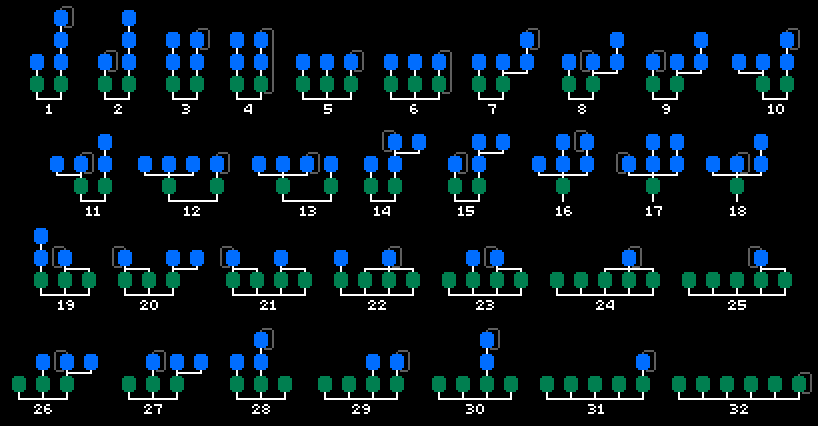
Note: One of the algorithms is incorrect due to a missing operator. Need to update the image. Will have to get on that soon.

These are the original 32 algorithms as used in Yamaha DX7.

The later Yamaha FS1R and Yamaha SY77 may have compatibility with these algorithms, but that's beyond the current scope. The FS1R contains 88 algorithms, while the SY77 contains 45 algorithms.

@embix
embix / playground.rs
Last active November 23, 2019 15:13 — forked from rust-play/playground.rs
Rust Playground: Tutorial Copy/Borrowing/Ownership/Lifetimes/Move-Semantik/Affine Typsysteme
// Super schnelles Anfänger Tutorial Copy/Borrowing/Ownership/Lifetimes/Move-Semantik/Affine Typsysteme
fn main() {
//schritt1(); // Ownership
//schritt2(); // Move-Semantik, Affines Typsystem und Copy
//schritt3(); // Borrowing
//schritt4(); // Lifetimes
}
// c# companion script
// SpriteUVToShader.cs -------------------------------------------------------------------------------------------------------------------------------- //
// Save you your project, add to your SpriteRenderer gameObject
using UnityEngine;
using System.Collections;
using System.Collections.Generic;
@embix
embix / SimpleHTTPServer.cs
Created November 8, 2017 19:23 — forked from aksakalli/SimpleHTTPServer.cs
SimpleHTTPServer in C#
// MIT License - Copyright (c) 2016 Can Güney Aksakalli
// https://aksakalli.github.io/2014/02/24/simple-http-server-with-csparp.html
using System;
using System.Collections.Generic;
using System.Linq;
using System.Text;
using System.Net.Sockets;
using System.Net;
using System.IO;
@embix
embix / ExternalReferenceLinksProviderComponent.cs
Created May 4, 2017 20:37 — forked from ZimM-LostPolygon/ExternalReferenceLinksProviderComponent.cs
A simple SandCastle BuildComponent for replacing unknown type references with links from XML database
using System;
using System.Collections.Generic;
using System.ComponentModel.Composition.Hosting;
using System.Diagnostics;
using System.IO;
using System.Linq;
using System.Reflection;
using System.Windows.Forms;
using System.Xml;
using System.Xml.Linq;
@embix
embix / git-aliases.md
Created September 1, 2016 06:10 — forked from mwhite/git-aliases.md
The Ultimate Git Alias Setup

The Ultimate Git Alias Setup

If you use git on the command-line, you'll eventually find yourself wanting aliases for your most commonly-used commands. It's incredibly useful to be able to explore your repos with only a few keystrokes that eventually get hardcoded into muscle memory.

Some people don't add aliases because they don't want to have to adjust to not having them on a remote server. Personally, I find that having aliases doesn't mean I that forget the underlying commands, and aliases provide such a massive improvement to my workflow that it would be crazy not to have them.

The simplest way to add an alias for a specific git command is to use a standard bash alias.

# .bashrc
@embix
embix / install_ffmpeg_ubuntu.sh
Created July 16, 2016 14:48 — forked from xdamman/install_ffmpeg_ubuntu.sh
Install latest ffmpeg on ubuntu 12.04 or 14.04
#!/bin/bash
# Bash script to install latest version of ffmpeg and its dependencies on Ubuntu 12.04 or 14.04
# Inspired from https://gist.github.com/faleev/3435377
# Remove any existing packages:
sudo apt-get -y remove ffmpeg x264 libav-tools libvpx-dev libx264-dev
# Get the dependencies (Ubuntu Server or headless users):
sudo apt-get update
@embix
embix / ffmpeg4matelight.sh
Created February 17, 2016 22:46 — forked from MichaelKreil/ffmpeg4matelight.sh
using ffmpeg to stream videos, gifs, the webcam or the screen to matelight
# Stream a video
ffmpeg -re -i video.avi -vf "scale=40:ih*40/iw, crop=40:16" -f rawvideo -vcodec rawvideo -sws_flags bilinear -pix_fmt rgb24 - > /dev/udp/matelight.cbrp3.c-base.org/1337
# Loop a gif
ffmpeg -re -ignore_loop 0 -i image.gif -vf "scale=40:ih*40/iw, crop=40:16" -f rawvideo -vcodec rawvideo -sws_flags bilinear -pix_fmt rgb24 - > /dev/udp/matelight.cbrp3.c-base.org/1337
# Stream webcam
# Mac
ffmpeg -re -f avfoundation -r 30 -s 1280x720 -i "0" -vf "scale=40:ih*40/iw, crop=40:16, pp=autolevels:f, eq=1.5" -f rawvideo -vcodec rawvideo -sws_flags bilinear -pix_fmt rgb24 - > /dev/udp/matelight.cbrp3.c-base.org/1337
using System;
using System.Collections.Generic;
using System.Linq;
using System.Text;
using NLog;
using NLog.Common;
using NLog.Targets;
using NLog.Config;
namespace ConsoleApplication1
aptitude install -y git curl python-dev python-pip redis-server ruby1.9.1-full rubygems1.9.1
aptitude install -y mysql-server libmysqlclient-dev
adduser --system --shell /bin/sh --gecos 'git version control' --group --disabled-password --home /home/git git
adduser --disabled-login --gecos 'gitlab system' gitlab
usermod -a -G git gitlab
su - gitlab
ssh-keygen -q -N '' -t rsa -f /home/gitlab/.ssh/id_rsa
aptitude install gitolite
cp /home/gitlab/.ssh/id_rsa.pub /home/git/gitlab.pub
su - git