
Last active
November 20, 2024 08:27
-
-
Save cellularmitosis/5b7541db99ee07a476dcb42afbffaee1 to your computer and use it in GitHub Desktop.
Revisions
-
cellularmitosis revised this gist
Dec 5, 2019 . 1 changed file with 1 addition and 1 deletion.There are no files selected for viewing
This file contains hidden or bidirectional Unicode text that may be interpreted or compiled differently than what appears below. To review, open the file in an editor that reveals hidden Unicode characters. Learn more about bidirectional Unicode charactersOriginal file line number Diff line number Diff line change @@ -5,7 +5,7 @@ Blog 2019/11/4 [next ->](https://gist.github.com/cellularmitosis/07177abbe5753bc59916931733c1fec0) # Installing Debian on the MIPS Creator CI20 With my recent interest in compilers, I decided to pick up a MIPS machine. -
Dec 5, 2019 . 1 changed file with 2 additions and 1 deletion.There are no files selected for viewing
This file contains hidden or bidirectional Unicode text that may be interpreted or compiled differently than what appears below. To review, open the file in an editor that reveals hidden Unicode characters. Learn more about bidirectional Unicode charactersOriginal file line number Diff line number Diff line change @@ -1,7 +1,8 @@ Blog 2019/11/4 [<- previous](https://gist.github.com/cellularmitosis/aa3001c8d5a961f7b382f6576978b644) | [index](https://gist.github.com/cellularmitosis/1106b185f8b34ae0e36afa5fbcd04a00) | [next ->](https://gist.github.com/cellularmitosis/07177abbe5753bc59916931733c1fec0) # Debian on the MIPS Creator CI20 -
Nov 23, 2019 . 1 changed file with 10 additions and 0 deletions.There are no files selected for viewing
This file contains hidden or bidirectional Unicode text that may be interpreted or compiled differently than what appears below. To review, open the file in an editor that reveals hidden Unicode characters. Learn more about bidirectional Unicode charactersOriginal file line number Diff line number Diff line change @@ -58,3 +58,13 @@ Hmm, I can't seem to get that image to boot correctly. I was able to get the gentoo image to boot. Grab [gentoo-stage4-ci20.img](https://gentoo.osuosl.org/experimental/mips/desktop-ci20/gentoo-stage4-ci20.img) from the [experimental/mips/desktop-ci20](https://gentoo.osuosl.org/experimental/mips/desktop-ci20/) directory. ## Resources - [elinux.org CI20 pages](https://elinux.org/MIPS_Creator_CI20) - [CI20 forum](https://groups.google.com/forum/#!forum/mips-creator-ci20) - [CI20-dev forum](https://groups.google.com/forum/#!forum/mips-creator-ci20-dev) - [ZubairLK's files](https://github.com/ZubairLK/ci20_other_files) - [kernel fork](https://github.com/MIPS/CI20_linux) - [uboot fork](https://github.com/MIPS/CI20_u-boot) -
Nov 5, 2019 . No changes.There are no files selected for viewing
-
Nov 5, 2019 . 1 changed file with 2 additions and 2 deletions.There are no files selected for viewing
This file contains hidden or bidirectional Unicode text that may be interpreted or compiled differently than what appears below. To review, open the file in an editor that reveals hidden Unicode characters. Learn more about bidirectional Unicode charactersOriginal file line number Diff line number Diff line change @@ -40,13 +40,13 @@ This indicates it is overwriting the onboard flash. Though there is no HDMI output, the CI20 is working correctly! About 10 minutes later the LED will turn red again, indicating it has finished writing to the onboard flash. There is a [note](http://mipscreator.mips.com/CI20/images/default_NAND/Debian8_20150909/Readme.txt) about how the older and newer boot sectors and root filesystems are incompatible, which can lead to a situation where the kernel boots, but panics when it can't mount the root filesystem. (Between this panic and the "mysterious" blue LED, this was the point at which I mistakenly thought I had bricked my CI20). This [process](https://elinux.org/CI20_Dev_Zone#NAND_Flashing_SD_card) is also covered in the [Android Authority review of the CI20](https://youtu.be/lsmhpDewIwA?t=369). ~Next, download [rootfs_2016_06_02.tar](http://mipscreator.mips.com/CI20/images/default_NAND/Debian8_20160602/rootfs_2016_06_02.tar). Partition and format an SD Card (on my machine, this was `mkfs.ext4 /dev/mmcblk0`). -
Nov 5, 2019 . 1 changed file with 7 additions and 2 deletions.There are no files selected for viewing
This file contains hidden or bidirectional Unicode text that may be interpreted or compiled differently than what appears below. To review, open the file in an editor that reveals hidden Unicode characters. Learn more about bidirectional Unicode charactersOriginal file line number Diff line number Diff line change @@ -48,8 +48,13 @@ which can lead to a situation where the kernel boots, but panics when it can't m This process is covered in the [Android Authority review of the CI20](https://youtu.be/lsmhpDewIwA?t=369). ~Next, download [rootfs_2016_06_02.tar](http://mipscreator.mips.com/CI20/images/default_NAND/Debian8_20160602/rootfs_2016_06_02.tar). Partition and format an SD Card (on my machine, this was `mkfs.ext4 /dev/mmcblk0`). Mount the filesystem and untar the tarball into it (`pv rootfs_2016_06_02.tar | tar x`). Place the SD Card into your CI20, set the boot jumper, and power it up.~ Hmm, I can't seem to get that image to boot correctly. I was able to get the gentoo image to boot. Grab [gentoo-stage4-ci20.img](https://gentoo.osuosl.org/experimental/mips/desktop-ci20/gentoo-stage4-ci20.img) from the [experimental/mips/desktop-ci20](https://gentoo.osuosl.org/experimental/mips/desktop-ci20/) directory. -
Nov 5, 2019 . 1 changed file with 1 addition and 1 deletion.There are no files selected for viewing
This file contains hidden or bidirectional Unicode text that may be interpreted or compiled differently than what appears below. To review, open the file in an editor that reveals hidden Unicode characters. Learn more about bidirectional Unicode charactersOriginal file line number Diff line number Diff line change @@ -11,7 +11,7 @@ With my recent interest in compilers, I decided to pick up a MIPS machine. 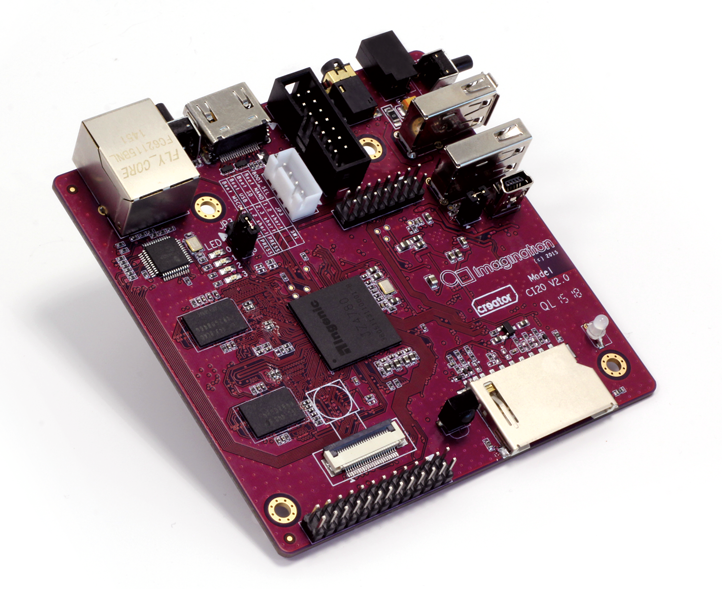 The [MIPS Creator CI20](https://en.wikipedia.org/wiki/Imagination_Creator#Creator_Ci20) is a single-board computer ([specs](https://elinux.org/CI20_Hardware)): - Dual-core 1.2GHz MIPS32 CPU - 1GB Ram - HDMI video out with OpenGL 2.1 via a PowerVR SGX540 GPU -
Nov 5, 2019 . 1 changed file with 11 additions and 0 deletions.There are no files selected for viewing
This file contains hidden or bidirectional Unicode text that may be interpreted or compiled differently than what appears below. To review, open the file in an editor that reveals hidden Unicode characters. Learn more about bidirectional Unicode charactersOriginal file line number Diff line number Diff line change @@ -8,6 +8,9 @@ Blog 2019/11/4 With my recent interest in compilers, I decided to pick up a MIPS machine.  The [MIPS Creator CI20](https://en.wikipedia.org/wiki/Imagination_Creator#Creator_Ci20) is a single-board computer: - Dual-core 1.2GHz MIPS32 CPU - 1GB Ram @@ -29,6 +32,7 @@ Turns out I just needed to be patient! To update to a more recent release of Debian, download [nand_2016_06_02.img](http://mipscreator.mips.com/CI20/images/default_NAND/Debian8_20160602/nand_2016_06_02.img) from the [CI20 elinux page](https://elinux.org/CI20_Distros#Debian). This is an SD Card image, which when booted, will overwrite the onboard flash. Burn this image to an SD Card, set the boot jumper, and boot the CI20. You will see the LED turn briefly red, then blue. @@ -42,3 +46,10 @@ which can lead to a situation where the kernel boots, but panics when it can't m (Between this panic and the "mysterious" blue LED, this was the point at which I mistakenly thought I had bricked my CI20). This process is covered in the [Android Authority review of the CI20](https://youtu.be/lsmhpDewIwA?t=369). Next, download [rootfs_2016_06_02.tar](http://mipscreator.mips.com/CI20/images/default_NAND/Debian8_20160602/rootfs_2016_06_02.tar). Partition and format an SD Card (on my machine, this was `mkfs.ext4 /dev/mmcblk0`). Mount the filesystem and untar the tarball into it (`pv rootfs_2016_06_02.tar | tar x`). Place the SD Card into your CI20, set the boot jumper, and power it up. -
Nov 5, 2019 . 1 changed file with 0 additions and 0 deletions.There are no files selected for viewing
File renamed without changes. -
Nov 5, 2019 .There are no files selected for viewing
This file contains hidden or bidirectional Unicode text that may be interpreted or compiled differently than what appears below. To review, open the file in an editor that reveals hidden Unicode characters. Learn more about bidirectional Unicode charactersOriginal file line number Diff line number Diff line change @@ -0,0 +1,44 @@ Blog 2019/11/4 [<- previous](https://gist.github.com/cellularmitosis/aa3001c8d5a961f7b382f6576978b644) | [index](https://gist.github.com/cellularmitosis/1106b185f8b34ae0e36afa5fbcd04a00) # Debian on the MIPS Creator CI20 With my recent interest in compilers, I decided to pick up a MIPS machine. The [MIPS Creator CI20](https://en.wikipedia.org/wiki/Imagination_Creator#Creator_Ci20) is a single-board computer: - Dual-core 1.2GHz MIPS32 CPU - 1GB Ram - HDMI video out with OpenGL 2.1 via a PowerVR SGX540 GPU - Boot from 8GB onboard flash, SD Card, or USB - WiFi, Bluetooth, Ethernet It is available for about $70 from [mouser.com](https://www.mouser.com/ProductDetail/Imagination-Technologies/VL-62851?qs=tCMd4XlZ%2FiDIxiQwKR9F%252bA==), sold as the Imagination Technologies VL-62851 ([datasheet](https://www.mouser.com/datasheet/2/782/imaginationtechnologies_Ci20_QSG_final-4-838339.pdf)). ## Bricked? Nope! I found the instructions for updating Debian confusing, and at one point thought I had bricked my CI20. Turns out I just needed to be patient! To update to a more recent release of Debian, download [nand_2016_06_02.img](http://mipscreator.mips.com/CI20/images/default_NAND/Debian8_20160602/nand_2016_06_02.img) from the [CI20 elinux page](https://elinux.org/CI20_Distros#Debian). Burn this image to an SD Card, set the boot jumper, and boot the CI20. You will see the LED turn briefly red, then blue. This indicates it is overwriting the onboard flash. Though there is no HDMI output, the CI20 is working correctly! About 10 minutes later the LED will turn red again, indicating it has finished writing to the onboard flash. There is a [note](https://elinux.org/CI20_Dev_Zone#NAND_Flashing_SD_card) about how the older and newer boot sectors and root filesystems are incompatible, which can lead to a situation where the kernel boots, but panics when it can't mount the root filesystem. (Between this panic and the "mysterious" blue LED, this was the point at which I mistakenly thought I had bricked my CI20).