

In any web browser:
- From the Arduino website, download & install the latest Arduino IDE (v1.8 or later). Available for Windows, Mac, Linux & ARM.
In the Arduino IDE: (original instructions) or docs here
- From File > Preferences, add a Boards Manager URL
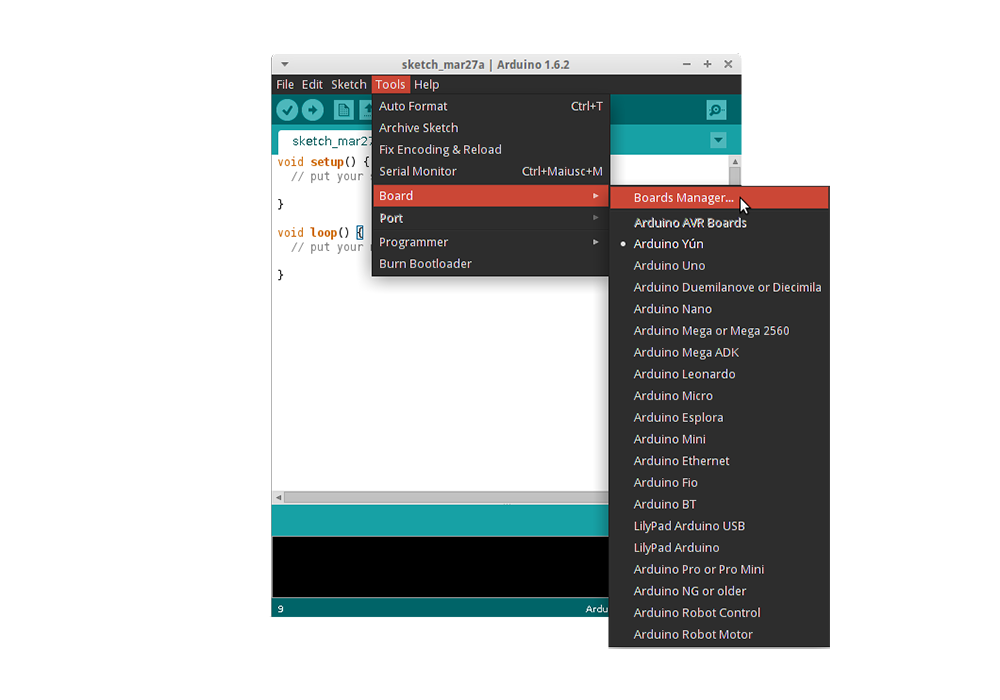
http://arduino.esp8266.com/stable/package_esp8266com_index.json - From Tools > Board > Board Manager, search for D1 mini and install (+/- 150MB)
Before connecting the D1 Mini, make a note of the currently connected COM devices. In your terminal run:
- Windows:
modeor goto Device Manager > Ports - Mac
ls /dev/tty.* && ls /dev/cu.*orls /dev/* - Linux
ls /dev/tty.* && ls /dev/cu.ordmesg | grep tty*
After connecting the D1 Mini, recheck the COM port assignments to identify the port# assigned to the device.
- From Tools > Port select the correct COM port# as assigned to the device.
- From File > Examples > ESP8266 open the Blink Sketch
- Double check the pin asignment (For the D1 mini it should be <pin# here>)
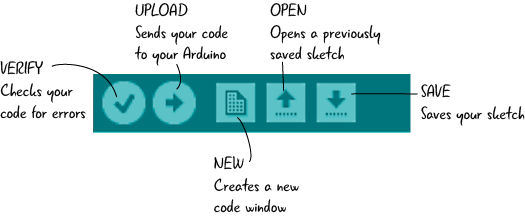
- Verify the Sketch (check mark)
- Upload the code to the module (right arrow)
The LED on the device should blink!
NB - Runs at 3.3V! - fortunately the module includes a onboard 3.3V regulator.
- D1 Mini (Product page)
- Arduino Getting Started USB Drivers
- Win|Mac Drivers
- [[Linux Drivers ?]]
Module Variants (Like the illegitimate D1 Mini Node MCU look-alike from robotics.org.za)
- Original Wesmos: Wesmos Logo, HC-340 USB chip, ESP8266-12S
- NodeMCU: (see website)
- Fakes: No Wesmos or NodeMCU logo, HL-340 USB chip, ESP8266-12N

- ESP8266 - A WiFi enabled microcontroller, not an officially supported Arduino chip. The ESP8266 Arduino project has implemented an Arduino Core library for the ESP8266 Chip
- Data Sheet v5.5 (Espressif Systems)
- Data Sheet v4.3 (Adafruit)
Youtube
EEVblog #998 - How To Program ESP8266 WiFi With Arduino (Video)
ESP8266 Arduino Project
ESP8266 Community Forums
NodeMCU
(in the world of Arduino)
- sketch - A complete Arduino program
- setup - The setup routine run before the main loop (runs once)
- loop - The main program that runs continuously
