
-
Star
(134)
You must be signed in to star a gist -
Fork
(68)
You must be signed in to fork a gist
-
-
Save arthurbeggs/06df46af94af7f261513934e56103b30 to your computer and use it in GitHub Desktop.
| #!/bin/bash | |
| ################################################################################ | |
| ### OpenCV2 Installation Script ### | |
| ################################################################################ | |
| # Source code at https://github.com/arthurbeggs/scripts # | |
| ################################################################################ | |
| # # | |
| # Feel free to copy and modify this file. Giving me credit for it is your # | |
| # choice, but please keep references to other people's work, which I don't # | |
| # have ownership and thus cannot decide what to do with the licenses. # | |
| # # | |
| ################################################################################ | |
| ### Single line script will download and run this script automatically: | |
| # curl -s "https://raw.githubusercontent.com/arthurbeggs/scripts/master/install_apps/install_opencv2.sh" | bash | |
| ### Dependencies | |
| sudo apt-get update | |
| sudo apt-get install -y build-essential cmake libgtk2.0-dev pkg-config \ | |
| python-numpy python-dev libavcodec-dev libavformat-dev \ | |
| libswscale-dev libjpeg-dev libpng12-dev libtiff5-dev \ | |
| libjasper-dev libopencv-dev checkinstall pkg-config \ | |
| yasm libjpeg-dev libjasper-dev libavcodec-dev \ | |
| libavformat-dev libswscale-dev libdc1394-22-dev \ | |
| libxine2 libgstreamer0.10-dev libv4l-dev \ | |
| libgstreamer-plugins-base0.10-dev python-dev \ | |
| python-numpy libtbb-dev libqt4-dev libgtk2.0-dev \ | |
| libmp3lame-dev libopencore-amrnb-dev \ | |
| libopencore-amrwb-dev libtheora-dev libvorbis-dev \ | |
| libxvidcore-dev x264 v4l-utils unzip | |
| ### Download opencv-2.4.13.5 | |
| wget https://github.com/opencv/opencv/archive/2.4.13.5.zip -O opencv-2.4.13.5.zip | |
| unzip opencv-2.4.13.5.zip | |
| cd opencv-2.4.13.5 | |
| mkdir release | |
| cd release | |
| ### Compile and install | |
| cmake -G "Unix Makefiles" -DCMAKE_CXX_COMPILER=/usr/bin/g++ CMAKE_C_COMPILER=/usr/bin/gcc -DCMAKE_BUILD_TYPE=RELEASE -DCMAKE_INSTALL_PREFIX=/usr/local -DWITH_TBB=ON -DBUILD_NEW_PYTHON_SUPPORT=ON -DWITH_V4L=ON -DINSTALL_C_EXAMPLES=ON -DINSTALL_PYTHON_EXAMPLES=ON -DBUILD_EXAMPLES=ON -DWITH_QT=ON -DWITH_OPENGL=ON -DBUILD_FAT_JAVA_LIB=ON -DINSTALL_TO_MANGLED_PATHS=ON -DINSTALL_CREATE_DISTRIB=ON -DINSTALL_TESTS=ON -DENABLE_FAST_MATH=ON -DWITH_IMAGEIO=ON -DBUILD_SHARED_LIBS=OFF -DWITH_GSTREAMER=ON .. | |
| make all -j$(nproc) # Uses all machine cores | |
| sudo make install | |
| cd ../../ | |
| rm -rf ./opencv-2.4.13.5 | |
| sudo apt-get install python-opencv -y | |
| ### Echoes OpenCV installed version if installation process was successful | |
| echo -e "OpenCV version:" | |
| pkg-config --modversion opencv |


Thanks!!!
Instructions works well on ubuntu 18 as well just by using the newest set of packages available for the distro

sudo: ./install-opencv-2.4.13-in-ubuntu.sh: command not found
what can i do?
thank you very much
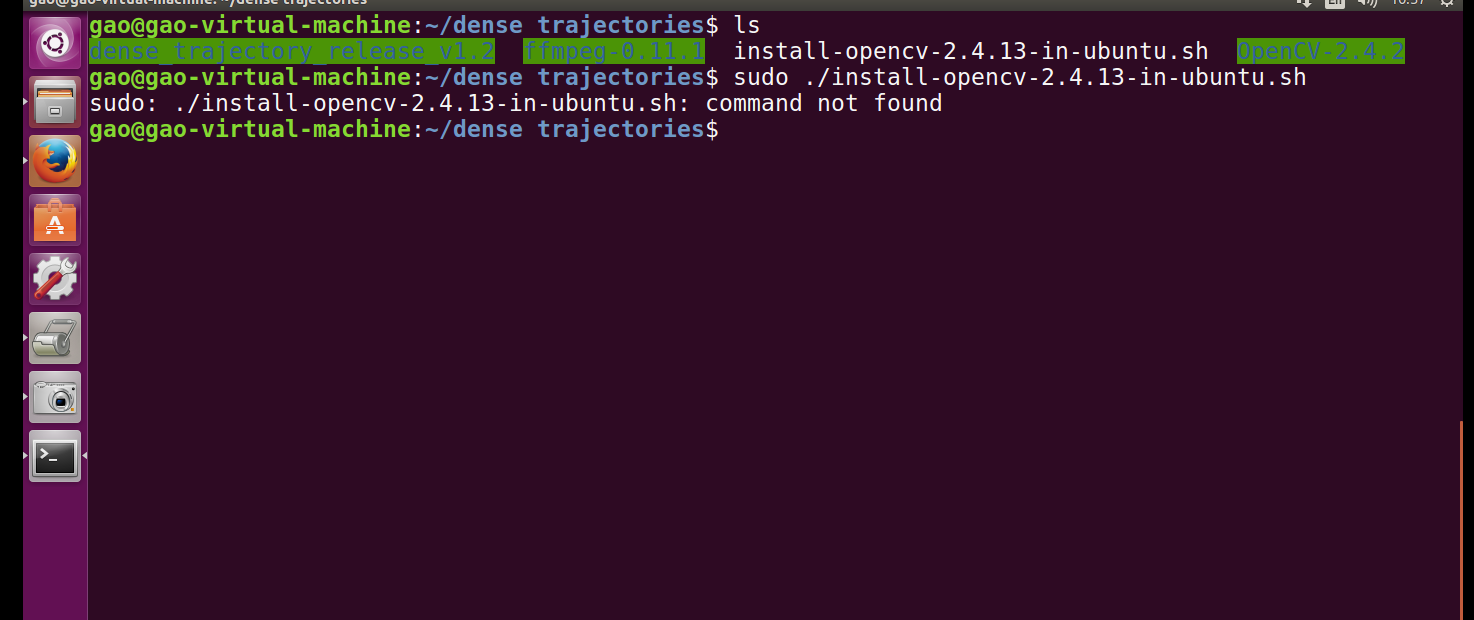
you can try with chmod +x install_opencv2_ubuntu.sh before you run the shell script.

@drsagitn 'sudo apt-get install python-opencv
pip install opencv-python' installs opencv 3.3.0. What is the way to install opencv 2.4.13?
Thanks in advance.
Hi,
were you able to install python binding via apt-get install python-opencv for the above OpenCV installation?

Thanks, but in my case script not worked as intended at first time... since... I had no unzip :)
For someone like me, it seems good to add script doing sudo apt install -y unzip
Also good to have set -e at the first line to stop procedure for the case like me

Awesome!
Thank you!
Thank you very much

Has anyone come across this error. How do i solve this.


Has anyone come across this error. How do i solve this.
hello there, i've met the same problem. have you solved it?
[ 18%] Linking CXX executable ../../bin/opencv_annotation
/home/yjon701/anaconda2/lib/libQt5Test.so.5.6.2: undefined reference to
operator delete[](void*, unsigned long)@CXXABI_1.3.9' /home/yjon701/anaconda2/lib/libpng16.so.16: undefined reference toinflateValidate@ZLIB_1.2.9'/home/yjon701/anaconda2/lib/libQt5Test.so.5.6.2: undefined reference to
__cxa_throw_bad_array_new_length@CXXABI_1.3.8' /home/yjon701/anaconda2/lib/libQt5Test.so.5.6.2: undefined reference tooperator delete(void*, unsigned long)@CXXABI_1.3.9'collect2: error: ld returned 1 exit status
[ 18%] Linking CXX executable ../../bin/opencv_visualisation
/home/yjon701/anaconda2/lib/libQt5Test.so.5.6.2: undefined reference to
operator delete[](void*, unsigned long)@CXXABI_1.3.9' /home/yjon701/anaconda2/lib/libpng16.so.16: undefined reference toinflateValidate@ZLIB_1.2.9'/home/yjon701/anaconda2/lib/libQt5Test.so.5.6.2: undefined reference to
__cxa_throw_bad_array_new_length@CXXABI_1.3.8' /home/yjon701/anaconda2/lib/libQt5Test.so.5.6.2: undefined reference tooperator delete(void*, unsigned long)@CXXABI_1.3.9'collect2: error: ld returned 1 exit status
make[2]: *** [bin/opencv_visualisation] Error 1
make[1]: *** [apps/visualisation/CMakeFiles/opencv_visualisation.dir/all] Error 2