Skip to content

Instantly share code, notes, and snippets.

@vszakats
vszakats / apple-notes-export-from-json.py
Last active May 10, 2023 12:39
Apple Notes.app JSON to Markdown/HTML converter
#!/usr/bin/env python3
# Copyright 2022-present Viktor Szakats. The MIT License.
# SPDX-License-Identifier: MIT
# Convert 'apple_cloud_notes_parser'-made JSON into Markdown or HTML.
# The goal is to export the content losslessly and with the ability to
# continue editing them after importing or opening them in Markdown
# editors as-is.
@pudquick
pudquick / brew.md
Last active April 25, 2026 07:41
Lightly "sandboxed" homebrew on macOS

brew is a bad neighbor

This isn't a guide about locking down homebrew so that it can't touch the rest of your system security-wise.

This guide doesn't fix the inherent security issues of a package management system that will literally yell at you if you try to do something about "huh, maybe it's not great my executables are writeable by my account without requiring authorization first".

But it absolutely is a guide about shoving it into its own little corner so that you can take it or leave it as you see fit, instead of just letting the project do what it likes like completely taking over permissions and ownership of a directory that might be in use by other software on your Mac and stomping all over their contents.

By following this guide you will:

  • Never have to run sudo to forcefully change permissions of some directory to be owned by your account
@brummer10
brummer10 / guitarix.py
Last active June 19, 2024 09:36
Demoing the use of the guitarix socket connection with python, show how to set and get parameter values, and how to fetch updates from the socket.
#! /usr/bin/python
# -*- coding: utf-8 -*-
guitarix_pgm = "guitarix -p 7000"
import socket, json, os, time
class RpcNotification:
def __init__(self, method, params):
@m-radzikowski
m-radzikowski / script-template.sh
Last active April 30, 2026 11:50
Minimal safe Bash script template - see the article with full description: https://betterdev.blog/minimal-safe-bash-script-template/
#!/usr/bin/env bash
set -Eeuo pipefail
trap cleanup SIGINT SIGTERM ERR EXIT
script_dir=$(cd "$(dirname "${BASH_SOURCE[0]}")" &>/dev/null && pwd -P)
usage() {
cat <<EOF
Usage: $(basename "${BASH_SOURCE[0]}") [-h] [-v] [-f] -p param_value arg1 [arg2...]
@stevejenkins
stevejenkins / Pi-hole on UC-CK 0.13.6
Last active December 31, 2024 13:58
Pi-hole on UC-CK 0.13.6
# Instructions for installing Pi-hole 4.2 on UniFi CloudKey Gen 1 (UC-CK) running firmware 0.13.6
# Pi-hole will need to be completely re-installed after every FW update or if CloudKey is reset to defaults.
# Verify UC-CK is running firmware v0.13.6 (or later) before installing Pi-hole. If not, do:
ubnt-systool fwupdate https://dl.ubnt.com/unifi/stage/cloudkey/firmware/UCK/UCK.mtk7623.v0.13.6.7ad551e.190225.0939.bin
# UC-CK firmware v0.13.6 downgrades UniFi Controller to 5.10.17. Upgrade to 5.10.19 with:
cd /tmp
wget https://dl.ubnt.com/unifi/5.10.19/unifi_sysvinit_all.deb
dpkg -i unifi_sysvinit_all.deb
@pamolloy
pamolloy / README.md
Last active October 16, 2024 20:40
Ubiquiti USG configuration for Wireguard

Download the latest ugw3 package from https://github.com/Lochnair/vyatta-wireguard/releases and install it on your USG using dpkg -i wireguard-ugw3-<version>.deb.

cd /config/auth
umask 077
mkdir wireguard
cd wireguard
wg genkey > wg_private.key
wg pubkey < wg_private.key > wg_public.key
@jsbain
jsbain / multicb.py
Created June 24, 2018 05:57
multicb.py
import cb, threading
class Service(object):
'''wrapper for a cb.Service. Can index characteristics by
s[uuid] or s[index]
'''
def __init__(self,service):
self.primary=service.primary
self.uuid=service.uuid
self.characteristics={}
@dannguyen
dannguyen / schemacrawler-sqlite-macos-howto.md
Last active March 5, 2025 23:27
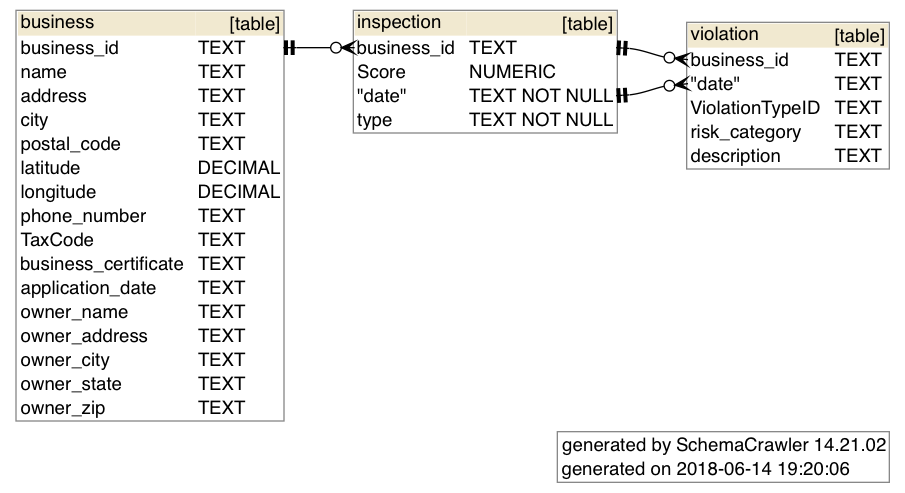
How to use schemacrawler to generate schema diagrams for SQLite from the commandline (Mac OS)
@udkyo
udkyo / Dockerfile
Last active November 3, 2025 16:16
Basic container for X11 forwarding goodness
FROM ubuntu
RUN apt update \
&& apt install -y firefox \
openssh-server \
xauth \
&& mkdir /var/run/sshd \
&& mkdir /root/.ssh \
&& chmod 700 /root/.ssh \
&& ssh-keygen -A \
&& sed -i "s/^.*PasswordAuthentication.*$/PasswordAuthentication no/" /etc/ssh/sshd_config \
@steven2358
steven2358 / ffmpeg.md
Last active April 30, 2026 20:08
FFmpeg cheat sheet