
Last active
December 5, 2023 06:17
-
-
Save Naedri/a5e66eba90824a803961726ab45a2a01 to your computer and use it in GitHub Desktop.
Revisions
-
Naedri revised this gist
Feb 10, 2023 . 1 changed file with 19 additions and 22 deletions.There are no files selected for viewing
This file contains hidden or bidirectional Unicode text that may be interpreted or compiled differently than what appears below. To review, open the file in an editor that reveals hidden Unicode characters. Learn more about bidirectional Unicode charactersOriginal file line number Diff line number Diff line change @@ -49,21 +49,17 @@ Add the following shortcuts to your *package.json* : "private": true, "scripts": { ... "eslint": "eslint . --ext ts,tsx,js,jsx", "eslint:fix": "eslint . --fix --ext ts,tsx,js,jsx", "prettier": "prettier --check \"./src/**/*.{ts,tsx,js,jsx,json,md}\"", "prettier:fix": "prettier --write \"./src/**/*.{ts,tsx,js,jsx,json,md}\"", "lint": "npm run eslint && npm run prettier", "format": "npm run eslint:fix && npm run prettier:fix" } ``` - `lint`: will search for problems, but will not fix. - `format`: will search for problems, and will fix. ### Protocol for a new repository @@ -94,17 +90,17 @@ Add the following config files at the root level your repository : ```json { "arrowParens": "avoid", "bracketSameLine": true, "bracketSpacing": true, "endOfLine": "lf", "printWidth": 80, "proseWrap": "always", "semi": true, "singleQuote": true, "tabWidth": 2, "trailingComma": "es5", "useTabs": false } ``` @@ -121,6 +117,7 @@ Add the following config files at the root level your repository : "eslint:recommended", "plugin:react/recommended", "plugin:@typescript-eslint/recommended", "plugin:@typescript-eslint/recommended-requiring-type-checking", "prettier" ], "parser": "@typescript-eslint/parser", -
Feb 10, 2023 . 1 changed file with 2 additions and 2 deletions.There are no files selected for viewing
This file contains hidden or bidirectional Unicode text that may be interpreted or compiled differently than what appears below. To review, open the file in an editor that reveals hidden Unicode characters. Learn more about bidirectional Unicode charactersOriginal file line number Diff line number Diff line change @@ -257,7 +257,7 @@ class ListComponent extends React.Component { 👍 Split into small pieces - [`ListItem.jsx`](https://miro.medium.com/max/2504/1*zkHad6Ktu2nPDU8pFEzL9Q.png) ```jsx import React from 'react' @@ -288,7 +288,7 @@ export default ListItem ``` - [`List.jsx`](https://miro.medium.com/max/3400/1*J37slRTcWt7a8AgAGhygQQ.png) ```jsx import React, { useState } from 'react'; -
Feb 10, 2023 . 1 changed file with 129 additions and 3 deletions.There are no files selected for viewing
This file contains hidden or bidirectional Unicode text that may be interpreted or compiled differently than what appears below. To review, open the file in an editor that reveals hidden Unicode characters. Learn more about bidirectional Unicode charactersOriginal file line number Diff line number Diff line change @@ -178,7 +178,74 @@ function MyComponent(props) { #### [01:00](https://www.youtube.com/watch?v=b0IZo2Aho9Y&list=PL0vfts4VzfNgUUEtEjxDVfh4iocVR3qIb&index=14&t=60s) Big Components 💩 A dirty React component : [`ListComponent`](https://miro.medium.com/max/1400/1*yMx7iU9sxrxnUOVZSs_rCg.png) ```jsx import React from 'react' import './ListComponent.css' class ListComponent extends React.Component { constructor(props) { super(props) this.state = { lastClickedButton: '', } } render() { return ( <div> <h1>The last clicked button is {this.state.lastClickedButton}</h1> <ul> <li> <button onClick={() => { this.setState({lastClickedButton: 'Create'}) this.props.createSomething() }} className="my-button"> Create </button> </li> <li> <button onClick={() => { this.setState({lastClickedButton: 'Read'}) this.props.readSomething() }} className="my-button"> Read </button> </li> <li> <button onClick={() => { this.setState({lastClickedButton: 'Update'}) this.props.updateSomething() }} className="my-button"> Update </button> </li> <li> <button onClick={() => { this.setState({lastClickedButton: 'Destroy'}) this.props.destroySomething() }} className="my-button"> Destroy </button> </li> </ul> </div> ) } } ``` 👍 Prefer functional components with React Hooks @@ -190,8 +257,67 @@ function MyComponent(props) { 👍 Split into small pieces - [`ListItem.js`](https://miro.medium.com/max/2504/1*zkHad6Ktu2nPDU8pFEzL9Q.png) ```jsx import React from 'react' import PropTypes from 'prop-types' const ListItem = ({action, title, setClicked}) => { return ( <li> <button onClick={() => { setClicked(title) action() }} className="my-button"> {title} </button> </li> ) } ListItem.propTypes = { action: PropTypes.func, setClicked: PropTypes.func, title: PropTypes.string, } export default ListItem ``` - [`List.js`](https://miro.medium.com/max/3400/1*J37slRTcWt7a8AgAGhygQQ.png) ```jsx import React, { useState } from 'react'; import PropTypes from 'prop-types'; import ListItem from './ListItem.jsx'; const List = ({ create, read, update, destroy }) => { const [clicked, setClicked] = useState(''); return ( <h1>The last clicked button is {clicked}</h1> <div> <ul> <ListItem title="Create" action={create} setClicked={setClicked} /> <ListItem title="Read" action={read} setClicked={setClicked} /> <ListItem title="Update" action={update} setClicked={setClicked} /> <ListItem title="Destroy" action={destroy} setClicked={setClicked} /> </ul> </div> ) }; List.propTypes = { create: PropTypes.func, read: PropTypes.func, update: PropTypes.func, destroy: PropTypes.func, }; export default List; ``` Reference : [Refactoring a Complex React Component](https://levelup.gitconnected.com/refactoring-a-complex-react-component-5-best-practices-to-write-efficient-and-readable-components-b0d06f4f22b4) -
Feb 10, 2023 . 1 changed file with 1 addition and 1 deletion.There are no files selected for viewing
This file contains hidden or bidirectional Unicode text that may be interpreted or compiled differently than what appears below. To review, open the file in an editor that reveals hidden Unicode characters. Learn more about bidirectional Unicode charactersOriginal file line number Diff line number Diff line change @@ -49,7 +49,7 @@ Add the following shortcuts to your *package.json* : "private": true, "scripts": { ... "eslint": "eslint . --ext .js,.jsx,.tsx,.ts", "eslint:fix": "npm run eslint --fix", "format": "npm run eslint:fix && npm run prettier:write", "lint": "npm run eslint && npm run prettier -- --check", -
Feb 10, 2023 . 1 changed file with 1 addition and 1 deletion.There are no files selected for viewing
This file contains hidden or bidirectional Unicode text that may be interpreted or compiled differently than what appears below. To review, open the file in an editor that reveals hidden Unicode characters. Learn more about bidirectional Unicode charactersOriginal file line number Diff line number Diff line change @@ -90,7 +90,7 @@ Install the following dev dependencies in your *package.json* with `npm install Add the following config files at the root level your repository : - *.prettierrc.json* ```json { -
Jul 27, 2022 . 1 changed file with 2 additions and 2 deletions.There are no files selected for viewing
This file contains hidden or bidirectional Unicode text that may be interpreted or compiled differently than what appears below. To review, open the file in an editor that reveals hidden Unicode characters. Learn more about bidirectional Unicode charactersOriginal file line number Diff line number Diff line change @@ -34,8 +34,8 @@ coverage Follow the rules of : - [GitHub - ionic-team/prettier-config: Shared Prettier config 💅](https://github.com/ionic-team/prettier-config) - [GitHub - ionic-team/eslint-config: Common eslint rules/preferences for Ionic.](https://github.com/ionic-team/eslint-config) #### defining shortcuts and config -
Jul 27, 2022 . 1 changed file with 3 additions and 3 deletions.There are no files selected for viewing
This file contains hidden or bidirectional Unicode text that may be interpreted or compiled differently than what appears below. To review, open the file in an editor that reveals hidden Unicode characters. Learn more about bidirectional Unicode charactersOriginal file line number Diff line number Diff line change @@ -49,9 +49,9 @@ Add the following shortcuts to your *package.json* : "private": true, "scripts": { ... "eslint": "eslint . --ext .js,.jsx,.tsx,.ts", "eslint:fix": "npm run eslint --fix", "format": "npm run eslint:fix && npm run prettier:write", "lint": "npm run eslint && npm run prettier -- --check", "prettier:js": "prettier \"src/**/*.{js,jsx}\"", "prettier:json": "prettier \"**/*.json\"", @@ -82,7 +82,7 @@ Install the following dev dependencies in your *package.json* with `npm install "eslint-plugin-import": "^2.26.0", "eslint-plugin-prettier": "^4.0.0", "eslint-plugin-react": "^7.30.0", "prettier": "^2.6.2" } ``` -
Jul 25, 2022 . 1 changed file with 7 additions and 11 deletions.There are no files selected for viewing
This file contains hidden or bidirectional Unicode text that may be interpreted or compiled differently than what appears below. To review, open the file in an editor that reveals hidden Unicode characters. Learn more about bidirectional Unicode charactersOriginal file line number Diff line number Diff line change @@ -45,12 +45,13 @@ Add the following shortcuts to your *package.json* : "eslintConfig": { "extends": "@ionic/eslint-config/recommended" }, "prettier": "@ionic/prettier-config", "private": true, "scripts": { ... "eslint": "npm run eslint --ext .js,.jsx,.tsx,.ts", "eslint:fix": "npm run eslint --fix", "format": "npm run eslint:fix -- && npm run prettier:write", "lint": "npm run eslint && npm run prettier -- --check", "prettier:js": "prettier \"src/**/*.{js,jsx}\"", "prettier:json": "prettier \"**/*.json\"", @@ -61,7 +62,8 @@ Add the following shortcuts to your *package.json* : ``` - `lint`: will search for problems, but will not fix. - `lint:fix`: will search and try to fix the problems. - `format`: will call prettier to fix the code style. ### Protocol for a new repository @@ -163,16 +165,10 @@ Add the following shortcuts to your *package.json* : ```json "scripts": { ... "format:config": "npm run format --config ./.prettierrc", } ``` ## Interoperability with other tools - You may install the corresponding `x-config-prettier` package : [*Stylelint*](https://yarn.pm/stylelint-config-prettier), [*ESlint*](https://yarn.pm/eslint-config-prettier), [*TSlint*](https://yarn.pm/tslint-config-prettier). -
Jul 25, 2022 . 1 changed file with 7 additions and 3 deletions.There are no files selected for viewing
This file contains hidden or bidirectional Unicode text that may be interpreted or compiled differently than what appears below. To review, open the file in an editor that reveals hidden Unicode characters. Learn more about bidirectional Unicode charactersOriginal file line number Diff line number Diff line change @@ -49,10 +49,14 @@ Add the following shortcuts to your *package.json* : "prettier": "@ionic/prettier-config", "private": true, "scripts": { "eslint": "eslint --ext .js,.jsx,.tsx,.ts", "format": "npm run eslint -- --fix && npm run prettier:write", "lint": "npm run eslint && npm run prettier -- --check", "prettier:js": "prettier \"src/**/*.{js,jsx}\"", "prettier:json": "prettier \"**/*.json\"", "prettier:ts": "prettier \"src/**/*.{ts,tsx}\"", "prettier:md": "prettier \"**/*.md\"", "prettier:write": "npm run prettier:js -- --write && npm run prettier:json -- --write && npm run prettier:ts -- --write && npm run prettier:md -- --write", } ``` -
Jul 25, 2022 . 2 changed files with 19 additions and 2 deletions.There are no files selected for viewing
This file contains hidden or bidirectional Unicode text that may be interpreted or compiled differently than what appears below. To review, open the file in an editor that reveals hidden Unicode characters. Learn more about bidirectional Unicode charactersOriginal file line number Diff line number Diff line change @@ -37,13 +37,18 @@ Follow the rules of : - [GitHub - ionic-team/prettier-config: Shared Prettier config 💅](https://github.com/ionic-team/prettier-config) - [GitHub - ionic-team/eslint-config: Common eslint rules/preferences for Ionic.](https://github.com/ionic-team/eslint-config) #### defining shortcuts and config Add the following shortcuts to your *package.json* : ```json "eslintConfig": { "extends": "@ionic/eslint-config/recommended" }, "name": "telemedaq_mobile", "prettier": "@ionic/prettier-config", "private": true, "scripts": { "lint": "npm run eslint && npm run prettier -- --check", "fmt": "npm run eslint -- --fix && npm run prettier -- --write", "prettier": "prettier "**/*.ts"", This file contains hidden or bidirectional Unicode text that may be interpreted or compiled differently than what appears below. To review, open the file in an editor that reveals hidden Unicode characters. Learn more about bidirectional Unicode charactersOriginal file line number Diff line number Diff line change @@ -64,6 +64,18 @@ TEL-99 - [How to enforce conventional commit messages in git (Bitbucket)](https://stackoverflow.com/questions/71870063/how-to-enforce-conventional-commit-messages-in-git-bitbucket) - [Husky](https://www.npmjs.com/package/husky) ## Examples In the `package.json` file you can writte : ```json "husky": { "hooks": { "pre-commit": "npm run lint" } } ``` # Good pratices Favor squash merging under pull request ? -
Jul 25, 2022 .There are no files selected for viewing
This file contains hidden or bidirectional Unicode text that may be interpreted or compiled differently than what appears below. To review, open the file in an editor that reveals hidden Unicode characters. Learn more about bidirectional Unicode charactersOriginal file line number Diff line number Diff line change @@ -0,0 +1,3 @@ # Coding rules Coding rules such as : linting, formatting, versionning and code development. This file contains hidden or bidirectional Unicode text that may be interpreted or compiled differently than what appears below. To review, open the file in an editor that reveals hidden Unicode characters. Learn more about bidirectional Unicode charactersOriginal file line number Diff line number Diff line change @@ -0,0 +1,32 @@ ## Client support - Hardware : Which is the smallest screen do we plan to support ? - Samsung galaxy s20/ultra ? - Software : Which versions do we plan to support ? - Android - Chrome ## Testing - What are the tools ? - Unit testing : [Jest](https://jestjs.io/docs/getting-started) with [Enzyme](https://enzymejs.github.io/enzyme/) (and not [Jasmine](https://jasmine.github.io/) with test runner [Karma](https://karma-runner.github.io/latest/index.html) as it needs some configuration) - End-to-end testing : [Cypress](https://www.cypress.io/how-it-works/) ? - Component unit testing : [React testing](https://testing-library.com/) ? - BDD testing : [Cucumber](https://cucumber.io/) ? ## Code reviewing - What are the tools ? - [By creating a pull request to merge your change through BitBucket](https://www.atlassian.com/git/tutorials/learn-about-code-review-in-bitbucket-cloud##create-a-pull-request-to-merge-your-change) ## Code quality analysis automatic tools - What are the tools ? - [SonarCloud Scan · Actions · GitHub Marketplace](https://github.com/marketplace/actions/sonarcloud-scan) - [Codacy | The fastest static analysis tool from setup to first analysis | Codacy](https://www.codacy.com/) - [Codecov - The Leading Code Coverage Solution](https://about.codecov.io/) ## Supplementary materials Please, have a look on the children pages from this section. This file contains hidden or bidirectional Unicode text that may be interpreted or compiled differently than what appears below. To review, open the file in an editor that reveals hidden Unicode characters. Learn more about bidirectional Unicode charactersOriginal file line number Diff line number Diff line change @@ -0,0 +1,178 @@ ## What are the tools ? - [Prettier](https://prettier.io/docs/en/options.html) - [ESLint](https://eslint.org/docs/2.0.0/user-guide/configuring#specifying-environments) - [TypeScript ESLint](https://typescript-eslint.io/docs/linting/) ## Protocols ### Common action to do for below protocoles #### ignoring files Add the following config files at the root level your repository : - .prettierignore : ```txt # Ignore artifacts: build coverage # Ignore all HTML files: # *.html ``` - .eslintignore : ```txt *.css *.svg ``` ### Protocol for an ionic repository #### install dependencies Follow the rules of : - [GitHub - ionic-team/prettier-config: Shared Prettier config 💅](https://github.com/ionic-team/prettier-config) - [GitHub - ionic-team/eslint-config: Common eslint rules/preferences for Ionic.](https://github.com/ionic-team/eslint-config) #### defining shortcuts Add the following shortcuts to your *package.json* : ```json "scripts": { ... "lint": "npm run eslint && npm run prettier -- --check", "fmt": "npm run eslint -- --fix && npm run prettier -- --write", "prettier": "prettier "**/*.ts"", "eslint": "eslint . --ext .ts", } ``` - `lint`: will search for problems, but will not fix. - `fmt`: will call prettier to fix the code style. ### Protocol for a new repository #### Install dependencies Install the following dev dependencies in your *package.json* with `npm install --save-dev` : ```json "devDependencies": { ... "@typescript-eslint/eslint-plugin": "^5.27.1", "@typescript-eslint/parser": "^5.27.1", "eslint": "^7.32.0", "eslint-config-prettier": "^8.5.0", "eslint-import-resolver-typescript": "^2.7.1", "eslint-plugin-import": "^2.26.0", "eslint-plugin-prettier": "^4.0.0", "eslint-plugin-react": "^7.30.0", "prettier": "^2.6.2"" } ``` #### Set up config Add the following config files at the root level your repository : - *prettierrc.json* ```json { "endOfLine": "crlf", "bracketSpacing": false, "bracketSameLine": true, "jsxBracketSameLine": true, "printWidth": 250, "proseWrap": "preserve", "semi": false, "singleQuote": true, "tabWidth": 4, "trailingComma": "es5", "useTabs": false } ``` - *.eslintrc.json* ```json { "env": { "browser": true, "es2021": true, "jest": true }, "extends": [ "eslint:recommended", "plugin:react/recommended", "plugin:@typescript-eslint/recommended", "prettier" ], "parser": "@typescript-eslint/parser", "parserOptions": { "ecmaFeatures": { "jsx": true }, "ecmaVersion": 12, "project": [ "./tsconfig.json" ], "sourceType": "module" }, "plugins": [ "react", "react-hooks", "@typescript-eslint", "prettier" ], "rules": { "react/react-in-jsx-scope": "off", "camelcase": "error", "spaced-comment": "error", "quotes": [ "error", "single" ], "no-duplicate-imports": "error" }, "settings": { "import/resolver": { "typescript": {} } } } ``` #### defining shortcuts Add the following shortcuts to your *package.json* : ```json "scripts": { ... "format": "prettier --write 'src/**/*.{js,jsx,ts,tsx,css,md,json}' --config ./.prettierrc", "lint": "eslint src/**/*.{js,jsx,ts,tsx,json}", "lint:fix": "eslint --fix src/**/*.{js,jsx,ts,tsx,json}" } ``` - `format`: will call prettier to fix the code style. - `lint`: will search for problems, but will not fix. - `lint:fix`: will search and try to fix the problems. ## Interoperability with other tools - You may install the corresponding `x-config-prettier` package : [*Stylelint*](https://yarn.pm/stylelint-config-prettier), [*ESlint*](https://yarn.pm/eslint-config-prettier), [*TSlint*](https://yarn.pm/tslint-config-prettier). - Deprecated practices : avoid use *prettier-eslint* and *prettier-cli*. ## References - [ESLint + Prettier + Typescript and React](https://blog.devgenius.io/eslint-prettier-typescript-and-react-in-2022-e5021ebca2b1) - [Prettier setup | Mashup Garage Playbook](https://www.mashupgarage.com/playbook/tools/prettier.html) - [Configuration Files - ESLint - Pluggable JavaScript Linter](https://eslint.org/docs/user-guide/configuring/configuration-files) - [Options · Prettier](https://prettier.io/docs/en/options.html) - [TypeScript ESLint](https://typescript-eslint.io/) This file contains hidden or bidirectional Unicode text that may be interpreted or compiled differently than what appears below. To review, open the file in an editor that reveals hidden Unicode characters. Learn more about bidirectional Unicode charactersOriginal file line number Diff line number Diff line change @@ -0,0 +1,69 @@ # Naming commit message convention It is from [Conventional Commits](https://www.conventionalcommits.org/en/v1.0.0-beta.4/) or [Commit Message Format from Angular](https://github.com/angular/angular/blob/22b96b9/CONTRIBUTING.md#-commit-message-guidelines) : ```txt <type>(<scope>): <subject> <BLANK LINE> <body> <BLANK LINE> <footer> ``` # Description ## *Type* It must be one of the following: - **build**: Changes that affect the build system or external dependencies (example scopes: gulp, broccoli, npm) - **ci**: Changes to our CI configuration files and scripts (example scopes: Travis, Circle, BrowserStack, SauceLabs) - **docs**: Documentation only changes - **feat**: A new feature - **fix**: A bug fix - **perf**: A code change that improves performance - **refactor**: A code change that neither fixes a bug nor adds a feature - **style**: Changes that do not affect the meaning of the code (white-space, formatting, missing semi-colons, etc) - **test**: Adding missing tests or correcting existing tests ## *Scope* It could be the one of the following is the list of supported scopes: - **animations** - **common** - **compiler** - **core** - **elements** - **forms** - **http** - **language-service** - **platform-browser** - **platform-server** - **router** ## Subject - Here the Jira ID goes - use the imperative, present tense: "change" not "changed" nor "changes" - don't capitalize the first letter - no dot (.) at the end ## Example ```txt fix(animations): color prod unit try catch wrapping TEL-99 ``` # Git hooks - [How to enforce conventional commit messages in git (Bitbucket)](https://stackoverflow.com/questions/71870063/how-to-enforce-conventional-commit-messages-in-git-bitbucket) - [Husky](https://www.npmjs.com/package/husky) # Good pratices Favor squash merging under pull request ? This file contains hidden or bidirectional Unicode text that may be interpreted or compiled differently than what appears below. To review, open the file in an editor that reveals hidden Unicode characters. Learn more about bidirectional Unicode charactersOriginal file line number Diff line number Diff line change @@ -0,0 +1,391 @@ ## CSS These coding rules are taken from the Airbnb React/JSX Style Guide. ### Use CSS modules With CSS Modules, it’s a guarantee that all the styles for a single component: 1. Live in one place 2. Only apply to that component and nothing else Plus, any component can have a true dependency, like: ```tsx import buttons from "./buttons.css"; import padding from "./padding.css"; element.innerHTML = `<div class="${buttons.red} ${padding.large}">`; ``` **This approach is designed to fix the problem of the** ***global scope*** **in CSS (**[**ref**](https://css-tricks.com/css-modules-part-1-need/)**).** ## Factoring Have a look at the following page(s) : - [The Twelve-Factor App](https://12factor.net/) ## Naming - **Extensions**: Use `.tsx` extension for React components. - **Filename**: Use PascalCase for filenames. E.g., `ReservationCard.jsx`. - **Reference Naming**: Use PascalCase for React components and camelCase for their instances. eslint: `react/jsx-pascal-case` ```tsx // 💩 import reservationCard from './ReservationCard'; // 👍 import ReservationCard from './ReservationCard'; // 💩 const ReservationItem = <ReservationCard />; // 👍 const reservationItem = <ReservationCard />; ``` - **Component Naming**: Use the filename as the component name. For example, `ReservationCard.jsx` should have a reference name of `ReservationCard`. However, for root components of a directory, use `index.jsx` as the filename and use the directory name as the component name: ```tsx // 💩 import Footer from './Footer/Footer'; // 💩 import Footer from './Footer/index'; // 👍 import Footer from './Footer'; ``` - **Higher-order Component Naming**: Use a composite of the higher-order component’s name and the passed-in component’s name as the `displayName` on the generated component. For example, the higher-order component `withFoo()`, when passed a component `Bar` should produce a component with a `displayName` of `withFoo(Bar)`. Why? A component’s `displayName` may be used by developer tools or in error messages, and having a value that clearly expresses this relationship helps people understand what is happening. ```tsx // 💩 export default function withFoo(WrappedComponent) { return function WithFoo(props) { return <WrappedComponent {...props} foo />; } } // 👍 export default function withFoo(WrappedComponent) { function WithFoo(props) { return <WrappedComponent {...props} foo />; } const wrappedComponentName = WrappedComponent.displayName || WrappedComponent.name || 'Component'; WithFoo.displayName = `withFoo(${wrappedComponentName})`; return WithFoo; } ``` ## Logging Client-Side and Server-Side should logs the message through a function for future adaptability. ## National Language Support (NLS) Every text displayed to the used should be gathered into one file, in order to ease the traduction that we could need in the future. ## React ### Basic Rules - Only include one React component per file. - However, multiple [Stateless, or Pure, Components](https://facebook.github.io/react/docs/reusable-components.html#stateless-functions) are allowed per file. eslint: `react/no-multi-comp`. - Always use TSX syntax. - Do not use `React.createElement` unless you’re initializing the app from a file that is not TSX. - `react/forbid-prop-types` will allow `arrays` and `objects` only if it is explicitly noted what `array` and `object` contains, using `arrayOf`, `objectOf`, or `shape`. ### Class vs `React.createClass` vs stateless - If you have internal state and/or refs, prefer `class extends React.Component` over `React.createClass`. eslint: `react/prefer-es6-class` `react/prefer-stateless-function` ```tsx // 💩 const Listing = React.createClass({ // ... render() { return <div>{this.state.hello}</div>; } }); // 👍 class Listing extends React.Component { // ... render() { return <div>{this.state.hello}</div>; } } ``` And if you don’t have state or refs, prefer normal functions (not arrow functions) over classes: ```tsx // 💩 class Listing extends React.Component { render() { return <div>{this.props.hello}</div>; } } // 💩 (relying on function name inference is discouraged) const Listing = ({ hello }) => ( <div>{hello}</div> ); // 👍 function Listing({ hello }) { return <div>{hello}</div>; } ``` ### Mixins - [Do not use mixins](https://facebook.github.io/react/blog/2016/07/13/mixins-considered-harmful.html). > Why? Mixins introduce implicit dependencies, cause name clashes, and cause snowballing complexity. Most use cases for mixins can be accomplished in better ways via components, higher-order components, or utility modules. ### Share Data with Props To pass data into a component with props, we will try to use as much as possible the [object destructuring synthax](https://developer.mozilla.org/en-US/docs/Web/JavaScript/Reference/Operators/Destructuring_assignment#object_destructuring). ```tsx // 💩 function MyComponent({ name }) { return <p>🔥 {name}</p>; } // 👍 function MyComponent(props) { return <p>🔥 {props.name}</p>; } // Both can be used by the same way <MyComponent name="Jeff" /> ``` ### [Antipatterns to avoid](https://www.youtube.com/watch?v=b0IZo2Aho9Y&list=PL0vfts4VzfNgUUEtEjxDVfh4iocVR3qIb&index=15) #### [01:00](https://www.youtube.com/watch?v=b0IZo2Aho9Y&list=PL0vfts4VzfNgUUEtEjxDVfh4iocVR3qIb&index=14&t=60s) Big Components 💩 A dirty React component : 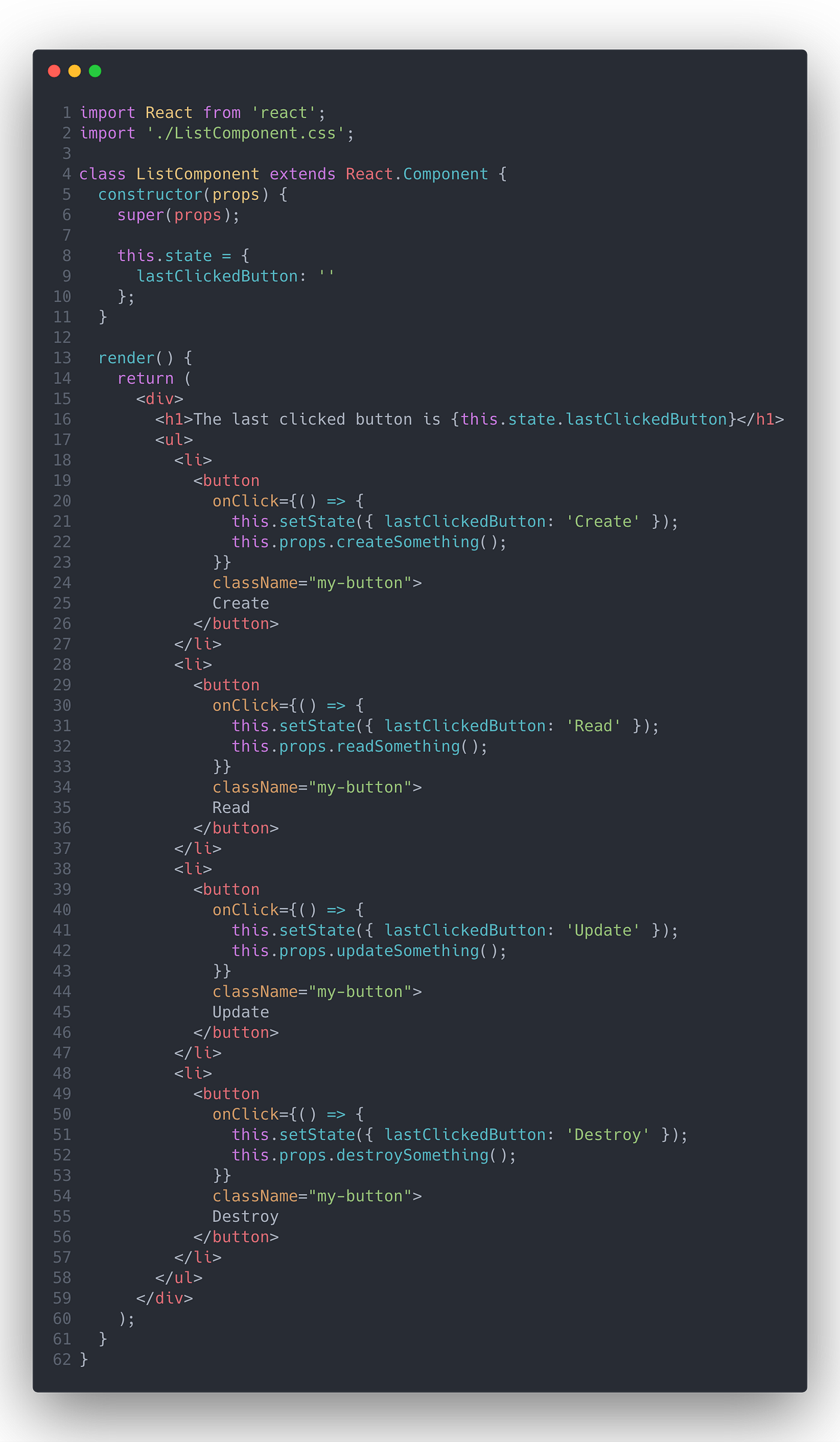 👍 Prefer functional components with React Hooks 👍 DRY 👍 Proper naming & props destructuring 👍 If you use JS add a PropTypes validation layer 👍 Split into small pieces `List.js` : 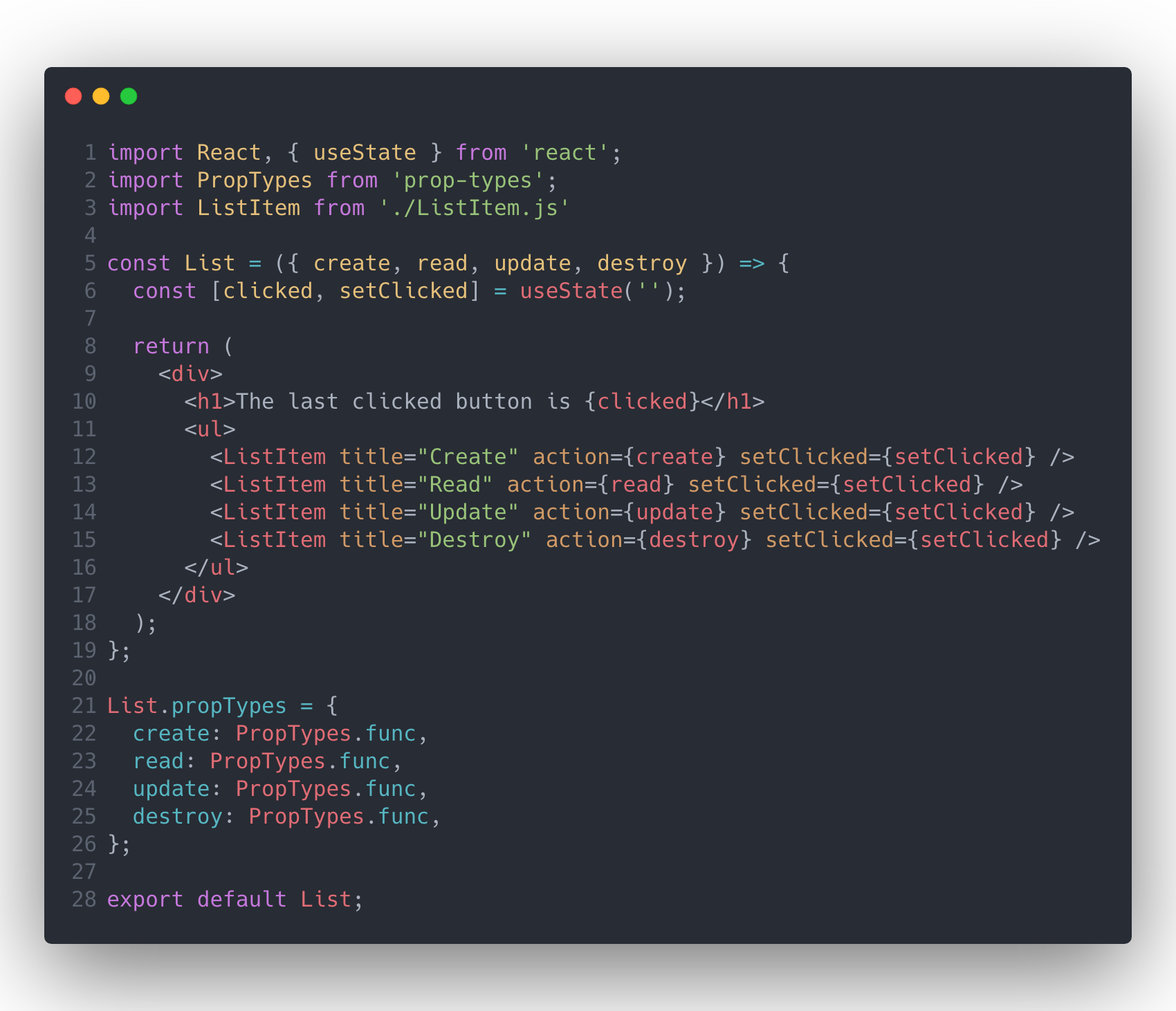 `Listen.js` : 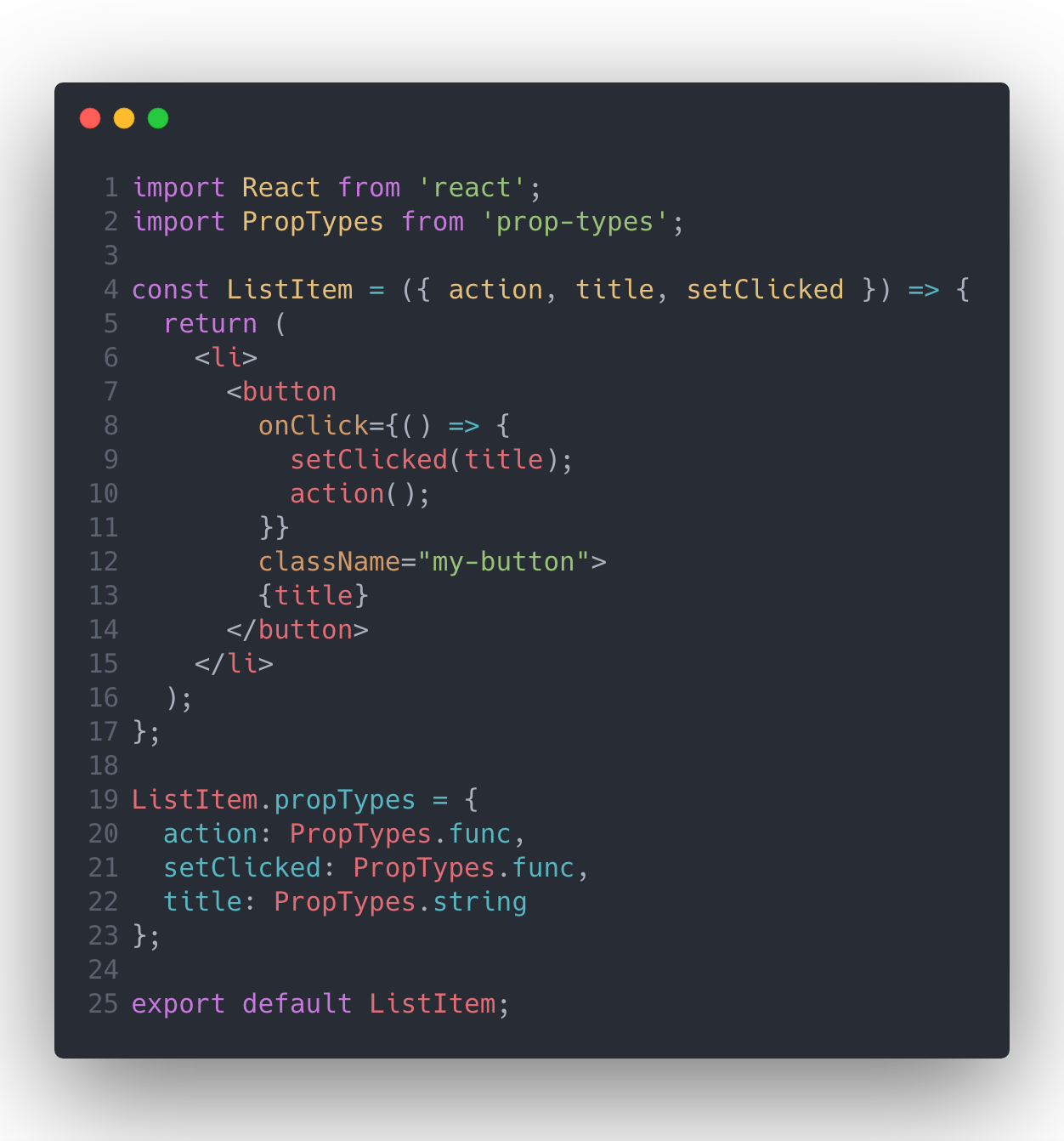 Reference : [Refactoring a Complex React Component](https://levelup.gitconnected.com/refactoring-a-complex-react-component-5-best-practices-to-write-efficient-and-readable-components-b0d06f4f22b4) #### [01:55](https://www.youtube.com/watch?v=b0IZo2Aho9Y&list=PL0vfts4VzfNgUUEtEjxDVfh4iocVR3qIb&index=14&t=115s) Nesting Gotcha 💩 *Child using the function defined by the parent => bad performance issue* ```tsx function Parent(){ const[count, setCount] = useState(0); const handleClick = () => setCount(count+1); const Child = () => { return <button onClick={handleClick}>+</button> } } return ( <div> <Child /> <div> ) ``` 👍 *pass the function in as a prop* ```tsx const Child = ({onClick}) => { return <button onClick={onClick}>+</button> } function Parent(){ const[count, setCount] = useState(0); const handleClick = () => setCount(count+1); } return ( <div> <Child onClick = {handleClick}/> <div> ) ``` #### [02:35](https://www.youtube.com/watch?v=b0IZo2Aho9Y&list=PL0vfts4VzfNgUUEtEjxDVfh4iocVR3qIb&index=14&t=155s) Failure to memoïse If your component renders the same result given the same props, you can wrap it in a call to `React.memo` for a performance boost in some cases by memoizing the result. This means that React will skip rendering the component, and reuse the last rendered result. `React.memo` only checks for prop changes. ```tsx function MyComponent(props) { /* render using props */ } function areEqual(prevProps, nextProps) { /* return true if passing nextProps to render would return the same result as passing prevProps to render, otherwise return false */ } export default React.memo(MyComponent, areEqual); ``` This method only exists as a [**performance optimization**](https://reactjs.org/docs/optimizing-performance.html)**.** Do not rely on it to “prevent” a render, as this can lead to bugs. #### [03:15](https://www.youtube.com/watch?v=b0IZo2Aho9Y&list=PL0vfts4VzfNgUUEtEjxDVfh4iocVR3qIb&index=14&t=195s) Useless Divs 💩 *As JSX need to return only one element, I wrap the two elements into a* `div` ```tsx function Frag(){ return ( <div> <nav></nav> <article></article> </div> ) } ``` 👍 *As JSX needs to return only one element, I wrap the two elements into a* `</>` *or a* `<React.Fragment>` ```tsx function Frag(){ return ( <> <nav></nav> <article></article> </> ) } ``` #### [03:44](https://www.youtube.com/watch?v=b0IZo2Aho9Y&list=PL0vfts4VzfNgUUEtEjxDVfh4iocVR3qIb&index=14&t=224s) Messy Files React components should be organised by folders, in which one folder contains one React component. These folders should include at least a structure similar to the following one (here example with *Navbar*) : ```tsx Navbar └── index.tsx ├── Navbar.module.css ├── Navbar.spec.ts └── Navbar.tsx ``` The`index.tsx` helps to import our component like this : - `import Navbar from './Navbar';` 👍 - not like that : `import Navbar from './Navbar/Navbar';` 💩 The`index.tsx` includes the following : ``` export { default } from './Navbar'; ``` To help, it has been implemented a folder template that can be used with the [vscode folder template extension](https://github.com/Huuums/vscode-folder-templates). #### [04:40](https://www.youtube.com/watch?v=b0IZo2Aho9Y&list=PL0vfts4VzfNgUUEtEjxDVfh4iocVR3qIb&index=14&t=280s) Big Bundles If a slow initial page load occurs, it may means the app is too big (importing too much stuff), to tackle this trouble we would try to load some module asynchronously. 👍 *Using* `lazy` *loading and* `Suspense`: ```tsx const Button = React.lazy(() => import('./Button')); function Page(){ return ( <Suspens fallback={<div>Loading...</div>}> <Button /> </Suspens> ); } ``` #### [05:34](https://www.youtube.com/watch?v=b0IZo2Aho9Y&list=PL0vfts4VzfNgUUEtEjxDVfh4iocVR3qIb&index=14&t=334s) Prop Drilling ##### Which state management libraries to use ? [Hooks](https://reactjs.org/docs/hooks-intro.html), [Redux](https://github.com/reduxjs/redux), and [Recoil](https://github.com/facebookexperimental/Recoil) ? At first, React hooks will be used as the primary state management tool state, especially with `useState`, `useEffect`, and `useReducer`. We can use `useReducer`as follow ([reference](https://www.youtube.com/watch?v=TNhaISOUy6Q&t=478s)) : ```tsx function reducer(state, action) { switch(action.type) { case 'increment' : return {count: state + 1}; case 'decrement' : return {count: state - 1}; default: throw new Error(); } } function App() { const[state, dispatch] = useReducer(reducer, 0); return( <> Count: {state} <button onClick={()=> dispatch({type: 'decrement'})}>-</button> <button onClick={()=> dispatch({type: 'increment'})}>+</button> </> ); } ``` However if we had to choose one, we may think about Recoil, for the following reason : - It was built and released by engineers from Facebook's team, the React creator. - It doesn't impose a strict learning curve as Redux and Mobx do. - it doesn't intend to have so much Redux boilerplate in the codebase. ##### How to pass data among react component siblings ? - Redux → no - ContextAPI (`useContext` hook) → parsimoniously, cause it makes you contained component impossible to reuse without having it with the same context (given by the same outside parent component). - Combination of callback and use of props → yes #### [06:30](https://www.youtube.com/watch?v=b0IZo2Aho9Y&list=PL0vfts4VzfNgUUEtEjxDVfh4iocVR3qIb&index=14&t=390s) Prop Plowing Try to use the [spread syntax](https://developer.mozilla.org/en-US/docs/Web/JavaScript/Reference/Operators/Spread_syntax) when you can. Here an example for spread props : ```tsx const data = { id: 7 name: "John", age: 29 } return ( // <User id={data.id} name={data.name} age={data.age} /> // 💩 <User {...data} /> // 👍 ) ```