
NetLogo is a programmable modeling environment for simulating natural and social phenomena. It was authored by Uri Wilensky in 1999 and has been in continuous development ever since at the Center for Connected Learning and Computer-Based Modeling.
NetLogo is particularly well suited for modeling complex systems developing over time. Modelers can give instructions to hundreds or thousands of “agents” all operating independently. This makes it possible to explore the connection between the micro-level behavior of individuals and the macro-level patterns that emerge from their interaction.
NetLogo provides a wide range of built-in commands that you can use to build your model. But sometimes you may run into a situation where no command does what you need, and you have no way of using the available commands to achieve your goal. (For example, capturing a picture using a webcam.)
This is where extensions come in. They allow one to provide custom commands, programmed in Java or another JVM language. Because the commands are written in Java, they can do whatever a Java program can do, which is a lot, much more than can be done from within NetLogo. (Yes, using a webcam is an example.)
To reuse pieces of code across models, NetLogo provides include files (a.k.a., .nls files). These files contain NetLogo code (not a whole model, just code) and can be included as part of models (or other include files). The way they are included is simply to merge their code inside the including code. Whatever variables or procedures defined in the include files, whatever extensions used there, they are treated as if typed inside the main (the including) code. (Similar to #include in C/C++)
-
The current way of installing extensions is quite cumbersome:
- Find the extension you want (the Extensions wikipage helps with that, though it's not perfect).
- Make sure it is compatible with your version of NetLogo.
- If it's just a
.jarfile, put it under a directory of the same name inside the extensions folder (which you have to bar lookup based on your OS). - If it's a zip file containing multiple files, put all the files under a directory of the extension name (matching the jar name) inside the extensions folder.
-
Another important problem with this, is that on Mac & Windows (and optionally on Linux) NetLogo is installed in a place that only admin can modify, so regular users are not able to install extensions! (They can still place extensions next to the model file to use them, but they cannot install them in a central place so they can be used from any model).
-
Also, you have to manually check from time to time to see if an extension you're using has a new version released, and re-install it.
(Include files are still considered and documented as an experimental feature of NetLogo)
-
An important aspect extensions provide, which include files do not, is namespacing: a command from an extension is always prefixed with the extension name and a colon. Procedures declared in include files are not namespaced, making it harder for them to be reused without name clashes, and harder to know where procedures come from (the context may also help in understanding what the procedure does)
-
Another drawback of include files is that, unlike a model file, they do not contain info about the NetLogo version they are created in, so you may mistakenly try to use an include file from a newer version (which may use a new command) inside a model from an older version of NetLogo (which doesn't have this command).
-
There is no central place where include files are shared, and there are almost zero of them available anyway.
-
There is no central place to store include files so they can be used in any model, they have to be put next to each model they are used in.
The "modules" idea was concieved during the summer to address the limitations of include files.
-
Module procedures are namespaced, like extensions. Calling a module procedure requires prefixing the name with the module name and a double colon.
-
Module files contain the NetLogo version info.
-
Modules can be stored in a central place, like extensions, so they can be used by any model.
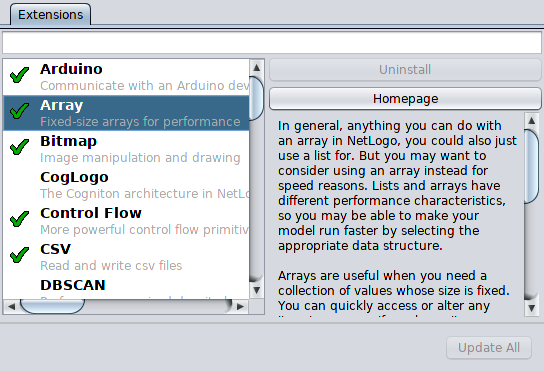
My project for GSoC 2018 was to create an Extension & Include Files Manager, that will allow users to easily manage (install, uninstall and update) the extensions (or include files) they use.
- Extension Manager UI
- Metadata file (describes all the details about the available extensions)
- A set of available extensions
- Elegant handling of NetLogo/extension compatibility
- Gather community extensions
- Include bundled extensions (= extensions that come built-in with NetLogo)
- An easy way for community members to submit more extensions, or update existing ones with new versions
- Downloading the metadata and showing a list of extensions based on it
- Support for filtering
- Extension management
- Install
- Update
- Uninstall
- Gracefully handling of metadata parsing errors
- Automatically checking for extension updates (whenever the dialog is shown)
- Support for updating all extensions to their newest versions
- Per-user management of extensions
- Generalization of the Extension Manager to allow other stuff to be managed through it (include files, in particular)
- Offline support
- Documentation
As include files gain a more widespread use (which we hope to achieve with the Manager), their issues -- which we presented earlier -- will be magnified. This is why modules were concieved and are of more importance than ever. They are quite essential to have an established and significant set of sharable, reusable pieces of NetLogo code, in a way include files do not enable. This is why a follow-up of the Extension Manager is to have modules in the language and in the Manager.
- Modules support in the language.
- Adding modules to the Extension Manager
- As with extensions, pre-user management for modules.
- Probably bundling some modules with NetLogo, possibly converting some existing extensions to modules.
These are the PRs involved with the extension manager: https://github.com/NetLogo/NetLogo/pulls?utf8=%E2%9C%93&q=is%3Apr+author%3AIdloj+created%3A2018-04-01..2018-08-14 The first one (at the bottom) is the main PR, and others are fixes and enhancements.
Most of the relevant code resides in org.nlogo.app.tools.
The code highly generic to allow different types of addons to be managed using the same code. Currently only extensions are managed there but after modules are added to the compiler the Manager should also handle them. Other types may be added in the future. "Library" is a general name we use for all these things managed in the Libraries Dialog: extensions, modules, whatever-comes-in-the-future.
LibrariesDialog is the actual dialog presented to the user. It creates a different tab (LibrariesTab) for each category (type of library), with each tab showing a list of libraries in its category, with the option to install, uninstall, update them or open their homepage.
An instance of LibraryManager is used by LibrariesDialog to create lists of LibraryInfo from the metadata file (https://github.com/NetLogo/NetLogo-Libraries/blob/6.0/libraries.conf). Each list consists of libraries from one category and is displayed in a tab of its own as described earlier. On construction, LibraryManager gets the operations (install/uninstall) associated with each category, to allow complete control over these operations which can be different among different categories (unlike the other parts where we use a common mechanism and representation for all categories).
The support for modules is currently a work-in-progress (https://github.com/Idloj/NetLogo/compare/hexy...modules). Adding modules to the language is the main challenging part. Adding some modules to the Manager shouldn't be a problem, because the Manager is already general enough to handle different types of "libraries".