Skip to content

Instantly share code, notes, and snippets.

Show Gist options
  • Select an option

  • Save HimDek/e09340eae2861e1ad8b7f6bdba5ee9ff to your computer and use it in GitHub Desktop.

Select an option

Save HimDek/e09340eae2861e1ad8b7f6bdba5ee9ff to your computer and use it in GitHub Desktop.
This Guide will show you how to install and run apk files or Android apps in any Edition of Windows 11 using Windows Subsystem for Android. WSA or Windows Subsystem for Android is a Tool that allows Windows to run Android Apps directly without using any emulator.

Install Android apps or apk files in Windows using Windows Subsystem for Android

WSA or Windows Subsystem for Android is a Tool that allows Windows to run Android Apps directly without using any emulator. The problem is Windows Subsystem for Android is currently only available through preview via the Beta Channel of the Windows Insider Program. But if you follow my guide, you don't have to be in Windows Insider Program to try it out. The only thing you need is Windows 11 installed and some patience.

Prerequisites:

  • Windows Subsystem for Android or WSA must be Installed.

Click here to view the guide that shows how to install Windows Subsystem for Android in any Edition of Windows 11 (including Windows 11 Home) non Inider or stable release.

How to Install Android Apps or apk files in Windows Subsystem for Android:

  • First install Windows Subsystem for Android. Click here to know how to do that.
  • Search and run Windows Subsystem for Android Setting from Windows start menu.
  • The window shown in the screenshot below will appear. There, click on the icon in the extreme left side of the Files box. This will start Windows Subsystem for Android and open the File Manager App in Android. This can take some time so be patient.
  • Keep File Manager running otherwise Windows Subsystem for Android will terminate itself.
  • Enable Optional Diagnostic Data and Developer mode in Windows Subsystem for Android Setting Window and click the Refresh button in the IP address Section.
  • Click here to download the latest version of adb and extract the downloaded zip file.
  • Inside the extracted folder, there should be a file named adb.exe along with a plenty of other files.
  • Put the apk files of the Android apps that you want to install in this folder, and rename them to names that are easier to remember.

    Note: You can download apk files of Android apps from websites like APKPure, APKMirror or F-Droid. These are trusted websites.

  • Copy the path of this folder from the pathbox in Windows File Explorer as shown in the screenshot below: 11
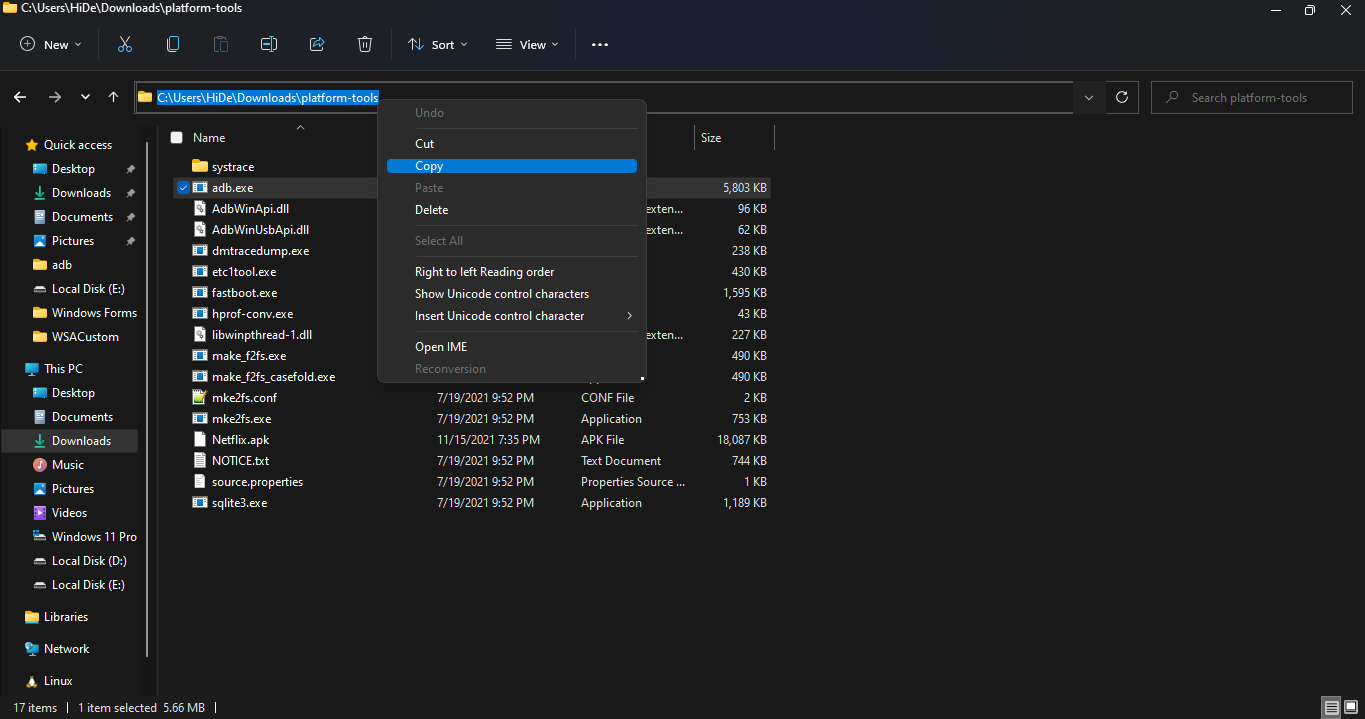
  • Search for Command Prompt in Windows Start Menu and Open it.
  • Type cd "" in the command prompt. Inside those "", paste the copied path by pressing Ctrl + V. The windows should look something like the below screenshot. Then press Enter. 12
  • Now, type adb connect 127.0.0.1:58526 in the Command Prompt Window. Press Enter and wait for the connection.
  • Once connected, type adb install "name.apk" in the Command Prompt. Replace name with the name of the apk file that you want to install and press Enter. After successful install, the installed App will appear in Windows Start Menu. Repeat this step for all the apk files that you want to install and they will appear in Windows Start Menu as well.

Thats it! Thanks for using this Guide. I hope it helped.

@jack-the-alien
Copy link
Copy Markdown

Bolauae1 is an online streaming application that allows users to watch all the short drama content available on the app for free. You can watch Hindi emotional clips, dramatic scenes, and story-driven videos.

@henriquegoncalvesteixeira2-cpu
Copy link
Copy Markdown

Nubhbbybgbvybvhbunhnhhu###

@henriquegoncalvesteixeira2-cpu
Copy link
Copy Markdown

Luiz Henrique ###

@maxpaul8754-svg
Copy link
Copy Markdown

Find out if your license has been printed using the License Print Check in Nepal system. Save time and stay updated with accurate online tracking information.

@seoexpert01
Copy link
Copy Markdown

seoexpert01 commented Apr 7, 2026

Windows Subsystem for Android allows users to run Android apps and install APK files directly on a Windows PC without needing an emulator. By enabling this feature and using tools like ADB, users can easily sideload APK files and enjoy mobile apps on a larger screen. This provides a smooth and integrated Android experience within the Windows environment. Similarly, Hypic Mod APK can also be installed through APK sideloading methods, allowing users to enjoy advanced photo editing features on compatible devices. 💻📱

@davidhammad
Copy link
Copy Markdown

This code snippet is super clean and really helped me understand how it works — thanks for sharing! If anyone wants to discuss improvements or ask questions about implementation, feel free to connect with me on whatsapp gb

@jamesrick21s
Copy link
Copy Markdown

As artificial intelligence continues to transform the digital landscape, tools that simplify content creation and media editing are becoming increasingly valuable. One such innovative solution is visora ai, which empowers users to generate images, videos, and creative assets with minimal effort. Whether you are a content creator, marketer, or business owner, this platform helps streamline workflows and boost productivity by offering ready-to-use templates and advanced AI-powered features for high-quality results.

@jamesrick21s
Copy link
Copy Markdown

Coloring activities are a great way to relax, boost creativity, and improve focus for both kids and adults alike. Whether used at home, in classrooms, or during leisure time, a coloring page provides an enjoyable and engaging experience that helps develop fine motor skills and artistic expression. With countless themes available from animals and cartoons to nature and educational designs these pages offer endless opportunities for fun and learning while encouraging imagination in a simple yet meaningful way.

@maxpaul8754-svg
Copy link
Copy Markdown

Nepal’s online driving licence system is a modern step toward digital governance, making the process more transparent, accessible, and user-friendly for all applicants.

@davidhammad
Copy link
Copy Markdown

This Gist shows a useful collection of code snippets and technical examples that can help developers explore specific functions and ideas. It’s the sort of resource that people often reference when searching for tools like whatsapp plus and related mods for customization or messaging functionality.

@evgfinescheck
Copy link
Copy Markdown

If you want to verify your vehicle fines in the UAE, the EVG fine check system makes it easy to view all traffic violations in one place.

You can quickly enter your vehicle details and check any outstanding fines before payment or renewal.

@Lesedi521
Copy link
Copy Markdown

PSIRA (Private Security Industry Regulatory Authority) is the official regulatory body in South Africa responsible for registering and regulating security service providers and officers, ensuring compliance, professionalism, and industry standards in the private security sector, and you can learn more through PSIRA.

@davidalexa853-gif
Copy link
Copy Markdown

Great guide! The explanation is really clear, especially the part about connecting ADB and installing APKs without using an emulator. This method is much lighter and works smoothly compared to traditional setups. I’ve been trying a few apps this way and noticed that using reliable sources makes a big difference. While testing, I came across a detailed guide on WhatsApp Plus APK 2026
that explains features and installation steps quite clearly, which might be helpful for others exploring similar apps.

@ameliaavia654-alt
Copy link
Copy Markdown

Installing Android apps or APK files on Windows using the Windows Subsystem for Android is a smart way to run mobile apps without relying on heavy emulators. It offers better performance, smoother integration, and a more native experience on your PC. This method is especially useful for testing or accessing apps quickly, and it pairs well with tools like Delta Executor Free Download for users exploring advanced app functionality.

@shamisays-cmd
Copy link
Copy Markdown

Click on any service above to visit the official TNREGINET portal.

@shamisays-cmd
Copy link
Copy Markdown

Lightroom mod apk for iOS and Android installation methods.
you can edit your photos videos without restrictions.

@shamisays-cmd
Copy link
Copy Markdown

Hot51 mod apk is a trending entertainment app where you can enjoy live
streaming, fun content, and the latest videos all in one place.

@shamisays-cmd
Copy link
Copy Markdown

We also provide other tools like the Marks Percentage Calculator to
calculate the percentage of marks. Here is the following formula.

@shamisays-cmd
Copy link
Copy Markdown

Click on any service above to visit the official TNREGINET portal.

@shamisays-cmd
Copy link
Copy Markdown

Click on any service above to visit the official TNREGINET portal.

@shamisays-cmd
Copy link
Copy Markdown

Login using your credentials to access your dashboard and manage all services online, from EC Online viewing to guideline value checks.

@shamisays-cmd
Copy link
Copy Markdown

Login using your credentials to access your dashboard and manage all services online, from EC Online viewing to guideline value checks.

@shamisays-cmd
Copy link
Copy Markdown

Login using your credentials to access your dashboard and manage all services online, from EC Online viewing to guideline value checks.

@shamisays-cmd
Copy link
Copy Markdown

Login using your credentials to access your dashboard and manage all services online, from EC Online viewing to guideline value checks.

@wnunezc
Copy link
Copy Markdown

wnunezc commented Apr 26, 2026

There should be a version of Docker Desktop/Docker Engine that, just as it leverages WSL, allows us to leverage WSA and have a directory of pre-compiled images... This would be a direct way to popularize this technology.

@Customudonapks
Copy link
Copy Markdown

Installing Android apps or APK files on Windows using the Windows Subsystem for Android is a smart way to run mobile apps without relying on heavy emulators. It offers better performance, smoother integration, and a more native experience on your PC. This method is especially useful for testing or accessing apps quickly, and it pairs well with tools like Custom Udon for users exploring advanced app functionality.

@muzzamilbhoja12345-web
Copy link
Copy Markdown

The Patta Chitta is a land [ownership]( document issued by the Government of Tamil Nadu, India

@wnunezc
Copy link
Copy Markdown

wnunezc commented Apr 28, 2026

There should be a version of Docker Desktop/Docker Engine that, just as it leverages WSL, allows us to leverage WSA and have a directory of pre-compiled images... This would be a direct way to popularize this technology.

@gbwaapk26
Copy link
Copy Markdown

Really interesting breakdown — I like how clearly everything is structured here. It’s always refreshing to see people sharing practical resources in such a simple way.

This actually reminds me of how users are now leaning toward more customizable apps instead of sticking with default ones. For example, a lot of people I know have shifted to modified messaging apps like GB WhatsApp because of the added control — things like advanced privacy options, file sharing limits, and UI tweaks make a noticeable difference in everyday use.

Tools and tweaks like the ones shared here kind of follow the same idea: giving users more flexibility and control beyond the standard experience.

Curious to hear — do you prefer sticking with official apps, or do you explore modded/custom options too?

@maxpaul8754-svg
Copy link
Copy Markdown

The police report online system in Nepal allows citizens to file complaints quickly without visiting a station. It improves accessibility, saves time, and ensures faster response from authorities.

Sign up for free to join this conversation on GitHub. Already have an account? Sign in to comment