
Forked from Belgabor/Django_ReactJS_Webpack_project_setup.md
Created
November 17, 2017 08:54
-
-
Save ArtemBernatskyy/1590d4af7aa1959fbc1d867b43449cd8 to your computer and use it in GitHub Desktop.
Revisions
-
genomics-geek created this gist
Apr 20, 2016 .There are no files selected for viewing
This file contains hidden or bidirectional Unicode text that may be interpreted or compiled differently than what appears below. To review, open the file in an editor that reveals hidden Unicode characters. Learn more about bidirectional Unicode charactersOriginal file line number Diff line number Diff line change @@ -0,0 +1,692 @@ # Guide on how to create and set up your Django project with webpack, npm and ReactJS :) Hopefully this will answer *"How do I setup or start a Django project?"* I was trying to set up my own website, and there was a lot to read, learn and digest! Therefore, I put this together which is a collection of all the guides/blog posts/articles that I found the most useful. At the end of this, you will have your barebones Django app configured and ready to start building :) **NOTE:** This guide was built using Django 1.9.5, NodeJS 4+ with NPM 3+ ## 1. Setting up your dev environment If working on Mac OSX, follow this [guide](https://gist.github.com/genomics-geek/e3b6823cd03272f0ba8268cf9063c335). ### Requirements + PostgreSQL + virtualenv + virtualenvwrapper + git + NodeJS 4+ with NPM 3+ ## 2. Create a Virtual Environment It’s common practice to use a virtual environment for your Python projects in order to create self-contained development environments. The goal of virtualenv is to prevent different versions of libraries/packages from messing with each other. It’s like an isolated, soundproof room within your home where you can scream as loud as you want, about anything you want, and nobody else outside that room can hear it. Use virtualenvwrapper to create a virtual environment for your project: ``` mkvirtualenv -p /usr/local/bin/python3 [project-name] ``` After running this command you should see (project-name) before your prompt, indicating that you’re running within the ```project-name``` virtualenv. You should see something like this: ``` (project-name) MacBook-Air:~ michaelgonzalez$ ``` ## 3. Install Python packages I start off every project with the same 7 Python packages: ``` pip install django-webpack-loader pip install dj-database-url pip install django pip install gunicorn pip install psycopg2 pip install python-decouple pip install requests pip install whitenoise ``` ## 4. Create a directory for your Django project This one is easy: ``` mkdir [project-name] cd [project-name] ``` ## 5. Setup Django project Now lets automagically generate some code that establishes a Django project. Run the following command: ``` django-admin startproject [project-name] . ``` This should have created the following folder structure: ``` [project-name]/ manage.py [project-name]/ __init__.py settings.py urls.py wsgi.py ``` ## 6. Create README.md file This file will obviously be very simple to start, but it doesn't hurt to start describing your project :). You can fill in all the details as you develop! Make sure to visit this [Markdown cheatsheet](https://github.com/adam-p/markdown-here/wiki/Markdown-Cheatsheet), which will allow you to create well designed and organized README files. ## 7. Create .gitignore file This file will specify intentionally untracked files that Git should ignore. For more info, look [here](https://git-scm.com/docs/gitignore). The contents of ```.gitignore```: ``` venv *.pyc staticfiles .env env node_modules [project-name]/static/build db.sqlite3 .DS_Store __pycache__ ``` ## 8. Use git and GitHub for version control I personally choose to use git for my software version control. I also use GitHub, which is a web-based Git repository hosting service. These tools help with deployment, working on teams, etc. This makes your life so much easier, trust me! First things first, make sure to create a new repo at GitHub.com and __DO NOT__ initialize with a README.md. After you have created the repo, run these commands: ``` git init git add . git commit -m "first commit" git remote add origin https://github.com/user-name/[project-name].git git push -u origin master ``` ## 9. Create .editorconfig file [EditorConfig](http://editorconfig.org/) helps developers define and maintain consistent coding styles between different editors and IDEs. This file will initialize the coding style for this project. I base my ```.editorconfig``` on [PEP 0008](https://www.python.org/dev/peps/pep-0008/) and [AirBnB JavaScript Style Guide](https://github.com/airbnb/javascript). Here are the contents of ```.editorconfig```: ``` root = true # Unix-style newlines with a newline ending every file [*] end_of_line = lf insert_final_newline = true # Set default charset for JavaScript and Python [*.{js,py}] charset = utf-8 # Python settings [*.py] indent_style = space indent_size = 4 trim_trailing_whitespace = true # JavaScript, JSX, CSS, SCSS, HTML settings [*.{js,jsx,css,scss,html}] indent_style = space indent_size = 2 trim_trailing_whitespace = true # Markdown settings [*.md] trim_trailing_whitespace = false ``` ## 10. Configure Python package requirements Initialize the base Python package requirements for your Django project: ``` pip freeze > requirements.txt ``` Now create a requirements folder, so we can manage different required packages for different environments: ``` mkdir requirements echo "r- base.txt" > requirements/production.txt echo "r- base.txt" > requirements/local.txt echo "r- base.txt" > requirements/testing.txt cp requirements.txt requirements/base.txt ``` ## 11. Reconfigure Django project settings Lets transform the project settings into a package. This ensures we have the flexibility to have different settings for different environments. #### 1. Convert the settings.py into a package Your Django project should now look like: ``` [project-name]/ README.md manage.py config/ __init__.py settings/ __init__.py base.py #This was settings.py but was renamed to base.py local.py production.py testing.py urls.py wsgi.py requirements/ base.txt local.txt production.txt testing.txt requirements.txt ``` #### 2. Update ```DJANGO_SETTINGS_MODULE``` The ```DJANGO_SETTINGS_MODULE``` environment needs to be changed in two places: + ```manage.py``` + ```config/wgsi.py``` Lets update the ```manage.py``` file. Before: ```python #!/usr/bin/env python import os import sys if __name__ == "__main__": os.environ.setdefault("DJANGO_SETTINGS_MODULE", "[project-name].settings") from django.core.management import execute_from_command_line execute_from_command_line(sys.argv) ``` After: ```python #!/usr/bin/env python import os import sys if __name__ == "__main__": os.environ.setdefault("DJANGO_SETTINGS_MODULE", "config.settings.base") from django.core.management import execute_from_command_line execute_from_command_line(sys.argv) ``` Lets update the ```config/wgsi.py``` file. Before: ```python """ WSGI config for [project-name] project. It exposes the WSGI callable as a module-level variable named ``application``. For more information on this file, see https://docs.djangoproject.com/en/1.9/howto/deployment/wsgi/ """ import os from django.core.wsgi import get_wsgi_application os.environ.setdefault("DJANGO_SETTINGS_MODULE", "[project-name].settings") application = get_wsgi_application() ``` After: ```python """ WSGI config for [project-name] project. It exposes the WSGI callable as a module-level variable named ``application``. For more information on this file, see https://docs.djangoproject.com/en/1.9/howto/deployment/wsgi/ """ import os from django.core.wsgi import get_wsgi_application os.environ.setdefault("DJANGO_SETTINGS_MODULE", "config.settings.base") application = get_wsgi_application() ``` #### 3. Update ```ROOT_URLCONF```, ```BASE_DIR```, ```WSGI_APPLICATION``` Now that we have rearragned Django settings, we need to make some changes in the base settings to reflect this. We will make a few changes to the ```config/settings/base.py``` file: 1. BASE_DIR + Before: ```python BASE_DIR = os.path.dirname(os.path.dirname(os.path.abspath(__file__))) ``` + After: ```python BASE_DIR = os.path.dirname(os.path.dirname(os.path.dirname(os.path.abspath(__file__)))) ``` 2. ROOT_URLCONF + Before: ```ROOT_URLCONF = '[project-name].urls'``` + After: ```ROOT_URLCONF = 'config.urls'``` 3. WSGI_APPLICATION + Before: ```WSGI_APPLICATION = '[project-name].wsgi.application'``` + After: ```WSGI_APPLICATION = 'config.wsgi.application'``` #### 4. Create ```APPS_DIR``` variable We will make this change near the top of the ```config/settings.base.py``` file near the ```BASE_DIR``` variable: Before: ```python BASE_DIR = os.path.dirname(os.path.dirname(os.path.dirname(os.path.abspath(__file__)))) ``` After: ```python BASE_DIR = os.path.dirname(os.path.dirname(os.path.dirname(os.path.abspath(__file__)))) APPS_DIR = '{0}/apps'.format(BASE_DIR) ``` #### 5. Adjust ```config/settings/base.py``` settings to take common project templates and static assests into account In order for the project to know to look for common project templates, we need to adjust the ```TEMPLATE``` variable, specifically the DIRS key. Before: ```python TEMPLATES = [ { 'BACKEND': 'django.template.backends.django.DjangoTemplates', 'DIRS': [], 'APP_DIRS': True, 'OPTIONS': { 'context_processors': [ 'django.template.context_processors.debug', 'django.template.context_processors.request', 'django.contrib.auth.context_processors.auth', 'django.contrib.messages.context_processors.messages', ], }, }, ] ``` After: ```python TEMPLATES = [ { 'BACKEND': 'django.template.backends.django.DjangoTemplates', 'DIRS': [ '{0}/templates'.format(APPS_DIR), ], 'APP_DIRS': True, 'OPTIONS': { 'context_processors': [ 'django.template.context_processors.debug', 'django.template.context_processors.request', 'django.contrib.auth.context_processors.auth', 'django.contrib.messages.context_processors.messages', ], }, }, ] ``` In order for the project to know to look for common project staticfiles, we need to add the ```STATICFILES_DIRS```, ```STATIC_ROOT```, and ```WEBPACK_LOADER``` variables. I put these variables right under the ```STATIC_URL``` variable. STATICFILES_DIRS: ```python STATICFILES_DIRS = [ '{0}/static'.format(APPS_DIR), ] ``` STATIC_ROOT: ```python STATIC_ROOT = os.path.join(BASE_DIR, 'staticfiles') ``` WEBPACK_LOADER: ```python WEBPACK_LOADER = { 'DEFAULT': { 'BUNDLE_DIR_NAME': 'bundles/', 'STATS_FILE': os.path.join(BASE_DIR, '../webpack-stats.json') } } ``` #### 6. Adjust ```INSTALLED_APPS```, so we can track which apps are DJango, internal, and external. In the ```config/settings/base.py``` file, find the ```INSTALLED_APPS``` variable. Before: ```python INSTALLED_APPS = [ 'django.contrib.admin', 'django.contrib.auth', 'django.contrib.contenttypes', 'django.contrib.sessions', 'django.contrib.messages', 'django.contrib.staticfiles', ] ``` After: ```python DJANGO_APPS = [ 'django.contrib.admin', 'django.contrib.auth', 'django.contrib.contenttypes', 'django.contrib.sessions', 'django.contrib.messages', 'django.contrib.staticfiles', ] THIRD_PARTY_APPS = [ 'webpack_loader', ] PROJECT_APPS = [] INSTALLED_APPS = DJANGO_APPS + THIRD_PARTY_APPS + PROJECT_APPS ``` ## 12. Reconfigure Django settings to use environment variables The use of [Decouple](https://pypi.python.org/pypi/python-decouple) helps you to organize your settings so that you can change parameters without having to redeploy your app. We will be able to store project parameters in our ```.env``` file. #### 1. Add new packages to import In the import section of ```config/settings/base.py``` add: ```python import dj_database_url from decouple import config ``` #### 2. Update ```SECRET_KEY``` to use .env In ```config/settings/base.py``` we will update ```SECRET_KEY```: + Before: ```SECRET_KEY = '3@@5e9=4ux8lbi-uwkb4bqa2a(7276spkiyl3&-w7v_p)iqd+%'``` + After: ```SECRET_KEY = config('SECRET_KEY')``` #### 3. Update ```DEBUG``` to use .env In ```config/settings/base.py``` we will update ```DEBUG```: + Before: ```DEBUG = True``` + After: ```DEBUG = config('DEBUG', cast=bool)``` #### 4. Update ```ALLOWED_HOSTS``` to use .env In ```config/settings/base.py``` we will update ```ALLOWED_HOSTS```: + Before: ```ALLOWED_HOSTS = []``` + After: ```python ALLOWED_HOSTS = config( 'ALLOWED_HOSTS', cast=lambda v: [d for d in [s.strip() for s in v.split(' ')] if d], default='', ) ``` #### 5. Update ```DATABASES``` to use .env + Before: ```python DATABASES = { 'default': { 'ENGINE': 'django.db.backends.sqlite3', 'NAME': os.path.join(BASE_DIR, 'db.sqlite3'), } } ``` + After: ```python DATABASES = { 'default': dj_database_url.parse(config('DATABASE_URL')), } ``` #### 6. Create ```.env``` file **MAKE SURE .env is in your .gitignore file!**. You need to keep that file private! The contents of ```.env```: ``` SECRET_KEY=3@@5e9=4ux8lbi-uwkb4bqa2a(7276spkiyl3&-w7v_p)iqd+% DEBUG=true ALLOWED_HOSTS=localhost .project-url.com 127.0.0.1 0.0.0.0 DATABASE_URL=postgres://user:password@localhost:5432/database_name ``` ## 13. Set up PostgreSQL database Initiate PostgreSQL shell ``` psql ``` Create project database ``` CREATE DATABASE [project-name]; ``` Create database user ``` CREATE USER user WITH PASSWORD 'password'; ALTER ROLE user SET client_encoding TO 'utf8'; ALTER ROLE user SET default_transaction_isolation TO 'read committed'; ALTER ROLE user SET timezone TO 'UTC'; GRANT ALL PRIVILEGES ON DATABASE [project-name] TO user; ``` ## 14. Prepare your Django app to use npm, webpack and ReactJS We will use NPM to manage frontend dependencies instead of managing them manually in one of the static files directories. #### 1. Setting up webpack ``` npm init ``` ``` npm install --save-dev react webpack webpack-bundle-tracker babel-core babel babel-loader webpack-dev-server react-hot-loader ``` #### 2. Create webpack config ``` mkdir -p apps/static/js touch webpack.config.js touch apps/static/js/index.js ``` Populate ```webpack.config.js``` with: ```javascript var path = require("path") var webpack = require('webpack') var BundleTracker = require('webpack-bundle-tracker') module.exports = { context: __dirname, entry: [ 'webpack-dev-server/client?http://localhost:3000', 'webpack/hot/only-dev-server', './apps/static/js/index' ], output: { path: path.resolve('./apps/static/bundles/'), filename: '[name]-[hash].js', publicPath: 'http://localhost:3000/static/bundles/', // Tell django to use this URL to load packages and not use STATIC_URL + bundle_name }, plugins: [ new webpack.HotModuleReplacementPlugin(), new webpack.NoErrorsPlugin(), // don't reload if there is an error new BundleTracker({filename: './webpack-stats.json'}), ], module: { loaders: [ // we pass the output from babel loader to react-hot loader { test: /\.jsx?$/, exclude: /node_modules/, loaders: ['react-hot', 'babel'], }, ], }, resolve: { modulesDirectories: ['node_modules', 'bower_components'], extensions: ['', '.js', '.jsx'] } } ``` #### 5. Add some scripts to npm pacakage manager for easy dev Open ```package.json``` and add the following: ``` ... "scripts": { "build": "webpack --config webpack.config.js --progress --colors", "build-production": "webpack --config webpack.prod.config.js --progress --colors", "watch": "node server.js" } ``` #### 4. Create server.js to run webpack-dev-server to both compile and serve our bundles. Create a file ```server.js``` with: ```javascript var webpack = require('webpack') var WebpackDevServer = require('webpack-dev-server') var config = require('./webpack.config') new WebpackDevServer(webpack(config), { publicPath: config.output.publicPath, hot: true, inline: true, historyApiFallback: true }).listen(3000, '0.0.0.0', function (err, result) { if (err) { console.log(err) } console.log('Listening at 0.0.0.0:3000') }) ``` As you develop have a terminal running: ``` node server.js ``` Now as you develop, any changes made to the react components will reflect in the browser. No reload needed. Magic! right? Just run: ``` npm run watch ``` This will do continous builds as things change. The only exception is if you make any changes to the webpack configuration though. ## 15. Run migrations Congrats! Your Django project is now set up. Lets run migrations and then verify everything is set up correctly. #### 1. Run makemigrations: ``` python manage.py makemigrations ``` This will output: ``` No changes detected ``` #### 2. Run migrate: ``` python manage.py migrate ``` This will output: ``` Operations to perform: Apply all migrations: admin, contenttypes, auth, sessions Running migrations: Rendering model states... DONE Applying contenttypes.0001_initial... OK Applying auth.0001_initial... OK Applying admin.0001_initial... OK Applying admin.0002_logentry_remove_auto_add... OK Applying contenttypes.0002_remove_content_type_name... OK Applying auth.0002_alter_permission_name_max_length... OK Applying auth.0003_alter_user_email_max_length... OK Applying auth.0004_alter_user_username_opts... OK Applying auth.0005_alter_user_last_login_null... OK Applying auth.0006_require_contenttypes_0002... OK Applying auth.0007_alter_validators_add_error_messages... OK Applying sessions.0001_initial... OK ``` #### 3. Run server Now you are ready to run your application locally! Run this command: ``` python manage.py runserver ``` This will output: ``` Performing system checks... System check identified no issues (0 silenced). April 16, 2016 - 13:21:27 Django version 1.9.5, using settings 'config.settings.base' Starting development server at http://127.0.0.1:8000/ Quit the server with CONTROL-C. ``` In your web browser, open the followig URL: ```http://127.0.0.1:8000/```. You should see something like this: 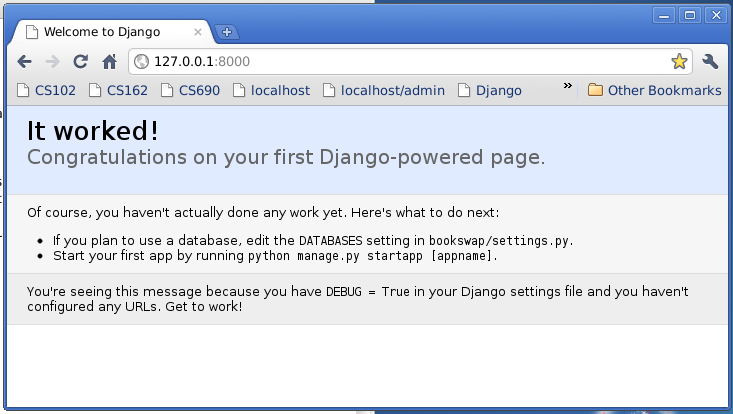 **Congrats** Your Django up is set up and running correctly :) ## Congrats! You have made it through this guide and have your Django + ReactJS project up and running :) Follow [this guide](https://gist.github.com/genomics-geek/c784561bc3b736d867fa3ac6b1bc2977) to set up your first Django app. # Resources + [Real Python Django Tutorial](https://realpython.com/learn/start-django/#django-18) + [Python Decouple](http://simpleisbetterthancomplex.com/2015/11/26/package-of-the-week-python-decouple.html) + [Owais Lone blog post about Django + ReacJS with Webpack](http://owaislone.org/blog/webpack-plus-reactjs-and-django/)