
- Ally's GCP Quiz
- GCP Certification Quiz
- Google Developers Codelabs
- Cloudreach Blog - Passing the exam after an initial failure
- GCP Enterprise Best Practices
- GCP Designing a Disaster Recovery Plan
- GCP Example Solutions
- GCP Networking Fundamentals
- GCP Shared VPC
- Google Cloud Platform Fundamentals for AWS Professionals
- Google Cloud Platform Fundamentals: Core Infrastructure
- Google Certified Professional - Cloud Architect - Part 1
Navigating Google Cloud Platform: A Guide for new GCP Users
Google has built a global, meshed backbone network to interconnect their data centers and to deliver traffic to their Edge Points of Presence (POPs)
70+ edge PoPs in 33 countries interconnected via the Backbone network
This is a caching platform that sits on top of their infrastructure network. Edge locations can be found in virtually every country.
- Specific geographical locations where you can run your resources
- Collection of zones
- Regional resources are available to resources in any zone in the region
Example: us-central1
- A multi-regional location is a general geographical area, such as the United States.
- multi-region locations contain multiple regional locations.
- A regional location is a specific geographical area, such as South Carolina.
- All regional locations are seperated from other regional locations by at least 100 miles.
Example: Multi-region = us-central
- Isolated locations within a region
- Zonal resources are only available in that zone
Example: us-central1-a

- Sub-hour billing (billed in minutes)
- Ingress is free
- Egress is charged
- Egress to some GCP services sometimes free
- Sustained use discounts are applied automatically; there is no action required on your part to enable these discounts.
- Discounts increase
- You can get up to a 30% net discount for instances that run the entire month.
- Machines that run more for than 25% of the month (incremental discount for each percent past 25%)
- No upfront costs and not tied to machine type
Example: https://cloudplatform.googleblog.com/2014/04/introducing-sustained-use-discounts.html
Note: Understand, watch a video about it, read Joe's notes.
- Similar to AWS Reserved Instances (RIs) TBA
- All data is encrypted at rest
- Network encryption ** All control information is encrypted ** All WAN traffic to be encrypted automatically ** Moving towards encrypting all local traffic within data centres
Google advises you to always "distrust the network". They have created a security model called Beyond Corp that shifts access controls from the network permiteter to individuals devices and users, allows employees to work securely from any location without needing a VPN

- Organization
- Projects
- Resources
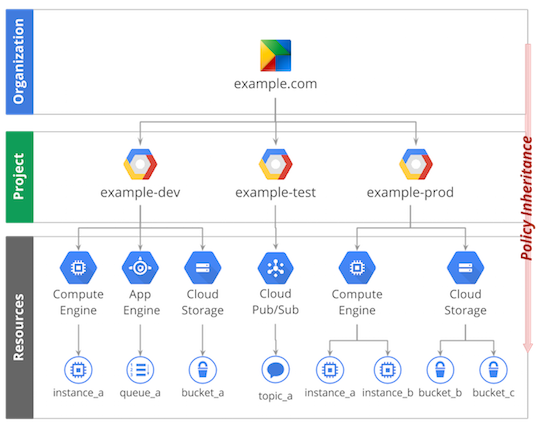
It's important to remember that a resource can only have one parent project
Control access to resources
Components:
- Project Name (Friendly Name)
- Project ID (App ID)
- Must be globally unique
- Cannot be changed once set
- Project Number
- Used in places to identify resources that belong to specific projects
- Pre-configured Google SDK Linux Instance
- Automatic auth based upon GCP Console login
- Accessible via any web browser
- All client libs for web apps pre-installed
- 5GB persistent storage
Note
- Direct/interactive use only
- If in violation, session can be terminated without notice
Allows you to manage Google Cloud Platform resources and developer workflow
Format: gcloud [GROUP] [GROUP] [COMMAND] --arguments
Example: gcloud compute instances create instance-1 --zone us-central1-a
Note
gcloud alpha...- Feature is typically not ready for Production
gcloud beta...- Feature on the other hand is normally a completed feature, that is being tested to be production ready.
Provides granular access to resources, prevents unwanted access to other resources and adopts the security principle of least privilege.
Core Components:
- Members (Who)
- Person (Google Account)
- Service Account
- Special type of account belonging to your application and can be identified by
<project_number/id>@developer.gserviceaccount.com
- Special type of account belonging to your application and can be identified by
- Permissions & Roles (What)
- Role
- Collection of permissions
- Assigned to users
- Permissions
- Give access to a given resource
- Identified by
<service>.<resource>.<verb>
- Role
- Resources
- Policies
- Collection of Roles that define who has what type of access
- Are hierarchally defined, with parent overruling child policy
Historical roles before Cloud IAM was implemented, they are applied at the Project level and the scope is very broad.
Types:
- Viewer
- Read only
- Editor
- Read + Write
- Owner
- Read + Write
- Manage access to Project and resources
- Setup project billing
Much more granular access, they are applied at the Resource level
| Resource | Global | Regional | Zonal |
|---|---|---|---|
| Images | x | ||
| Snapshots | x | ||
| Instance Templates | x | ||
| VPC Network | x | ||
| Firewalls | x | ||
| Routes | x | ||
| Addresses | x | ||
| Subnets | x | ||
| Regional Managed Instance Groups | x | ||
| Instances | x | ||
| Disks | x | ||
| Machine Types | x | ||
| Zonal Managed Instance Groups | x |
- Zonal
- IAAS
- VMs referred to as Instances
- Offers complete control and most flexibility at the cost of the following adminstrative burdens;
- CPU/GPU
- Memory
- Disk Space
- OS
- Firewall Controls
- Network Connection/management (VPN/Load Balancing)
You can create and manage groups of VM instances so that you don't have to individually control each instance in your project. Compute Engine offers two different types of instance groups:
- managed
- zonal managed instance groups
- regional managed instance groups
- unmanaged
Uses instance templates to create a group of identical resources. Making changes to instances will make the changes to the whole instance group, benefits of homongenous grouping of VM instances are:
- Automatic scaling
- Work with Load balancing to distribute traffic to all of the instances in the group
- If an instance in a group stops, crashes, or is deleted then the group automatically recreates the instance
A Zonal managed instance group will contain instances from the same zone.
Note: Choose zonal if you want to avoid the slightly higher latency incurred by cross-zone communication or if you need fine-grained control of the sizes of your groups in each zone.
A Regional group will contain instances from multiple zones across the region.
Note: This is general recommended group over Zonal as it protects against zonal failures and unforeseen scenarions where an entire group of instances in a single zone malfunctions.
Unmanaged groups are groups of dissimilar instances that you can arbitrarily add and remove from the group. Unmanaged instance groups do not offer autoscaline, rolling update support, or the use of instance templates.
Note: Use if you need to apply load balancing to your pre-existing configurations or to groups of dissimilar instances.
- Regional
- Managed Applications not machines
- Powered by Kubernetes
- Deploy containerized applications
- De-couples app components from OS
- Run app in multiple envs, regardless of OS
- Kubernetes DNS on by default
- No need for Consul unless wanted
- No IAM integration
- To connect with other GCP services you have top manage these secrets more manually.
- Production clusters require >=3 nodes
- Integrates with Persistent Storage on underlying GCE components
- Regional
- Managed Service
- No adminstration is needed for underlying infrastructure
- Deployment, maintenance, and scalability handled
- Developers can focus on writing the code, while Google handles the rest
- Build scalable web apps and mobile backends
Supports:
- Python
- Java
- Go
- PHP
Supports:
- Java 8
- Servlet 3.1
- Jetty 9
- Python 2.7 & 3.5
- Node.js
- Ruby
- PHP
- .NET core
- Go
- AND any other custom runtime if using a custom Docker image
- Regional
- FaaS (Functions as a Service, I.e. Serverless)
- Runs Node.js code in response to an event
- Triggers can include:
- GCS Objects
- Pub/Sub Messages
- HTTP Request
- Triggers can include:
- Pay for CPU & RAM assigned to function per 100ms (mins. 100ms)
- Massive scalability (horizontally)
TBA
- Zonal
- Data is encypted at rest
- 375GB SSD attached to each server
- Similar to the ephemeral disk on AWS
- Data is lost whenever the instance shuts down
- Data survives live migrations
- Pay for GB-month provisioned
- Zonal
- Persistent disks
- Performance scales with wolume size
- Performance is way below that of a Local SSD but is still fast.
- Can resize while in use but will need file system update within VM
- Max file size: 10TB
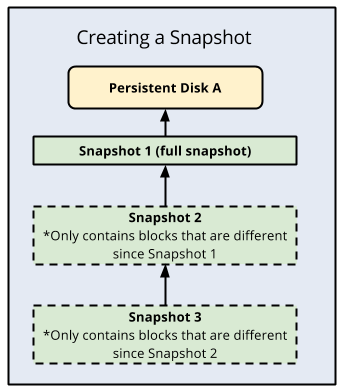
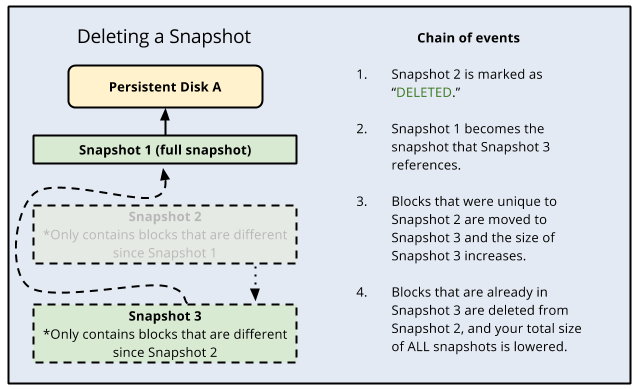
- Pricing = Incremental storage difference * ($ * time)
- Global
- Can Snapshot with Persistent Disk and make machine images out of them
- Similar to EBS
- Regional
- Fully Managed
- Databases:
- MySQL
- PostgreSQL
- Supports automatice replication, backup, failover
- Scaling is manual (both vertically and horizontally)
- Regional / Multi-Regional / Global
- Horizontally scalable
- Strongly consistent
- Provides external consistency which is far more than stongly
- Relational database structure with non-relational horizontal scale
- Supports SQL to query data
- ACID transactions
- Scales from 1 to thousands of nodes
- Requires 3 nodes for a Production environment
- Use only for large systems
- Not for small apps/systems
- Pay for provisioned node time (region/multi-region) and used storage time
- Production systems are very costly
- Multi-Regional
- Serverless column-store data warehouse
- Supports SQL to query data
- Pay for:
- GBs actually considered (scanned) during queries
- Attemtps to reuse cached results, which are free
- Data stored (GB-months)
- Relatively inexpensive
- This gets cheaper when tables are not modified for 90 days
- Streaming inserts paid per GB
- GBs actually considered (scanned) during queries
- Regional / Multi-Regional
- Fully Managed
- NoSQL DB
- Similar to DynamoDB
- Capabilities:
- ACID transactions
- SQL-like queries
- Indexes
- RESTful interface
- Pay for GB-months of storage used
- Pay for IO operations (r,w,deletes) performed
Notes:
- Cloud Datastore was born as the structured data store for AppEngine
- Scales from 0 to terabytes worth of data as your application grows
- Regional
- Fully Managed
- Low latency
- High throughput
- NoSQL DB
- Used for large operational and analytical applications
- Supports:
- HBase API
- Integrates with:
- Hadoop
- Dataflow
- Dataproc
- Automatic storage scaling
- Manual processing nodes scaling
- Pay per processing node hours
- Pay for GB-hours used for storage
- Cheap HDD or fast SSD
When should I use it?
- Storing 1TB and more of structured data
- When there is a very high high volume of writes
- When read and write latency reqwuirements are that of a single digit millisecond range with strong consistency
- When a clear, straightforward migration from HBase to a managed cloud service is required
- Regional Multi-Regional
- Fully Managed
- Strongly Consistent (for overwirte PUTs and DELETEs)
- Durability = 11 9'S
- Can provide site hosting funtionality
- Lifecycle features
- Rackable, high-capacity storage server
- Physically transfer (ship) data from your data centre to GCS
- Similar to AWS Snowball
- Ingest only
- 100 or 480TB versions
- Global
- If data is not in your own data centre then you can use this
- Destination is always GCS bucket
- Source can be:
- S3
- HTTP/HTTPS endpoint
- GCS Bucket
- Pay for it's actions, such as data transfer
- Global
- Google's registrar for domain names
- Built-in DNS or custom nameservers
- Supports DNSSEC
- Global
- DNS service
- 100% uptime guarantee
- Low latency globally
- Supports DNSSEC
- Pay for:
- Hosted zone, fixed fee
- DNS lookups (i.e. usage)
- Regional Global
- Two types:
- Regional Static IP
- GCE Instances
- Network Load Balancers
- Global Static IP (Anycast IP)
- Global Load Balancers
- HTTP(S)
- SSL Proxy
- TCP Proxy Note:
- Global Load Balancers
- Regional Static IP
- Pay for IPs that are not in use
-
Regional Global
-
Built into their Software Defined Networking (SDN) system that can naturally handle spikes without any prewarming
-
Two types:
- Regional Metwork Load Balancer
- Supports:
- Session Affinity
- Setting up uses forwarding rules based on IP, protocol (TCP/UDP), and (optionally) port
- Round Robin
- Health Checks
- Session Affinity
- Supports:
- Global Load Balancer
- Supports:
- Multi-region failover for HTTP(S), SSL Proxy, and TCP Proxy
- Supports:
- Regional Metwork Load Balancer
-
Global
-
Low-latency content delivery
-
Based on HTTP(S) CLB & integrated with GCE & GCS
-
Supports GCP only
- Does not support custom origins
-
Supports the following protocols of HTTP/2 and HTTPS
-
Pay for
- POP to client network egress
- HTTP(S) request volume
- Per cache invalidation request (not per resource)
-
VPC
-
Global
-
Global IPv4 unicast SDN for GCP resources
-
Subnets are Regional
-
Can:
- Be shared across multiple Projects
- Be peered with other VPCs
- Enable private (internal IP) access to some GCP services (e.g. BQ, GCS)
-
Pay for:
- Certain services (e.g. VPN)
- Network egress
- Regional Multi-Regional
Say you have an application running within GCP on a GCE instance but you need to let the application access data from a business system on-premise then you would choose to Cloud Interconnect
- Connecting external networks to Google's network
- Dedicated Interconnect
- Cloud VPN
- Direct Peering
- Carrier Peering
- Regional
- IPsec VPN
- To connect to VPC via public internet for low-volume data connections
- Persistent, static connections between gateways
- Not for a Dynamic client
- VPN Gateways must have static IP
- Encrypted link to VPC, into one subnet
- Supports both Static and Dynamic routing
- Dynamic is preferred to stop the need to re-establish the connection
- 99.9% availability SLA
- Pay per tunnel-hour
- Normal traffic charges apply
- Regional Multi-Regional
- Direct physical link between VPC and on-prem for high-volume data connections
- VLAN attachment is private connection to VPC in one region; no public GCP APIs
- Link are private but not encrypted
- You need to layer your own encryption in order to achieve encrypted traffic
- Redundant connections are advised to provide high availabilty achieving 99.99% SLA.
- Without redundant conneciotns the SLA is 99.9%
- Pay fee per 10Gbps link, plus small fee per VLAN attachment
- Regional
- Dynamic routing using BGP for hybrid networks linking GCP VPCs to external networks
- Works with Cloud VPN and Dedicated Interconnect
- Automatically learns subnets in VPC and announces them to on-prem network
- Without Cloud Router you must manage static routes for VPN
- Free to setup
- Pay for VPC egress
- Regional Multi-Regional
- Direct, low-latency connectivity to certain CDN providers, with cheaper egress
- For external CDNs, not GCP's CDN service
- Supports:
- Akami
- Cloudflare
- Fastly
- Contact CDN provider to set up for GCP project and which regions
- Free to enable, then pay less for the egress you configured

- Global
- Fully Managed
- A service to connect, manage, and ingest data from devices globally
- Devices connect securely using IoT industry-standard MQTT or HTTPS protocols
- CA signed certs can be used to verify device ownership on first connect
- Pay per MB of data exchanged with devices
- Handles device identity, authentication, config, and control
- Publishes incoming telemtry to Cloud PubSub for processing
- Global
- Infinitely scalable
- At least once messaging for ingestion, decoupling etc...
- Can be thought of as the "glue" that links everything together
- Pay for data volume; min 1KB per publish/push/pull request, not charged per message
- Has "poll mode" which is similar to AWS SQS
- Can even end up being the replacement for things such as AWS Kinesis or Apache Kafka
- Topic and Subscribers
- A publisher sends a message to that topic which will then get sent to all the subscribers
- Can be up to 10MB
- Undelivered messages are strored for 7 days
- There is no DLQ (Dead Letter Queue)
- Delivers to HTTPS endpoints
- Will delete messages when it receives an HTTP success code
- Uses a "slow-start" algorithm which ramps up on success and backs off & retries, on failures
- Delivers messages to requesting clients and waits for ACK to delete or until the timer expires
- Lets clients set rate of consumption, and suppors batching and long-polling
- xinetd
- helm
- Kubernetes, Jenkins, Helm (Reference)
- Apache Beam (Relates to Data Flow)
- Organsiational setup suing Projects for isolation etc...
- CAPEX vs OPEX
gcloud alphavsgcloud betavsgcloud- How do you share a VPC network from one project to another within an organisation.
- You have to configure a Shared VPC
- What is a Shared VPC?
- It's this
- Kubernetes and Helm within GCP