
-
-
Save pklaus/5921022 to your computer and use it in GitHub Desktop.
| #undef HID_ENABLED | |
| // Arduino Due ADC->DMA->USB 1MSPS | |
| // by stimmer | |
| // from http://forum.arduino.cc/index.php?topic=137635.msg1136315#msg1136315 | |
| // Input: Analog in A0 | |
| // Output: Raw stream of uint16_t in range 0-4095 on Native USB Serial/ACM | |
| // on linux, to stop the OS cooking your data: | |
| // stty -F /dev/ttyACM0 raw -iexten -echo -echoe -echok -echoctl -echoke -onlcr | |
| volatile int bufn,obufn; | |
| uint16_t buf[4][256]; // 4 buffers of 256 readings | |
| void ADC_Handler(){ // move DMA pointers to next buffer | |
| int f=ADC->ADC_ISR; | |
| if (f&(1<<27)){ | |
| bufn=(bufn+1)&3; | |
| ADC->ADC_RNPR=(uint32_t)buf[bufn]; | |
| ADC->ADC_RNCR=256; | |
| } | |
| } | |
| void setup(){ | |
| SerialUSB.begin(0); | |
| while(!SerialUSB); | |
| pmc_enable_periph_clk(ID_ADC); | |
| adc_init(ADC, SystemCoreClock, ADC_FREQ_MAX, ADC_STARTUP_FAST); | |
| ADC->ADC_MR |=0x80; // free running | |
| ADC->ADC_CHER=0x80; | |
| NVIC_EnableIRQ(ADC_IRQn); | |
| ADC->ADC_IDR=~(1<<27); | |
| ADC->ADC_IER=1<<27; | |
| ADC->ADC_RPR=(uint32_t)buf[0]; // DMA buffer | |
| ADC->ADC_RCR=256; | |
| ADC->ADC_RNPR=(uint32_t)buf[1]; // next DMA buffer | |
| ADC->ADC_RNCR=256; | |
| bufn=obufn=1; | |
| ADC->ADC_PTCR=1; | |
| ADC->ADC_CR=2; | |
| } | |
| void loop(){ | |
| while(obufn==bufn); // wait for buffer to be full | |
| SerialUSB.write((uint8_t *)buf[obufn],512); // send it - 512 bytes = 256 uint16_t | |
| obufn=(obufn+1)&3; | |
| } |


This code is excellent! I am experiencing one issue though.
About 7 min 40 sec into the code running, it just stops. I ran it 3 times and came up with the exact same time. I have not touched the computer, no errors are displayed, there is not a time limit in the code that I can see. In order to get the program to run again, I need to press the reset button on the Due and rebuild the python script.
What would cause the code to all of a sudden stop working? Is there a limit to the number of loop iterations in the Due? Is there a limit to the number of iterations in python? Is this an OS issue? (I am using Windows 10, 64-bit)
I have tried removing all code pertaining to exiting in the Python code, yet the issue persists.
Any advice is appreciated.
Thanks,
Eric

It seems there is a bug in arduino part. See here for the explanation and a fix: http://forum.arduino.cc/index.php?topic=137635.msg2526475#msg2526475
Nice job! I runt it, work very well. But I have a big problem because I am new with arduino DUE and the registers. I want to make 4 channels acquisition and It was very difficult for me. Do you have an exemple, or give me a direction to go. Thank's . Patrick
And I want to keep the plot of the 4 channels in Python, of course.

Hi, very nice! I'm trying to make 2 channels acquisition but I don't fully understand your code. Could you explain it a little bit so I can modify to use 2 channels instead of one?

I think there is an error in ADC_Handler where the buffer pointers are updated. By the time the handler is called, the DMA is already filling the "next" buffer = bufn+1. So not only must bufn be incremented, but the "next" buffer should then be bufn+2. I think the updates work better like this:
void ADC_Handler(){ // move DMA pointers to next buffer
int f=ADC->ADC_ISR;
if (f&(1<<27)){
bufn=(bufn+1)&3;
ADC->ADC_RNPR=(uint32_t)buf[(bufn+1)&3];
ADC->ADC_RNCR=bufsize;
}
}

Hi, Awesome code.
can you help me write a python code that will just simply write the data in a text file. so a text file containing time values,voltage,rate
no need for graphing etc. just receive the data from the Due and store it in a text file.
thanks!

Hi
Im trying to run the python code on my pc using python3.5.4. and I get an error:
Exception: PyQtGraph requires one of PyQt4, PyQt5 or PySide; none of these packages could be imported.
I have already installed PyQtGraph so which one of these others mentioned above should I install with my version of python?
Thanks

Hi all
In order to get the program run (I did amend the buffer increment in the ADC_Handler ), I need to open a serial when I use the native port.
More specifically, every time I close the serial from the PC side the Arduino DUE stops, I use a led blinking as a check. My led blinking is related to the actual transfer, hence I guess the process just hangs at the SerialUSB.write.
There are other posts in which users noted issue when a serial transfer is initiated on the native port without an actual connection. The weird thing is that is I re-open the port on the PC side the Arduino actually continues from the point it was interrupted.
.
Thanks.
Best

Hi!
I see that you use SeriaUSB together with Python. Did you do anything particular? In my case, when using the Native port, nothing is getting to the PC... (I use Linux, in case it matters)

Hi, I want use the Arduino due or teensy 4.0 like SPI-USB convwersion and I need 1Msps, I want use TCL or c++ in linux but I cant get more the 7ksps, with Arduino Serial console I get 1Msps but I want a TCL script,
what I doing wrong?
Can be something like Baudrate? Cant use more than 250000 in linux
What i can do?
Thanks

Hi @emanavas,
Hi, I want use the Arduino due or teensy 4.0 like SPI-USB convwersion and I need 1Msps, I want use TCL or c++ in linux but I cant get more the 7ksps, with Arduino Serial console I get 1Msps but I want a TCL script,
what I doing wrong?
First of all, could you confirm you're connecting to the Native USB Port, not the Programming USB Port? Are you running the sketch as in the original Gist on top of this page or a modified version?
Can be something like Baudrate? Cant use more than 250000 in linux
Baudrate only matters if there's a physical UART connection in your transmission line. (Such as in the case of the "Programming USB Port" where the transmission takes this route: PC <- USB -> ATmega16U2 <- UART (LV-TTL) -> Arduino Due)
What i can do?
Show us your minimal code example of your TCL / C++ code so that we can help further.
Phil
Hi pklaus,
Finally I Decided use a C++ and I get around 3MB/s Using printng a FIX value from TEENSY 4.0, My goal its attach a external ADC 1-3Msps to teensy and send to PC.
ABout a DUE, I used a Native USB and I now I know this Baudrate its a virtual and depends of the driver og the host (Linux/PC).
Basically always work by the USB 2.0 (480Mbps) because we dont have a FTDI.

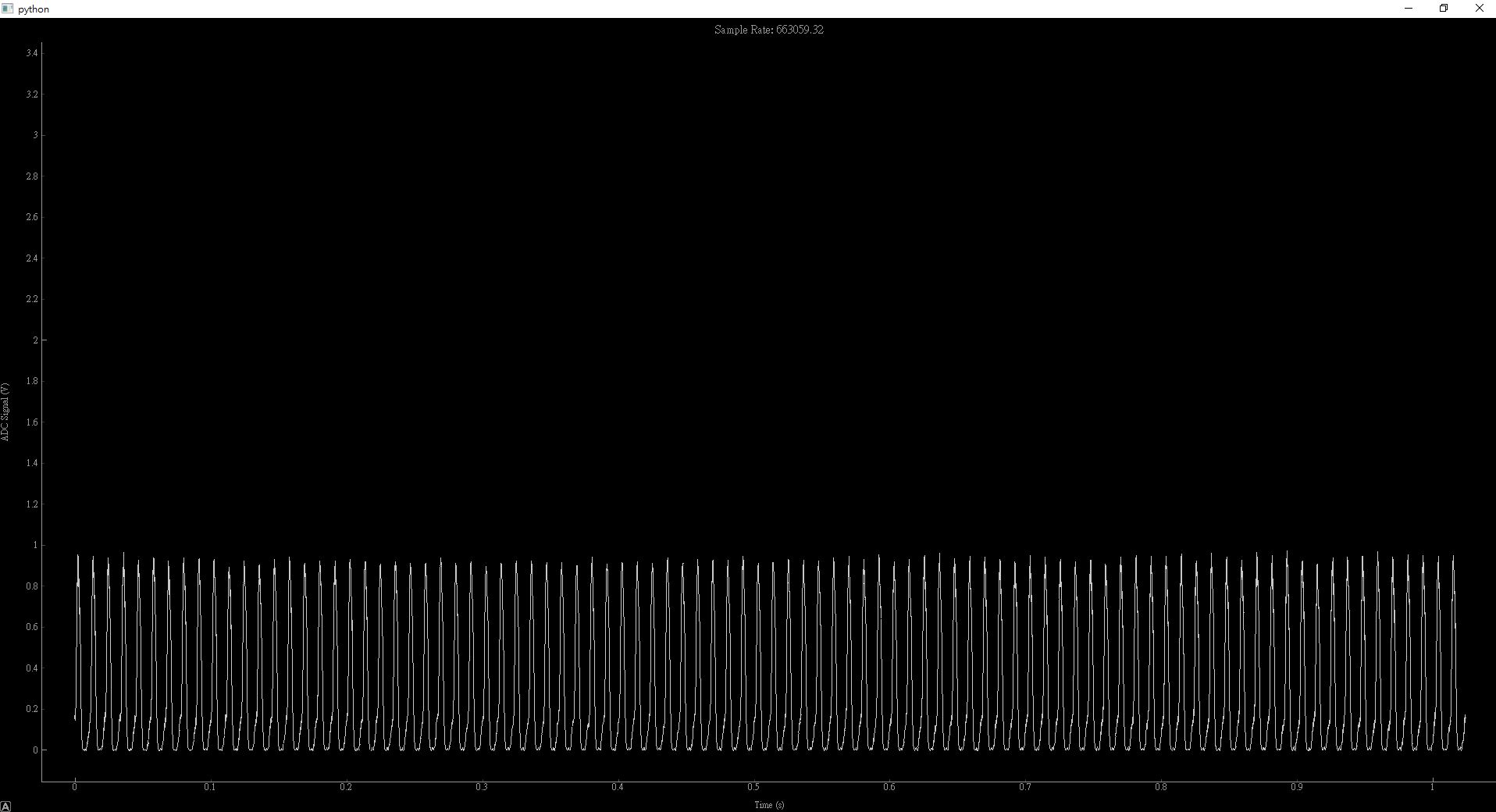
Hello
I use this code, it works fine
But the result shows there is only 666kHzSPS, not 1MSPS.
Do you give me a direction to go?
Thanks

Minor correction: it should be (3.3/(2**12 - 1)) instead of (3.3/2**12) on this line.

Hello
I use this code, it works fine
But the result shows there is only 666kHzSPS, not 1MSPS.
Do you give me a direction to go?
Thanks
ADC_FREQ_MAX is defined as 20000000. The datasheet of the SAM3X specifies a max ADC frequency of 22MHz.
Use the following call to adc_init to get full 1MSPS:
adc_init(ADC, SystemCoreClock, 22000000, ADC_STARTUP_FAST);

This is great code! Is there any possibility to add more than one channel to the ADC? I am interested in using up to 5 analog inputs

Hello, may I ask why after executing app.exec_()
will keep running interactively
Traceback (most recent call last):
t,v,r = thread.get(1000*1024, downsample=100)
data = data.reshape(num/downsample,downsample).mean(axis=1)
TypeError: 'float' object cannot be interpreted as an integer
This sketch helped me a lot, I use it as a base to implement the recording part of my white noise spectrum analyzer.
https://github.com/hamed/snowWhiteNoise