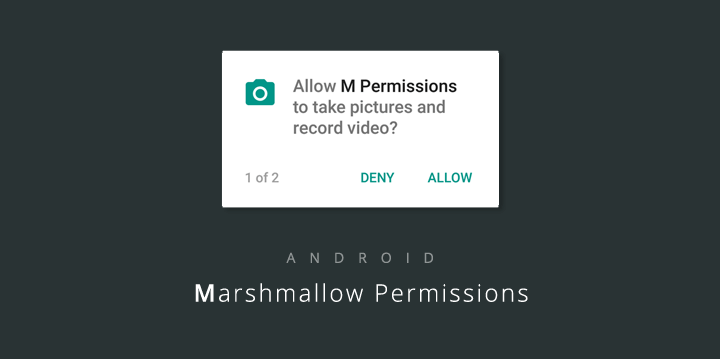
Starting from Android Marshmallow (API 23), users will be asked for
permissions while the app is running. This way, a user is able to choose
which permissions they should grant without affecting the application flow.
In this tutorial I will cover requesting runtime permissions in Android M and N,
how to perform a request, get its result and then handle it.
**
There are many user-permissions in Android but I am only going to focus on some of the most used.
To begin, create a new project in Android Studio, choosing a minimum API level of 23 and adding an Empty Activity. This will be the only activity in the project.
***
Declaring Permissions
======================
Open AndroidManifest.xml and add the following permissions:
```
```
The permissions above are some of the most used in android apps, but all of them work in a similar way.
***
Asking For Permission
=====================
Each of this permissions will be asked for by using a button.
Update the code inside activity_main.xml to:
```
```
At this stage, if a user installed the application,
it would require the following permissions:
***
askForPermission();
================
Inside MainActivity.java, after `onCreate` add this method:
```
private void askForPermission(String permission, Integer requestCode) {
if (ContextCompat.checkSelfPermission(MainActivity.this, permission) != PackageManager.PERMISSION_GRANTED) {
// Should we show an explanation?
if (ActivityCompat.shouldShowRequestPermissionRationale(MainActivity.this, permission)) {
//This is called if user has denied the permission before
//In this case I am just asking the permission again
ActivityCompat.requestPermissions(MainActivity.this, new String[]{permission}, requestCode);
} else {
ActivityCompat.requestPermissions(MainActivity.this, new String[]{permission}, requestCode);
}
} else {
Toast.makeText(this, "" + permission + " is already granted.", Toast.LENGTH_SHORT).show();
}
}
```
This method asks a user for permissions. Firstly it checks whether the permission you are asking for is granted or not. If it is, then the app shows a Toast saying that the permission was already granted. If the permission is not granted, it checks if the user has denied this permission before. If the permission is important for the app, it should be requested again. If the permission was not denied before, perform a request by calling `ActivityCompat.requestPermissions(MainActivity.this, new String[]{permission}, requestCode);`
Each permission request needs three parameters. The first is context, the second a String array of permission(s), and the third the requestCode of type Integer. The last parameter is a random code attached to the request, and can be any number that suits your use case. When a result returns in the activity, it contains this code and uses it to differentiate multiple results from each other.
The method is ready to perform requests, and now it should be linked with the corresponding buttons. Each of the buttons created has an `android:onClick="ask"` property.
You need to create a public method called `ask` that will be called on each click of the buttons. It’s code is:
```
public void ask(View v){
switch (v.getId()){
case R.id.location:
askForPermission(Manifest.permission.ACCESS_FINE_LOCATION,LOCATION);
break;
case R.id.call:
askForPermission(Manifest.permission.CALL_PHONE,CALL);
break;
case R.id.write:
askForPermission(Manifest.permission.WRITE_EXTERNAL_STORAGE,WRITE_EXST);
break;
case R.id.read:
askForPermission(Manifest.permission.READ_EXTERNAL_STORAGE,READ_EXST);
break;
case R.id.camera:
askForPermission(Manifest.permission.CAMERA,CAMERA);
break;
case R.id.accounts:
askForPermission(Manifest.permission.GET_ACCOUNTS,ACCOUNTS);
break;
default:
break;
}
}
```
The second parameter of the askForPermission method are some random integers.
Add their declarations before the `onCreate()` method:
```
static final Integer LOCATION = 0x1;
static final Integer CALL = 0x2;
static final Integer WRITE_EXST = 0x3;
static final Integer READ_EXST = 0x4;
static final Integer CAMERA = 0x5;
static final Integer ACCOUNTS = 0x6;
static final Integer GPS_SETTINGS = 0x7;
```
***
Handling The Results:
==========================
To handle the results of a permission request, the `onRequestPermissionsResult` method is called. It’s code is below:
```
@Override
public void onRequestPermissionsResult(int requestCode, String[] permissions, int[] grantResults) {
super.onRequestPermissionsResult(requestCode, permissions, grantResults);
if(ActivityCompat.checkSelfPermission(this, permissions[0]) == PackageManager.PERMISSION_GRANTED){
switch (requestCode) {
//Location
case 1:
askForGPS();
break;
//Call
case 2:
Intent callIntent = new Intent(Intent.ACTION_CALL);
callIntent.setData(Uri.parse("tel:" + "{This is a telephone number}"));
if (ActivityCompat.checkSelfPermission(this, Manifest.permission.CALL_PHONE) != PackageManager.PERMISSION_GRANTED) {
startActivity(callIntent);
}
break;
//Write external Storage
case 3:
break;
//Read External Storage
case 4:
Intent imageIntent = new Intent(Intent.ACTION_PICK, android.provider.MediaStore.Images.Media.EXTERNAL_CONTENT_URI);
startActivityForResult(imageIntent, 11);
break;
//Camera
case 5:
Intent takePictureIntent = new Intent(MediaStore.ACTION_IMAGE_CAPTURE);
if (takePictureIntent.resolveActivity(getPackageManager()) != null) {
startActivityForResult(takePictureIntent, 12);
}
break;
//Accounts
case 6:
AccountManager manager = (AccountManager) getSystemService(ACCOUNT_SERVICE);
Account[] list = manager.getAccounts();
Toast.makeText(this,""+list[0].name,Toast.LENGTH_SHORT).show();
for(int i=0; i
***
Conclusion
==========
In this tutorial, I showed how to ask for permissions, and handle the results with Android’s new permission model. The aim of this new model is to put users in control of what our apps need to do. I’d love to hear your comments and opinions on this change and how to handle it below.
all thanks to [theodhorpandeli](https://github.com/theodhorpandeli) and [SitePoint Editors repo
](https://github.com/sitepoint-editors)
Full Project: [Github](https://github.com/sitepoint-editors/RuntimePermissions)
 Starting from Android Marshmallow (API 23), users will be asked for
permissions while the app is running. This way, a user is able to choose
which permissions they should grant without affecting the application flow.
In this tutorial I will cover requesting runtime permissions in Android M and N,
how to perform a request, get its result and then handle it.
**
There are many user-permissions in Android but I am only going to focus on some of the most used.
To begin, create a new project in Android Studio, choosing a minimum API level of 23 and adding an Empty Activity. This will be the only activity in the project.
***
Declaring Permissions
======================
Open AndroidManifest.xml and add the following permissions:
```
Starting from Android Marshmallow (API 23), users will be asked for
permissions while the app is running. This way, a user is able to choose
which permissions they should grant without affecting the application flow.
In this tutorial I will cover requesting runtime permissions in Android M and N,
how to perform a request, get its result and then handle it.
**
There are many user-permissions in Android but I am only going to focus on some of the most used.
To begin, create a new project in Android Studio, choosing a minimum API level of 23 and adding an Empty Activity. This will be the only activity in the project.
***
Declaring Permissions
======================
Open AndroidManifest.xml and add the following permissions:
```
 At this stage, if a user installed the application,
it would require the following permissions:
At this stage, if a user installed the application,
it would require the following permissions:
 ***
askForPermission();
================
Inside MainActivity.java, after `onCreate` add this method:
```
private void askForPermission(String permission, Integer requestCode) {
if (ContextCompat.checkSelfPermission(MainActivity.this, permission) != PackageManager.PERMISSION_GRANTED) {
// Should we show an explanation?
if (ActivityCompat.shouldShowRequestPermissionRationale(MainActivity.this, permission)) {
//This is called if user has denied the permission before
//In this case I am just asking the permission again
ActivityCompat.requestPermissions(MainActivity.this, new String[]{permission}, requestCode);
} else {
ActivityCompat.requestPermissions(MainActivity.this, new String[]{permission}, requestCode);
}
} else {
Toast.makeText(this, "" + permission + " is already granted.", Toast.LENGTH_SHORT).show();
}
}
```
This method asks a user for permissions. Firstly it checks whether the permission you are asking for is granted or not. If it is, then the app shows a Toast saying that the permission was already granted. If the permission is not granted, it checks if the user has denied this permission before. If the permission is important for the app, it should be requested again. If the permission was not denied before, perform a request by calling `ActivityCompat.requestPermissions(MainActivity.this, new String[]{permission}, requestCode);`
Each permission request needs three parameters. The first is context, the second a String array of permission(s), and the third the requestCode of type Integer. The last parameter is a random code attached to the request, and can be any number that suits your use case. When a result returns in the activity, it contains this code and uses it to differentiate multiple results from each other.
The method is ready to perform requests, and now it should be linked with the corresponding buttons. Each of the buttons created has an `android:onClick="ask"` property.
You need to create a public method called `ask` that will be called on each click of the buttons. It’s code is:
```
public void ask(View v){
switch (v.getId()){
case R.id.location:
askForPermission(Manifest.permission.ACCESS_FINE_LOCATION,LOCATION);
break;
case R.id.call:
askForPermission(Manifest.permission.CALL_PHONE,CALL);
break;
case R.id.write:
askForPermission(Manifest.permission.WRITE_EXTERNAL_STORAGE,WRITE_EXST);
break;
case R.id.read:
askForPermission(Manifest.permission.READ_EXTERNAL_STORAGE,READ_EXST);
break;
case R.id.camera:
askForPermission(Manifest.permission.CAMERA,CAMERA);
break;
case R.id.accounts:
askForPermission(Manifest.permission.GET_ACCOUNTS,ACCOUNTS);
break;
default:
break;
}
}
```
The second parameter of the askForPermission method are some random integers.
Add their declarations before the `onCreate()` method:
```
static final Integer LOCATION = 0x1;
static final Integer CALL = 0x2;
static final Integer WRITE_EXST = 0x3;
static final Integer READ_EXST = 0x4;
static final Integer CAMERA = 0x5;
static final Integer ACCOUNTS = 0x6;
static final Integer GPS_SETTINGS = 0x7;
```
***
Handling The Results:
==========================
To handle the results of a permission request, the `onRequestPermissionsResult` method is called. It’s code is below:
```
@Override
public void onRequestPermissionsResult(int requestCode, String[] permissions, int[] grantResults) {
super.onRequestPermissionsResult(requestCode, permissions, grantResults);
if(ActivityCompat.checkSelfPermission(this, permissions[0]) == PackageManager.PERMISSION_GRANTED){
switch (requestCode) {
//Location
case 1:
askForGPS();
break;
//Call
case 2:
Intent callIntent = new Intent(Intent.ACTION_CALL);
callIntent.setData(Uri.parse("tel:" + "{This is a telephone number}"));
if (ActivityCompat.checkSelfPermission(this, Manifest.permission.CALL_PHONE) != PackageManager.PERMISSION_GRANTED) {
startActivity(callIntent);
}
break;
//Write external Storage
case 3:
break;
//Read External Storage
case 4:
Intent imageIntent = new Intent(Intent.ACTION_PICK, android.provider.MediaStore.Images.Media.EXTERNAL_CONTENT_URI);
startActivityForResult(imageIntent, 11);
break;
//Camera
case 5:
Intent takePictureIntent = new Intent(MediaStore.ACTION_IMAGE_CAPTURE);
if (takePictureIntent.resolveActivity(getPackageManager()) != null) {
startActivityForResult(takePictureIntent, 12);
}
break;
//Accounts
case 6:
AccountManager manager = (AccountManager) getSystemService(ACCOUNT_SERVICE);
Account[] list = manager.getAccounts();
Toast.makeText(this,""+list[0].name,Toast.LENGTH_SHORT).show();
for(int i=0; i
***
askForPermission();
================
Inside MainActivity.java, after `onCreate` add this method:
```
private void askForPermission(String permission, Integer requestCode) {
if (ContextCompat.checkSelfPermission(MainActivity.this, permission) != PackageManager.PERMISSION_GRANTED) {
// Should we show an explanation?
if (ActivityCompat.shouldShowRequestPermissionRationale(MainActivity.this, permission)) {
//This is called if user has denied the permission before
//In this case I am just asking the permission again
ActivityCompat.requestPermissions(MainActivity.this, new String[]{permission}, requestCode);
} else {
ActivityCompat.requestPermissions(MainActivity.this, new String[]{permission}, requestCode);
}
} else {
Toast.makeText(this, "" + permission + " is already granted.", Toast.LENGTH_SHORT).show();
}
}
```
This method asks a user for permissions. Firstly it checks whether the permission you are asking for is granted or not. If it is, then the app shows a Toast saying that the permission was already granted. If the permission is not granted, it checks if the user has denied this permission before. If the permission is important for the app, it should be requested again. If the permission was not denied before, perform a request by calling `ActivityCompat.requestPermissions(MainActivity.this, new String[]{permission}, requestCode);`
Each permission request needs three parameters. The first is context, the second a String array of permission(s), and the third the requestCode of type Integer. The last parameter is a random code attached to the request, and can be any number that suits your use case. When a result returns in the activity, it contains this code and uses it to differentiate multiple results from each other.
The method is ready to perform requests, and now it should be linked with the corresponding buttons. Each of the buttons created has an `android:onClick="ask"` property.
You need to create a public method called `ask` that will be called on each click of the buttons. It’s code is:
```
public void ask(View v){
switch (v.getId()){
case R.id.location:
askForPermission(Manifest.permission.ACCESS_FINE_LOCATION,LOCATION);
break;
case R.id.call:
askForPermission(Manifest.permission.CALL_PHONE,CALL);
break;
case R.id.write:
askForPermission(Manifest.permission.WRITE_EXTERNAL_STORAGE,WRITE_EXST);
break;
case R.id.read:
askForPermission(Manifest.permission.READ_EXTERNAL_STORAGE,READ_EXST);
break;
case R.id.camera:
askForPermission(Manifest.permission.CAMERA,CAMERA);
break;
case R.id.accounts:
askForPermission(Manifest.permission.GET_ACCOUNTS,ACCOUNTS);
break;
default:
break;
}
}
```
The second parameter of the askForPermission method are some random integers.
Add their declarations before the `onCreate()` method:
```
static final Integer LOCATION = 0x1;
static final Integer CALL = 0x2;
static final Integer WRITE_EXST = 0x3;
static final Integer READ_EXST = 0x4;
static final Integer CAMERA = 0x5;
static final Integer ACCOUNTS = 0x6;
static final Integer GPS_SETTINGS = 0x7;
```
***
Handling The Results:
==========================
To handle the results of a permission request, the `onRequestPermissionsResult` method is called. It’s code is below:
```
@Override
public void onRequestPermissionsResult(int requestCode, String[] permissions, int[] grantResults) {
super.onRequestPermissionsResult(requestCode, permissions, grantResults);
if(ActivityCompat.checkSelfPermission(this, permissions[0]) == PackageManager.PERMISSION_GRANTED){
switch (requestCode) {
//Location
case 1:
askForGPS();
break;
//Call
case 2:
Intent callIntent = new Intent(Intent.ACTION_CALL);
callIntent.setData(Uri.parse("tel:" + "{This is a telephone number}"));
if (ActivityCompat.checkSelfPermission(this, Manifest.permission.CALL_PHONE) != PackageManager.PERMISSION_GRANTED) {
startActivity(callIntent);
}
break;
//Write external Storage
case 3:
break;
//Read External Storage
case 4:
Intent imageIntent = new Intent(Intent.ACTION_PICK, android.provider.MediaStore.Images.Media.EXTERNAL_CONTENT_URI);
startActivityForResult(imageIntent, 11);
break;
//Camera
case 5:
Intent takePictureIntent = new Intent(MediaStore.ACTION_IMAGE_CAPTURE);
if (takePictureIntent.resolveActivity(getPackageManager()) != null) {
startActivityForResult(takePictureIntent, 12);
}
break;
//Accounts
case 6:
AccountManager manager = (AccountManager) getSystemService(ACCOUNT_SERVICE);
Account[] list = manager.getAccounts();
Toast.makeText(this,""+list[0].name,Toast.LENGTH_SHORT).show();
for(int i=0; i