Object Methods
==============
Objects store unordered key-value pairs. With Objects we can not rely on indices to access values.Meaning - we'll have to iterate through…
------------------------------------------------------------------------
### Object Methods
#### Objects store *unordered* `key`-`value` pairs. With Objects we can not rely on indices to access values.Meaning - we'll have to iterate through objects in new ways to access the keys and values within.
A list of all of my articles to link to future posts You should probably skip this one… seriously it’s just for internal use!bryanguner.medium.com
### Iterating Through Objects
Objects store *unordered*
`key`-`value` pairs. With Objects we can not rely on indices to access values.
Meaning - we'll have to iterate through objects in new ways to access the keys
and values within.
This article will cover:
1. Iterate through Object `keys` and `values` using a `for...in` loop
2. Use the `Object.keys` and the `Object.values` methods to iterate through an Object.
### For In Loop
We can use special syntax to iterate through each `key` of an object (in
arbitrary order). This is super useful for looping through **both** the keys and
values of an object.
The syntax looks like this:
// The current key is assigned to *variable* on each iteration.
for (let variable in object) {
statement;
}
### ex.)
let obj = { name: "Rose", cats: 2 };
// The key we are accessing is assigned to the `currentKey`
// *variable* on each iteration.
for (let currentKey in obj) {
console.log(currentKey);
}
// prints out:
// name
// cats
The example above prints all the keys found in `obj` to the screen.
On each iteration of the loop, the `key` we are currently accessing is assigned to the`currentKey` variable.
To access values in an object, we would throw some bracket notation
into the mix:
let obj = { name: "Rose", cats: 2 };
for (let key in obj) {
let value = obj[key];
console.log(value);
}
// prints out:
// Rose
// 2
#### You can only use variable keys when using bracket notation (`obj[key]`)!
> Like all variables, you can name the current key variable whatever you like -
> just be descriptive! Here is an example of using a descriptive name for a key
> variable:
let employees = {
manager: "Angela",
sales: "Gracie",
service: "Paul"
};
for (let title in employees) {
let person = employees[title];
console.log(person);
}
// prints out:
// Angela
// Gracie
// Paul
### What’s a method?
A **method** is essentially a function that *belongs to* an object.
That means that every *method is a function*, but **not** every function
is a method.
- `myFunc` is a function
- `myObject.myFunc` is a *method* of the object `myObject`
- `myObject["myFunc"]` is a *method* of the object `myObject`
A method is just a key-value pair where the **key is the function name and the
value is the function definition**! Let's use what we learned earlier to teach
our dog some new tricks:
let dog = {
name: "Fido"
};
// defining a new key-value pair where the *function name* is the key
// the function itself is the value!
dog.bark = function() {
console.log("bark bark!");
};
// this is the same thing as above just using Bracket Notation
dog["speak"] = function(string) {
console.log("WOOF " + string + " WOOF!!!");
};
dog.bark(); // prints `bark bark!`
dog.speak("pizza"); // prints `WOOF pizza WOOF!!!`
Additionally, we can give objects methods when we initialize them:
let dog2 = {
name: "Rover",
bark: function() {
console.log("bork bork!");
},
speak: function(string) {
console.log("BORK " + string + " BORK!!!");
}
};
// Notice that in the object above, we still separate the key-value pairs with commas.
// `bark` and `speak` are just keys with functions as values.
dog2.bark(); // prints `bork bork!`
dog2.speak("burrito"); // prints `BORK burrito BORK!!!`
To invoke, or call, a method we need to specify **which** object is calling that method. In the example above the `dog2` object had the `bark` method so to invoke `bark` we had to specify it was `dog2`'s method: `dog2.bark()`.
### Useful Object Methods
### Iterating through keys using `Object.keys`
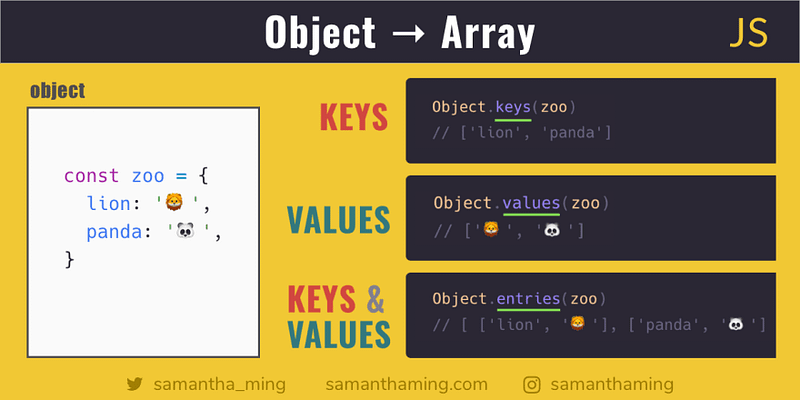
The `Object.keys` method accepts an object as the argument and returns an array of the *keys* within that Object.
> let dog = {name: "Fido", age: "2"}
undefined
> Object.keys(dog)
['name', 'age']
> let cup = {color: "Red", contents: "coffee", weight: 5}
undefined
> Object.keys(cup)
['color', 'contents', 'weight']
The return value of `Object.keys` method is an array of keys - which is useful
for iterating!
### Iterating through keys using `Object.values`
The `Object.values` method accepts an object as the argument and returns an
array of the *values* within that Object.
> let dog = {name: "Fido", age: "2"}
undefined
> Object.values(dog)
['Fido', '2']
> let cup = {color: "Red", contents: "coffee", weight: 5}
undefined
> Object.keys(cup)
['Red', 'coffee', 5]
The return value of `Object.values` method is an array of values - which is
useful for iterating!
By Bryan Guner on [June 3, 2021](https://medium.com/p/4066ed24b214).
Canonical link
Exported from [Medium](https://medium.com) on September 23, 2021.