This is paragraph
This is paragraph
### Attributes inside HTML tags Attributes can be added using `[]` `a[href=https://?google.com data-toggle=something target=_blank]` ### Numbering Numbering can be done using `$` You can use this inside tag or contents. `h${This is so awesome $}*6`


 To start the numbering from specific number, use this way
`img[src=emmet$@100.jpg]*5`
To start the numbering from specific number, use this way
`img[src=emmet$@100.jpg]*5`


 ### Tips
- Use `:` to expand known abbreviations
`input:date`
`form:post`
`link:css`
- Building Navbar
`.navbar>ul>li*3>a[href=#]{Item $@-}`
### CSS
Emmet works surprisingly well with css as well.
- `f:l`
float: left;
You can also use any options n/r/l
- `pos:a`
position: absolute;
Also use any options, pos:a/r/f
- `d:n/b/f/i/ib`
`d:ib`
display: inline-block;
- You can use `m` for margin and `p` for padding followed by direction
`mr` -> `margin-right`
`pr` -> `padding-right`
- `@f` will result in
@font-face {
font-family:;
src:url();
}
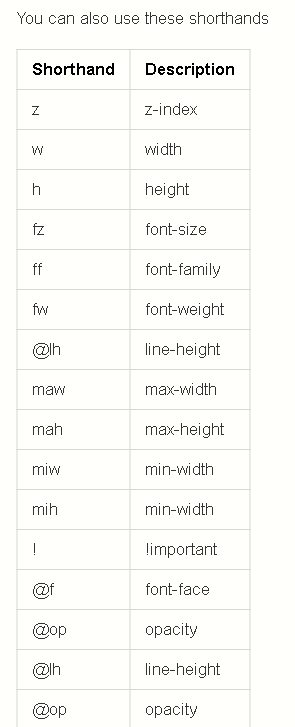
You can also use these shorthands
### Tips
- Use `:` to expand known abbreviations
`input:date`
`form:post`
`link:css`
- Building Navbar
`.navbar>ul>li*3>a[href=#]{Item $@-}`
### CSS
Emmet works surprisingly well with css as well.
- `f:l`
float: left;
You can also use any options n/r/l
- `pos:a`
position: absolute;
Also use any options, pos:a/r/f
- `d:n/b/f/i/ib`
`d:ib`
display: inline-block;
- You can use `m` for margin and `p` for padding followed by direction
`mr` -> `margin-right`
`pr` -> `padding-right`
- `@f` will result in
@font-face {
font-family:;
src:url();
}
You can also use these shorthands