
Aubai is an LLM-based chatbot assistant that is designed to answer questions related to company policies.
There are some key components you have to be clear about while building a chatbot like Aubai.
- Large Language model(LLM)
- Conversational Memory
- Prompt Engineering
- Function Calling
- Vector Embeddings
- Vector Database
There are many different LLMs available in the market which are fine-tuned for generating chat-like responses. among them, one of the best models is Openai's GPT-3.5 Turbo and GPT-4-Turbo (current). There are multiple reasons to select these models. These are the biggest models available in the current market which can be easily accessible by APIs and hosted by Openai apart from generating chat-like responses they also provide out-of-the-box functions like Function calling, Tools, and JSON response.
Context window is the maximum amount of text the model can consider at any one time when generating a response. the memory of any LLM-based system is also affected by the size of the context window, you will get the idea when you read about conversational memory. The context window is very large for GPT models. for example, GPT-3.5-Turbo has 4,096 tokens where GPT-4-Turbo has 128,000 tokens.
Tokens can be viewed as fragments of words. When the API deals with prompts, it breaks down the input into tokens. These tokens may not exactly match where words start or end; they can have spaces and parts of sub-words. To know how to count tokens please refer to https://platform.openai.com/tokenizer. The size of the context window is very important when you want a long continuous interaction with LLM in your use case.
Conversational memory gives power to an LLM-based chatbot to respond like it's having a real conversation. It helps the chatbot to remember what was said before, so each question isn't treated separately, and it considers past talks to give better replies. from the programming perspective, developers have to somehow keep the history of the interaction going with the LLM and feed it with each next input. without it, every query would be treated as an entirely independent input without considering past interactions. Example of conversational memory using Aubai's brain class.
from brain import Brain

# Example conversation history
conversation_history = [
    {"role": "system", "content": "LeaveBot"},
    {"role": "user", "content": "Hey"},
    {"role": "assistant", "content": "Hello there! How can I assist you today?
    If you have any questions related to Aubergine Solutions company's policy or guidelines, feel free to ask!"},
]

# Instantiate the Brain
leave_bot = Brain()

# User interacts with the chatbot
user_query_1 = "How many leave days am I entitled to per year?"
user_query_2 = "Can I take a leave for more than 10 days consecutively?"

# Initial interaction
conversation_history.append({"role": "user", "content": user_query_1})
response_1 = " ".join(response for response in leave_bot.llm_call(chain=conversation_history))
conversation_history.append({"role": "assistant", "content": response_1})

# User's next query
conversation_history.append({"role": "user", "content": user_query_2})
response_2 = " ".join(response for response in leave_bot.llm_call(chain=conversation_history))
conversation_history.append({"role": "assistant", "content": response_2})
Checkout the implementation for more details GitHub link: https://github.com/gehlotabhishek/aubai/blob/aubai-dev/code/brain.py
Prompt engineering is a fresh field that focuses on creating and fine-tuning prompts to make language models (LMs) more efficient across various applications and research areas. Having prompt engineering skills helps in understanding what large language models (LLMs) can and cannot do.
At its core, it is about arranging text in a way that an AI model can understand what a user wants to accomplish. A prompt is the task described in plain language that the AI needs to do. prompt engineering is a must to enhance the performance of LLMs in tasks like question answering and Chatbots. Developers leverage prompt engineering to craft reliable techniques for effective communication with LLMs and other tools.
One example will be the Chain of thought,
Prompt:
The odd numbers in this group add up to an even number: 4, 8, 9, 15, 12, 2, 1.
A: Adding all the odd numbers (9, 15, 1) gives 25. The answer is False.
The odd numbers in this group add up to an even number: 17,  10, 19, 4, 8, 12, 24.
A: Adding all the odd numbers (17, 19) gives 36. The answer is True.
The odd numbers in this group add up to an even number: 16,  11, 14, 4, 8, 13, 24.
A: Adding all the odd numbers (11, 13) gives 24. The answer is True.
The odd numbers in this group add up to an even number: 17,  9, 10, 12, 13, 4, 2.
A: Adding all the odd numbers (17, 9, 13) gives 39. The answer is False.
The odd numbers in this group add up to an even number: 15, 32, 5, 13, 82, 7, 1.
A:
Output:
Adding all the odd numbers (15, 5, 13, 7, 1) gives 41. The answer is False.You can perform the above similarly with Zero-shot COT Prompting, Prompt:
Note: 'Let's Think step by step' <---- add this special prompt.
Question: A juggler can juggle 16 balls. Half of the balls are golf balls, and half of the golf balls are blue. How many blue golf balls are there?
Answer:
Output:
There are 16 balls in total. Half of the balls are golf balls. That means that there are 8 golf balls. Half of the golf balls are blue. That means that there are 4 blue golf balls.To complete tasks LLM needs to understand the details of the tasks as much as possible and simply by just asking in one go may not solve the problem at this time different prompting techniques come into the picture. where adding some extra details related to the task or passing a specific prompt which tells the LLM to think differently for example, a vastly use method is the chain of thought technique. To implement the COT add this prompt 'Think step by step' in your query. LLM will solve the given task in a step-by-step manner. To understand different prompting techniques please refer: https://www.promptingguide.ai/
A function call is a very powerful approach to connecting LLM with the external digital world. In an API request, you can specify functions, and the model will smartly create a JSON object with the necessary arguments for calling one or more functions. The opener's API doesn't execute the function; instead, it provides JSON that you can use in your code to make the function call.
sequenceDiagram
User ->> Aubai: Can I take 13 days' leave in one go?
Aubai-->>Aubai: Analysed the query, need to call a function to get the information related to leave policy.
Aubai ->> ChromaDB Query Engine: query: can an employee take leaves for more than 10 days?
ChromaDB Query Engine ->> Vector Database: Get a list of related documents that are most similar and near to the query in vector space
Vector Database ->> Aubai: <list of related documents which are most similar and near to the query in vector space>
Aubai -->> Aubai: Curate the answer based on the user's query and database information
Aubai ->> User: You cannot take 13 days' leave in one go.
checkout the Function calling implementation on Aubai GitHub
Vector embeddings, in terms of Large Language Models (LLMs), are numerical representations of words, phrases, or even entire documents in a multi-dimensional space. These embeddings capture the semantic meaning of the text, allowing the LLM to understand and process language. Each point in the space represents a different word or text snippet, and the distance or angle between points reflects the similarity between their meanings. Embeddings enable the LLM to perform tasks such as classification, translation, and question answering more accurately.
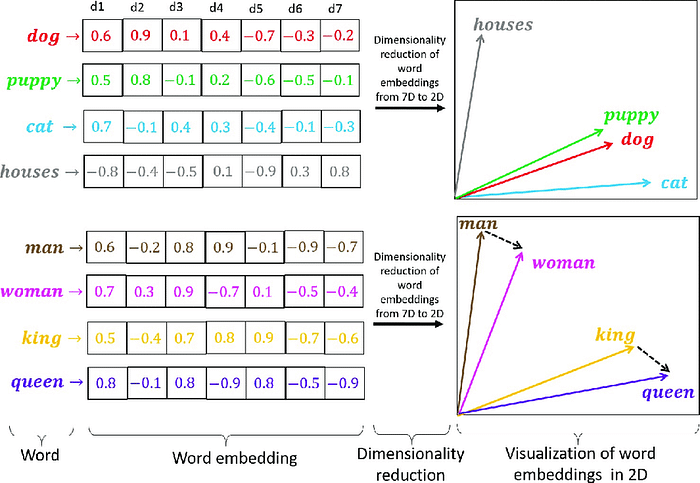
There are different models available to generate vector embeddings from the text.
Aubai utilizes multi-qa-mpnet-base-dot-v1 for sentence-to-vector embeddings.
multi-qa-mpnet-base-dot-v1 is a sentence-transformers model. It maps sentences & paragraphs to a 768-dimensional dense vector space and was designed for semantic search. The reason we chose this model is that It has been trained on 215M (question, answer) pairs from diverse sources which match our use case that is in the form of Q&A. You can check out the other models by sentence transformers and their implementations.
A vector database is a type of database that indexes and stores vector embeddings for fast retrieval and similarity search, with capabilities like CRUD operations, and metadata filtering. In Aubai we are using ChromaDB which is an open source vector database.
Before converting the text data into vector embedding, data should be divided into batches of chunks. The chunking process is highly dependent on the use case and the input format (pdf, txt, CSV, JSON, docx), in our use case we have to store the policy documents which are in pdf format. Let's see the approach of chunking the policy documents, converting them into vector embeddings, and storing them in our Chromadb vector database.
import os
from decouple import config
from chromadb.utils import embedding_functions
from long-chain.text_splitter import RecursiveCharacterTextSplitter
from pdf import PdfReader

def data_loader():
    # Set the directory path where PDF files are stored
    data_dir = 'data/policy'

    # Check if the directory exists
    if not os.path.exists(data_dir) or not os. path.isdir(data_dir):
        print("The 'data' directory does not exist in the current working directory.")
        return

    # Initialize an empty list to store data
    all_data = []

    # Loop through each file in the directory
    for file in os.listdir(data_dir):
        if file.endswith(".pdf"):
            # Extract the file name without the extension
            file_name = file.split(".")[0]

            # Construct the full PDF file path
            pdf_url = os.path.join(data_dir, file)

            # Read the PDF file
            pdf_reader = PdfReader(pdf_url)

            # Extract text from each page, remove spaces, and join lines
            pdf_texts = [" ".join(page.extract_text().replace(" ", "").split('\n')) for page in pdf_reader.pages]

            # Remove empty texts
            pdf_texts = [text for text in pdf_texts if text]

            # Initialize a text splitter
            character_splitter = RecursiveCharacterTextSplitter(
                separators=["\n\n", "\n", ". ", " ", ""],
                chunk_size=1000,
                chunk_overlap=0
            )

            # Split text into chunks
            character_split_texts = character_splitter.split_text('\n\n'.join(pdf_texts))

            # Display the total number of chunks
            print(f"\nTotal chunks: {len(character_split_texts)}")

            # Append each chunk to the data list with associated topic
            for chunk in character_split_texts:
                all_data.append({"topic": file_name, "content": chunk})
Explanation:
- A function
data_loaderto load data from PDF files, parse the text, and split it into chunks. - It iterates through each PDF file in the specified directory, extracts text from each page, and joins the text.
- The text is then split into chunks using a
RecursiveCharacterTextSplitterwith specified separators and chunk size. - The resulting chunks are stored in a list (
all_data) along with the associated topic.
    # Get the collection name and Chroma client host from environment variables
    collection_name = config('COMPANY_POLICY_DATA')
    chroma_client_host = config('CHROMA_CLIENT_HOST')

    # Initialize a ChromaDB HTTP client
    chroma_client = chromadb.HttpClient(host=chroma_client_host, port=8000)

    # Try to delete the existing collection (if any)
    try:
        chroma_client.delete_collection(name=collection_name)
    except:
        pass

    # Define distance functions for indexing
    distance_functions = ["l2", "ip", "cosine"]

    # Initialize a SentenceTransformer embedding function
    sentence_transformer_ef = embedding_functions.SentenceTransformerEmbeddingFunction(
        model_name="multi-qa-mpnet-base-dot-v1")

    # Create a new ChromaDB collection with specified metadata
    collection = chroma_client.create_collection(
        name=collection_name, embedding_function=sentence_transformer_ef, metadata={"hnsw:space": distance_functions[0]})
Explanation:
- Initializes a ChromaDB collection by creating a connection to ChromaDB, deleting any existing collection with the same name, and creating a new one.
- Defines a collection name, Chroma client host, and distance functions for indexing.
- The
SentenceTransformerEmbeddingFunctionis used for embedding text, and a new collection is created with specified metadata.
    # Initialize lists to store documents, metadata, and document IDs
    documents = []
    metadata = []
    ids = []
    n = 1

    # Iterate through each data chunk and extract content and topic
    for data in all_data:
        documents.append(data['content'])
        metadata.append({"topic": data['topic']})
        ids.append(f"{data['topic']}_{n}")
        n += 1

    # Add documents, metadata, and IDs to the ChromaDB collection
    collection.add(
        documents=documents,
        metadatas=metadata,
        ids=ids
    )

    # Return True indicating successful data loading
    return True
Explanation:
- prepare data for storage by iterating through each chunk and extracting content, topic, and unique IDs.
- It then adds the documents, metadata, and IDs to the ChromaDB collection using the
collection.addmethod. - Finally, the function returns
Trueto indicate successful data loading into the database.
Full code:
import chromadb
import os
from decouple import config
from pypdf import PdfReader
from  chromadb.utils  import  embedding_functions
from langchain.text_splitter import RecursiveCharacterTextSplitter

def data_loader():
    data_dir = 'data/policy'
    if not os.path.exists(data_dir) or not os.path.isdir(data_dir):
        print("The 'data' directory does not exist in the current working directory.")
        return
    all_data = []
    for file in os.listdir(data_dir):
        if file.endswith(".pdf"):
            file_name = file.split(".")[0]
            pdf_url = os.path.join(data_dir, file)
            pdf_reader = PdfReader(pdf_url)
            pdf_texts = [" ".join(page.extract_text().replace(" ", "").split('\n')) for page in pdf_reader.pages]
            pdf_texts = [text for text in pdf_texts if text]
            character_splitter = RecursiveCharacterTextSplitter(
                separators=["\n\n", "\n", ". ", " ", ""],
                chunk_size=1000,
                chunk_overlap=0
            )
            character_split_texts = character_splitter.split_text('\n\n'.join(pdf_texts))
            print(f"\nTotal chunks: {len(character_split_texts)}")
            for chunk in character_split_texts:
                all_data.append({"topic": file_name, "content": chunk})

    collection_name = config('COMPANY_POLICY_DATA')
    chroma_client_host = config('CHROMA_CLIENT_HOST')
    chroma_client = chromadb.HttpClient(host=chroma_client_host, port=8000)
    try:
        chroma_client.delete_collection(name=collection_name)
    except:
        pass
    distance_functions = ["l2", "ip", "cosine"]
    sentence_transformer_ef = embedding_functions.SentenceTransformerEmbeddingFunction(
        model_name="multi-qa-mpnet-base-dot-v1")
    collection = chroma_client.create_collection(
        name=collection_name, embedding_function=sentence_transformer_ef, metadata={"hnsw:space": distance_functions[0]})
    documents = []
    metadata = []
    ids = []
    n=1
    for data in all_data:
        documents.append(data['content'])
        metadata.append({"topic": data['topic']})
        ids.append(f"{data['topic']}_{n}")
        n+=1
    collection.add(
        documents=documents,
        metadatas=metadata,
        ids=ids
    )
    return True