.

Last active
September 12, 2022 20:03
-
-
Save MithunArunan/8e7a3df05862cbf6647ad3bde8ce884e to your computer and use it in GitHub Desktop.
Building a great product
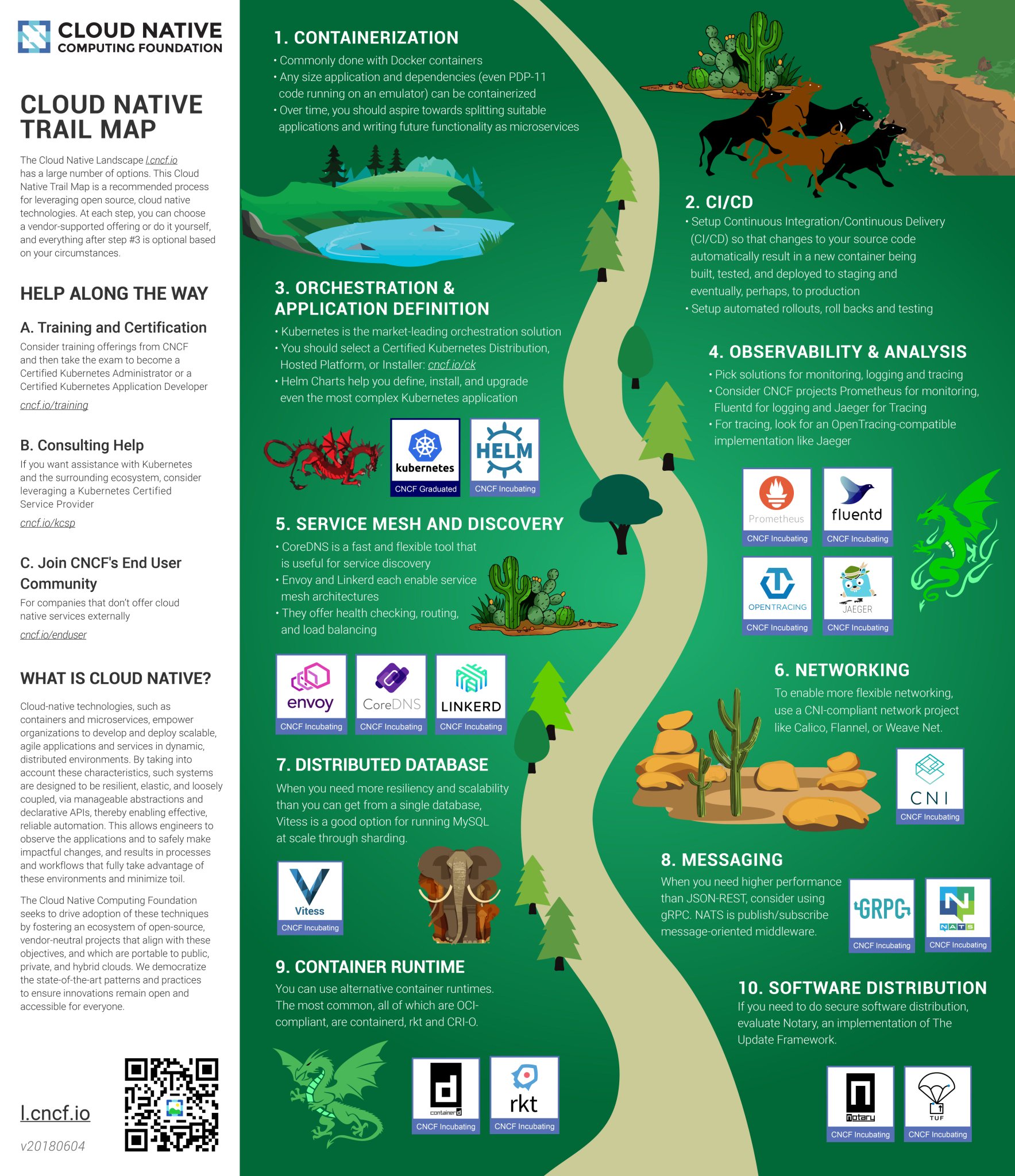
Certain set of standards for creating images /home/ /vol/data /vol/models - AI models
Before deploying any image let’s create another tag, preferably not with latest. :master
<image-name>:<version>
<image-name>:<version>-<commit-id-7chars>

curl -Lo kops https://github.com/kubernetes/kops/releases/download/$(curl -s https://api.github.com/repos/kubernetes/kops/releases/latest | grep tag_name | cut -d '"' -f 4)/kops-darwin-amd64
chmod +x ./kops
sudo mv ./kops /usr/local/bin/aws iam create-group --group-name kops
aws iam attach-group-policy --policy-arn arn:aws:iam::aws:policy/AmazonEC2FullAccess --group-name kops
aws iam attach-group-policy --policy-arn arn:aws:iam::aws:policy/AmazonRoute53FullAccess --group-name kops
aws iam attach-group-policy --policy-arn arn:aws:iam::aws:policy/AmazonS3FullAccess --group-name kops
aws iam attach-group-policy --policy-arn arn:aws:iam::aws:policy/IAMFullAccess --group-name kops
aws iam attach-group-policy --policy-arn arn:aws:iam::aws:policy/AmazonVPCFullAccess --group-name kops
aws iam create-user --user-name kops
aws iam add-user-to-group --user-name kops --group-name kops
aws iam create-access-key --user-name kops
export AWS_ACCESS_KEY_ID=$(aws configure get aws_access_key_id)
export AWS_SECRET_ACCESS_KEY=$(aws configure get aws_secret_access_key)aws s3api create-bucket \
--bucket product-example-com-state-store \
--region us-west-2 \
--create-bucket-configuration LocationConstraint=us-west-2export NAME=product.k8s.local
export KOPS_STATE_STORE=s3://product-example-com-state-storeaws ec2 describe-availability-zones --region us-west-2
kops create cluster \
--zones us-west-2a \
${NAME}
kops edit cluster ${NAME}
kops update cluster ${NAME} --yes
kops get nodes
kops validate cluster
kops delete cluster --name ${NAME}
kops delete cluster --name ${NAME} --yeskubectl apply -f https://raw.githubusercontent.com/kubernetes/dashboard/master/src/deploy/recommended/kubernetes-dashboard.yaml
kops get secrets kube --type secret -oplaintexthttps://kubernetes.io/docs/getting-started-guides/scratch/
https://github.com/kubernetes/kops
https://github.com/kubernetes/kops/blob/master/docs/aws.md
https://kubernetes.io/docs/getting-started-guides/kops/
https://kubernetes.io/docs/getting-started-guides/aws/
https://kubernetes.io/docs/getting-started-guides/kubespray/
openssl genrsa -out mithun.key 2048
openssl req -new -key mithun.key -out mithun.csr -subj "/CN=mithun/O=admin"
openssl x509 -req -in mithun.csr -CA /etc/kubernetes/pki/ca.crt -CAkey CA_LOCATION/ca.key -CAcreateserial -out employee.crt -days 500
kubectl config set-cluster <cluster_name> --server=https://<master-node-ip>:<master-node-port> --insecure-skip-tls-verify=true
kubectl config get-clusters
kubectl config set-credentials <cluster_name> --client-certificate= --client-key= --cluster=<cluster_name>
kubectl config set-credentials <cluster_name> --username=<username> --password=<password> --cluster=<cluster_name>
kubectl config set-context <cluster_name> --user=<cluster_name> --cluster=<cluster_name>
kubectl config use-context <cluster_name>
kubectl config view
kubectl get pods
Grouping all the kubernetes and docker configurations in one place k8s-configs dockerfiles - base docker images
Vault (for storing secrets) Vault-ui Kube-ops-view All other microservices
Create a label ‘app’ for grouping pods
Use ClusterIP for exposing the services internally, let’s create ingress when we would like to expose them to public.

ClusterIP - Exposes the service on a cluster-internal IP. Choosing this value makes the service only reachable from within the cluster. This is the default ServiceType
LoadBalancer - Exposes the service externally using a cloud provider’s load balancer
NodePort - Exposes the service on each Node’s IP at a static port (the NodePort)
kubectl apply -f k8s-spec-directory/ → kubectl apply -f juno/
telepresence --swap-deployment voice-worker --docker-run -it -v $PWD:/home/voice-worker gcr.io/vernacular-tools/voice-services/voice-worker:1
docker pull vault docker pull consul docker pull djenriquez/vault-ui
docker run --cap-add=IPC_LOCK -p 8200:8200 -e 'VAULT_DEV_ROOT_TOKEN_ID=roottoken' -e 'VAULT_DEV_LISTEN_ADDRESS=0.0.0.0:8200' -d --name=vault vault docker run -d -p 8201:8201 -e PORT=8201 -e VAULT_URL_DEFAULT=http://192.168.12.155:8200 -e VAULT_AUTH_DEFAULT=GITHUB --name vault-ui djenriquez/vault-ui
-
Telepresence
-
Dockers for development
-
Helm
Kubernetes - Design principles
Kubernetes configuration examples
Collector - FluentD/Beats (Filebeat/Metricbeat)
Backend store - ES
Visualization - Kibana

- Collect stdout/stderr logs using fluentd in kubernetes cluster as DaemonSet.
- Add kubernetes metadata to the logs
- Logrotate and Backup all the raw logs to s3 with kubernetes metadata (if needed to use other than ES as a backend store)
- Store all the logs in elastic search backend in a parsed format
- Backup all the elastic search index periodically
- Connect Kibana dashboard to ES backend and query the logs
fluent-plugin-kubernetes_metadata_filter
- Environment specific log encoding - JSON (production), console(development) JSON for machine consumption and the console output for humans
- Configuration to specify the mandatory parameters to be taken from thread variables
{
 "level": "info",
 "ip": "127.0.0.1",
 "log": "raw log from source",
 "request_id": "abcdefg",
 "xxx_metadata": {
 },
 "payload": {
 },
}- Flexibility to add new variables
- Strict type checking
Platform/Framework
Service essentials
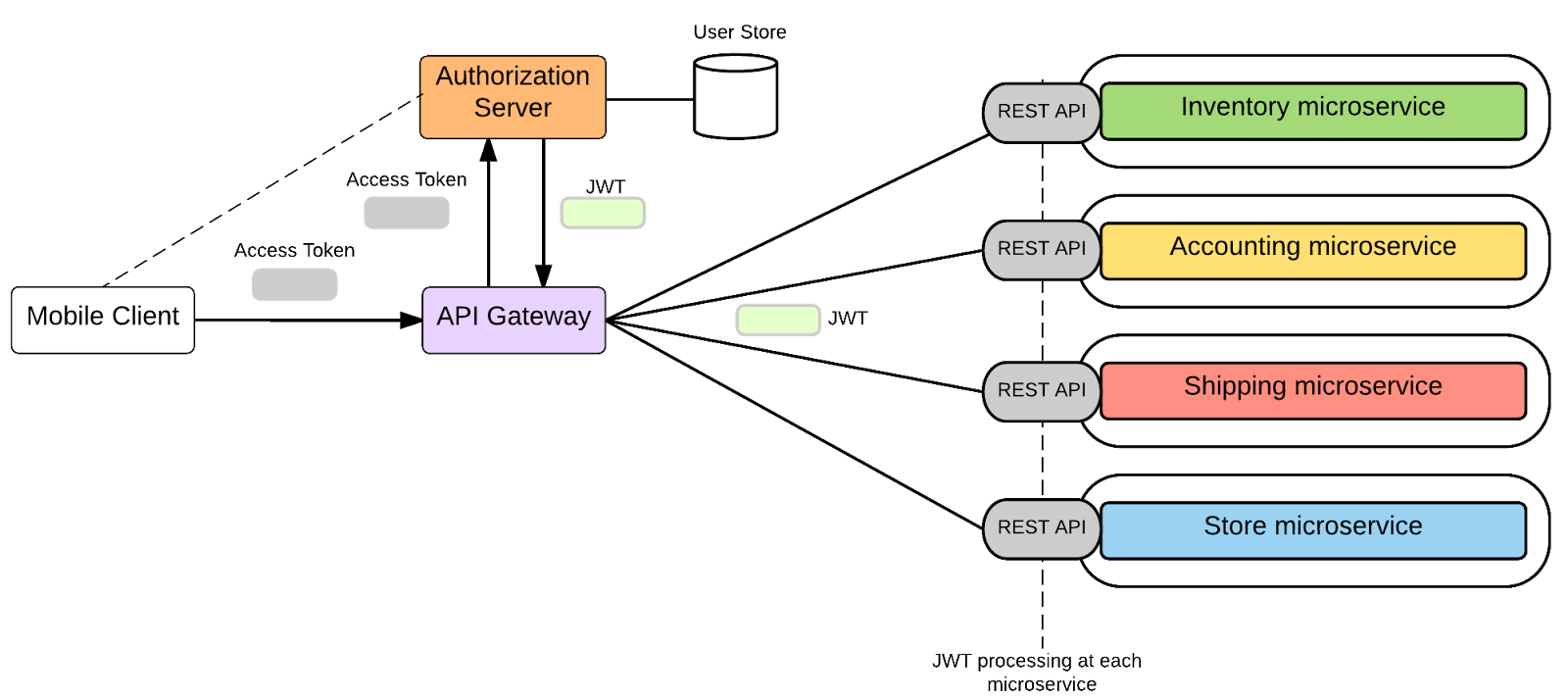
- Independently Developed & Deployed
- Private Data Ownership
If changes to a shared library require all services be updated simultaneously, then you have a point of tight coupling across services. Carefully understand the implications of any shared library you're introducing.
https://www.youtube.com/watch?v=X0tjziAQfNQ
https://dzone.com/articles/microservices-in-practice-1
https://eng.uber.com/building-tincup/
https://eng.uber.com/tech-stack-part-one/
https://konghq.com/webinars-success-service-mesh-architecture-monoliths-microservices-beyond/
For each microservice, track the folowing
- Overall CPU utilization
- Overall Memory utilization
- Overall Disk utilization
- Latency per API (50%, 95th percentile, 99th percentile)
- Throughput per API (max throughput, avg throughput)
- Newrelic
- Elastic.co APM
- Prometheus & Grafana
https://www.elastic.co/solutions/apm
https://github.com/kubernetes/heapster
https://github.com/coreos/prometheus-operator/tree/master/contrib/kube-prometheus
Message Queues - RabbitMQ, Kafka
| Consideration | RabbitMQ | Kafka |
|---|---|---|
| Language | ErLang | Scala |
| Organization |
- Exchanges
- Queues
- Bindings
Push API Pull API
MQTT STOMP
Clustering
Federation
Shovel
Nodes are equal peers, No Master/Slave setup. Data is sharded between the nodes and can be viewed by the client from any node.
All data/state for the cluster are replicated, not the queues. Each queue has a master node.
- Mirrored Queues
- Non Mirrored Quueues
Node discovery happens with ErlangCookie located at /var/lib/rabbitmq/.erlang.cookie using anyone of the standard peer discovery plugins rabbit_peer_discovery_k8s
Disk vs RAM Nodes - One disk node should be always present How external clients connect to rabbitmq?
How does node discovery happen?
Messages stored in disk? - /var/lib/rabbitmq/mnesia/rabbit@hostname/queues - File locations
rabbitmq-server
rabbitmqctl status
rabbitmq-plugins list
rabbitmqadminPostman
Postman
Sign up for free
to join this conversation on GitHub.
Already have an account?
Sign in to comment