Skip to content

Instantly share code, notes, and snippets.

@Dev-Dipesh
Last active June 6, 2025 19:31
Show Gist options
  • Select an option

  • Save Dev-Dipesh/2ac30a8a01afb7f65b2192928a875aa1 to your computer and use it in GitHub Desktop.

Select an option

Save Dev-Dipesh/2ac30a8a01afb7f65b2192928a875aa1 to your computer and use it in GitHub Desktop.
Setting up Elasticsearch, Logstash and Kibana with Nginx.

ELK

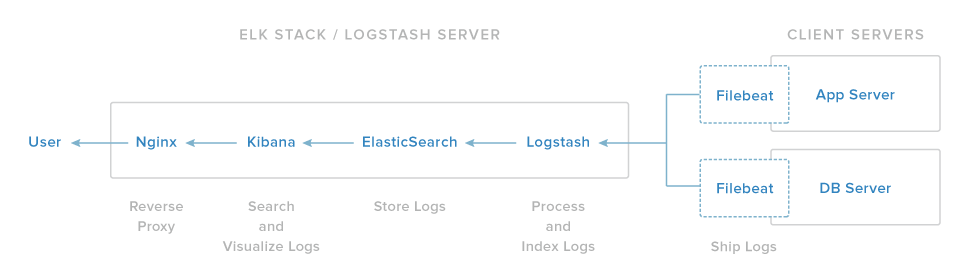
Our ELK stack setup has four main components: - Logstash: The server component of Logstash that processes incoming logs - Elasticsearch: Stores all of the logs - Kibana: Web interface for searching and visualizing logs, which will be proxied through Nginx - Filebeat: Installed on client servers that will send their logs to Logstash, Filebeat serves as a log shipping agent that utilizes the lumberjack networking protocol to communicate with Logstash

(ELK+NGINX)[https://assets.digitalocean.com/articles/elk/elk-infrastructure.png]

@danpem
Copy link

danpem commented Oct 5, 2017

Cool works

@mvharii
Copy link

mvharii commented Mar 5, 2018

Thanks Sir it works. However in above log stash section : We have yet to configure Logstash, but let leave it for later? what else to be configured and ES/Kibana/LS .. where they have stored in my local box? am unable to find the folders.. (as am new still learning could you please help me)

@duypv98
Copy link

duypv98 commented Dec 17, 2018

Cool sir

@edsonharantes
Copy link

love the half life reference :D

@ismailyenigul
Copy link

Hi @Dev-Dipesh
The following lines must be added to nginx conf to make basic auth work

   auth_basic “Kibana”;
   auth_basic_user_file  /etc/nginx/htpasswd.users;

Here is the complete conf

server {
  listen 80;
    server_name _;
    auth_basic “Kibana”;
   auth_basic_user_file  /etc/nginx/htpasswd.users;

  error_log   /var/log/nginx/kibana.error.log;
  access_log  /var/log/nginx/kibana.access.log;


  location / {
    rewrite ^/(.*) /$1 break;
    proxy_ignore_client_abort on;
    proxy_pass http://127.0.0.1:5601;
    proxy_set_header  X-Real-IP  $remote_addr;
    proxy_set_header  X-Forwarded-For $proxy_add_x_forwarded_for;
    proxy_set_header  Host $http_host;
   
  }
}

@petsoukos
Copy link

How about putting Logstash behind a proxy? It wont work using the same logic with Kibana. Something about being a TCP protocol or something.

Sign up for free to join this conversation on GitHub. Already have an account? Sign in to comment