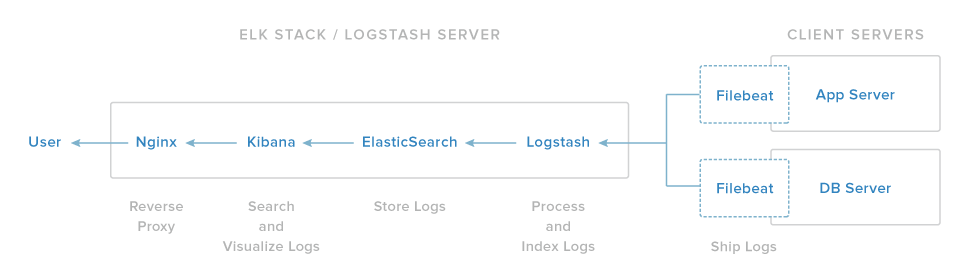
Our ELK stack setup has four main components: - Logstash: The server component of Logstash that processes incoming logs - Elasticsearch: Stores all of the logs - Kibana: Web interface for searching and visualizing logs, which will be proxied through Nginx - Filebeat: Installed on client servers that will send their logs to Logstash, Filebeat serves as a log shipping agent that utilizes the lumberjack networking protocol to communicate with Logstash

Last active
June 6, 2025 19:31
-
-
Save Dev-Dipesh/2ac30a8a01afb7f65b2192928a875aa1 to your computer and use it in GitHub Desktop.
Setting up Elasticsearch, Logstash and Kibana with Nginx.


Thanks Sir it works. However in above log stash section : We have yet to configure Logstash, but let leave it for later? what else to be configured and ES/Kibana/LS .. where they have stored in my local box? am unable to find the folders.. (as am new still learning could you please help me)

Cool sir

love the half life reference :D

Hi @Dev-Dipesh
The following lines must be added to nginx conf to make basic auth work
   auth_basic “Kibana”;
   auth_basic_user_file  /etc/nginx/htpasswd.users;
Here is the complete conf
server {
  listen 80;
    server_name _;
    auth_basic “Kibana”;
   auth_basic_user_file  /etc/nginx/htpasswd.users;

  error_log   /var/log/nginx/kibana.error.log;
  access_log  /var/log/nginx/kibana.access.log;


  location / {
    rewrite ^/(.*) /$1 break;
    proxy_ignore_client_abort on;
    proxy_pass http://127.0.0.1:5601;
    proxy_set_header  X-Real-IP  $remote_addr;
    proxy_set_header  X-Forwarded-For $proxy_add_x_forwarded_for;
    proxy_set_header  Host $http_host;

  }
}

How about putting Logstash behind a proxy? It wont work using the same logic with Kibana. Something about being a TCP protocol or something.
Sign up for free
to join this conversation on GitHub.
Already have an account?
Sign in to comment
Cool works