
Our ELK stack setup has four main components: - Logstash: The server component of Logstash that processes incoming logs - Elasticsearch: Stores all of the logs - Kibana: Web interface for searching and visualizing logs, which will be proxied through Nginx - Filebeat: Installed on client servers that will send their logs to Logstash, Filebeat serves as a log shipping agent that utilizes the lumberjack networking protocol to communicate with Logstash
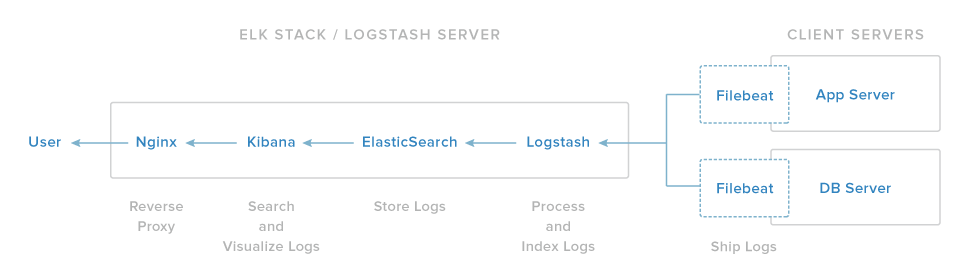
These are the versions we are currently setting up in this installment, please make note accordingly if you have specific version requirements.
JDK Version - 8
Elasticsearch - 2.x
Logstash - 2.2
Kibana - 4.5
For production go with three separate instances for each, elasticsearch, logstash and kibana. Currently we are setting it up on a single machine. You can opt for similar configuration on any cloud provider.
OS  - Ubuntu 14.04 LTS
RAM - 4Gb
CPU - 2
**1 - Install Java 8**
	- Add Oracle Java PPA to apt:
		`$ sudo add-apt-repository -y ppa:webupd8team/java`
	- Update your apt package database:
		`$ sudo apt-get update`
	- Install the latest version of Oracle Java 8
		`$ sudo apt-get -y install oracle-java8-installer`

**2 - Install Elasticsearch**
	- Import Elasticsearch public GPG key into apt
		`$ wget -qO - https://packages.elastic.co/GPG-KEY-elasticsearch | sudo apt-key add -`
	- Create the Elasticsearch source list
		`$ echo "deb http://packages.elastic.co/elasticsearch/2.x/debian stable main" | sudo tee -a /etc/apt/sources.list.d/elasticsearch-2.x.list`
	- Update your package database
		`$ sudo apt-get update`
	- Install Elasticsearch
		`$ sudo apt-get -y install elasticsearch`
	- Start Elasticsearch service
		`$ sudo service elasticsearch restart`
	- Test
		`$ curl localhost:9200`
	- If the output is similar to this, then you will know that Elasticsearch is running properly:
		```json
		{
			"status" : 200,
			"name" : "Jigsaw",
			"cluster_name" : "elasticsearch",
			"version" : {
				"number" : "1.7.1",
				"build_hash" : "b88f43fc40b0bcd7f173a1f9ee2e97816de80b19",
				"build_timestamp" : "2015-07-29T09:54:16Z",
				"build_snapshot" : false,
				"lucene_version" : "4.10.4"
			},
			"tagline" : "You Know, for Search"
		}
		```
	- Enable Elasticsearch to start on boot
		`$ sudo update-rc.d elasticsearch defaults 95 10`

**3 - Logstash Installation**


Cool works